
Put agent-powered insights inside your product under your brand. Learn how white-label analytics works and what to look for in a platform.

Ka Ling Wu
Co-Founder & CEO, Upsolve AI
10 min

White-label analytics is the practice of embedding data dashboards, reporting, and insights into your own product under your brand, so your customers get analytics that look and feel native rather than bolted on from a third party.
For B2B SaaS teams, it is how you give customers the reporting they expect without pulling engineers off the roadmap to build a BI stack from scratch.
The category is now shifting from static white-label dashboards toward embedded analytics agents that answer questions in plain language, and that shift is the real story for product leaders.
Key Takeaways |
|---|
|
What Is White-Label Analytics?
White-label analytics is a set of BI, dashboard, and reporting capabilities that a SaaS company embeds inside its own product and presents under its own brand. The end user never sees the underlying vendor. They see your interface, your typography, your color palette, and your domain. The analytics behave like a native part of your product, which is exactly the point.
This matters because customer-facing data has moved from a nice-to-have to a purchasing criterion. Buyers evaluating a SaaS product now expect to see their own usage, performance, and outcomes reflected back to them inside the tool they already pay for. White-label analytics is how product teams meet that expectation without sending customers to a separate reporting portal that breaks the experience. The demand shows up in the numbers: the embedded analytics market is projected to grow from about $22.9 billion in 2025 to nearly $75 billion by 2032 as more products treat customer-facing data as a core capability.
The distinction that matters: White-label is about ownership of the experience. Embedded is about location (analytics live inside your app). Most modern white-label analytics is also embedded, but the branding requirement is what makes it white-label.
White-Label Analytics vs Embedded Analytics vs Native BI
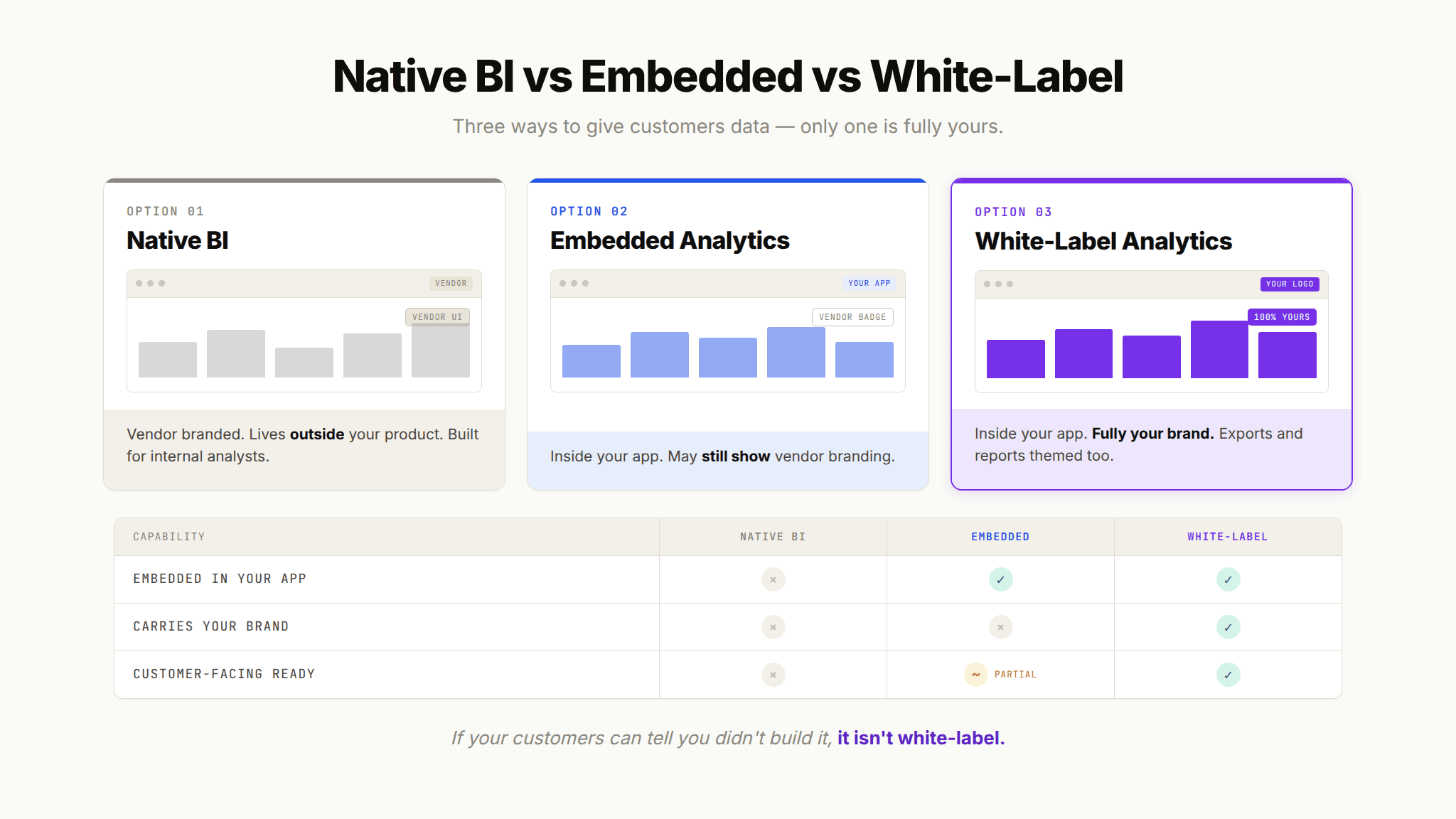
These terms overlap, which causes confusion in RFPs and internal debates. Here is how they differ in practice:
Native BI (Tableau, Power BI, Looker): A standalone tool your internal team uses. It carries the vendor's brand and lives outside your product. Great for analysts, wrong for customers.
Embedded analytics: Dashboards and charts placed inside your application via SDK or iFrame. It can still show vendor branding unless you explicitly white-label it.
White-label analytics: Embedded analytics with the vendor's identity fully removed and replaced with yours. This is what customer-facing SaaS products need.
The practical takeaway is simple. If your customers can tell you did not build the analytics yourself, you have embedded analytics but not true white-label analytics.
Why B2B SaaS Products Embed White-Label Analytics
Product leaders reach for white-label analytics for three reasons that all tie back to revenue.
Retention and stickiness: Analytics that customers check regularly make your product part of their routine. A DAU/MAU ratio above 20% signals healthy engagement, and reporting features are one of the most reliable ways to bring users back on a daily and weekly cadence.
Competitive parity: When a competitor ships AI-powered analytics, the feature gap becomes a churn risk. White-label analytics closes it.
Expansion revenue: Analytics tiers, premium reporting, and usage insights create upsell paths. Some teams treat customer-facing analytics as its own line item.
For a broader view of how customer-facing data fits the larger picture, see our guide on why the self-service analytics promise failed and how agents fix it.
Why White-Label Dashboards Are Hitting Their Limit
For a decade, the answer to customer-facing analytics was the dashboard. You built a set of charts, embedded them under your brand, and shipped. That approach worked until customers started asking for more than the charts could show.
The Dashboard Proliferation Problem
Dashboards solve the questions you anticipate at build time. The problem is that customers do not stop having new questions. So the backlog grows. Product asks engineering for a new chart. Engineering asks the data team for a new query. The data team is already buried. Every customer segment wants a slightly different view, and soon you are maintaining dozens of near-identical dashboards that no single person fully understands.
This is the same structural failure that hit internal BI. The promise was self-serve. What was delivered was a proliferation of dashboards that still required a human to build each new view. Multiply that across every customer in a multi-tenant product and the maintenance cost becomes unsustainable.
The Questions Your Customers Cannot Answer Themselves
A static dashboard is a dead end the moment a customer wants to go one level deeper. They see revenue is down, but they cannot ask why. They see a spike, but they cannot segment it. They have to file a support ticket, and now your customer success team is doing manual data pulls, which is expensive and slow.
Pro Tip: If your support or CS team regularly fields "can you pull this report for me" requests from customers, that is a direct signal your white-label dashboards have hit their ceiling. Those requests are unmet analytics demand, and every one of them is a candidate for an embedded agent to handle instantly.
The cost of getting this wrong is real. Acquiring a new customer costs five to seven times more than retaining an existing one, so an analytics experience that frustrates users quietly erodes the most valuable revenue you have.
From White-Label Dashboards to Embedded Analytics Agents
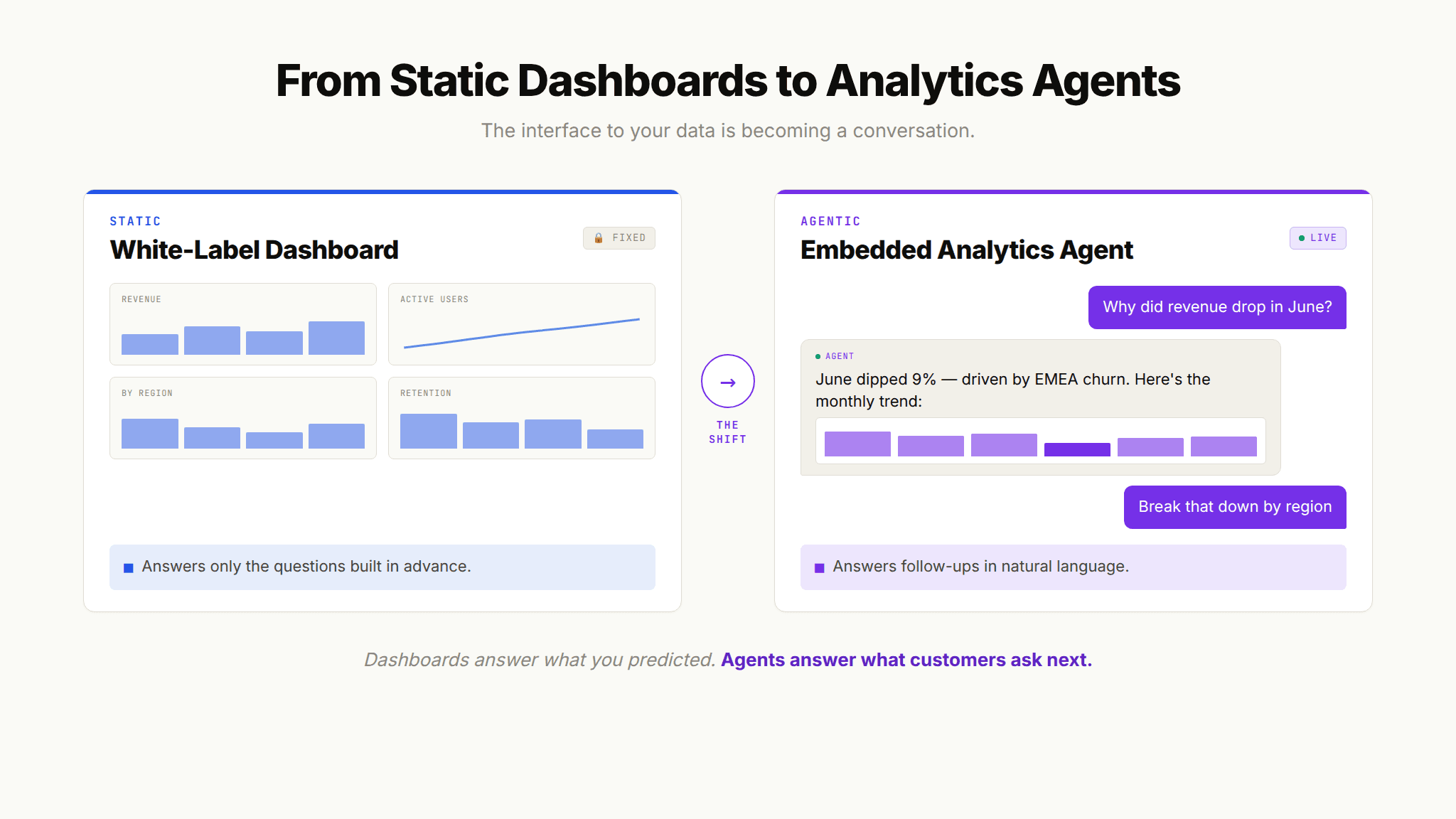
The shift underway is from analytics you look at to analytics you talk to. Instead of navigating a fixed dashboard, your customer asks a question in plain language and gets an answer, a chart, and the ability to keep going. This is the embedded analytics agent, and it is quickly becoming the expectation rather than the differentiator. The direction is already clear in the broader market, where an estimated 80% of organizations are moving away from traditional dashboards toward self-service and conversational experiences.
What an Embedded Analytics Agent Actually Does
An analytics agent does more than convert a question to a query. A production-grade agent receives a natural language question, retrieves the relevant business context, generates the analysis, validates the output against known-good answers, and returns a result the user can trust. Then it handles the follow-up. That last part is what a dashboard cannot do.
The difference between a copilot that assists and an agent that acts autonomously is the depth of context it can draw on. To understand where agents fit in the wider landscape, our overview of how AI agent builder platforms handle analytics breaks down the evaluation criteria that matter for embedded use cases.
The End-User Experience: Describe the Chart, the Agent Builds It
The most compelling version of embedded analytics flips the build step. Rather than your team building every chart in advance, the customer describes what they want to see and the agent builds it for them on the spot. Want revenue by region for the last two quarters as a stacked bar chart? Ask for it. Want to change it to a trend line? Ask again. This is the agentic dashboard, and for the end user it feels like having a data analyst on call around the clock.
This is what buyers mean when they talk about letting customers chat with their data. It is an alluring end result, and it is achievable, but only when the agent has the institutional knowledge to answer correctly. That is the part most teams underestimate.
How to Embed Agent-Powered Insights Under Your Brand
Shipping embedded, agent-powered white-label analytics follows a repeatable sequence. Here is the practical path.
Step 1: Choose Your Deployment Surface
Decide where the analytics live. Modern platforms support multiple surfaces:
Embedded SDK (React or iFrame): The most common choice for putting analytics directly inside your web app under your brand.
In-product chat: A conversational panel where customers ask questions without leaving your interface.
Workplace surfaces: Slack, Microsoft Teams, or other tools where your customers already work, if your product extends into those channels.
Most customer-facing SaaS deployments start with the embedded SDK because it gives the tightest brand control.
Step 2: Apply Your Branding and Theme
True white-label means every visible element carries your identity. At minimum, plan to control:
Logos and product name across all surfaces
Color palette and typography that match your design system
Domain and URLs so nothing points to a vendor domain
Chart styling so generated visuals look like they belong in your product
Pro Tip: Ask any vendor to show you a fully themed instance, not a demo with their branding swapped for a logo. The gap between "you can change the logo" and "this matches our design system pixel for pixel" is where the customer experience is won or lost.
Step 3: Encode Context So Answers Are Trustworthy
This is the step teams skip, and it is the step that determines whether the whole thing works. An agent answering your customers' questions needs to know what your data means: how a metric is defined, which table is authoritative, what a business rule says about the current quarter. This institutional knowledge has to be encoded, not assumed. Encoding it in a structured way is what separates an agent that impresses in a demo from one that holds up in front of paying customers.
Step 4: Set Guardrails and Test Accuracy
Before customers touch it, the agent needs scope rules (what it will and will not answer), behavioral guardrails, and an evaluation process. Golden query testing, where you validate the agent's answers against a set of verified queries, functions like unit tests for accuracy. Skipping this is how a demo that impressed becomes an embarrassment in front of a customer.
Multi-Tenant and Branding Considerations
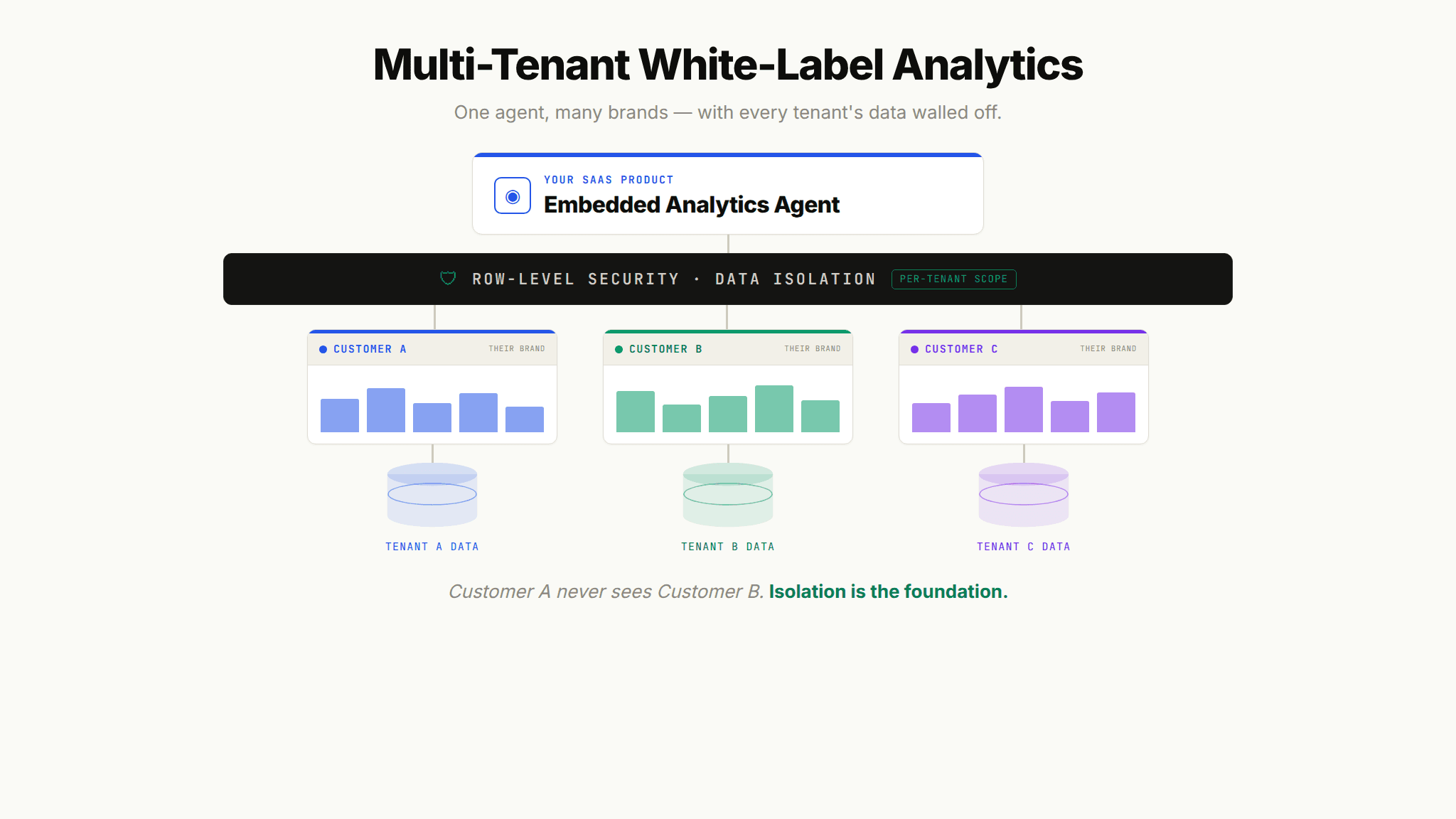
Customer-facing analytics is almost always multi-tenant, and multi-tenancy introduces requirements that internal BI never has to solve. Each customer must see their data and only their data, styled for your brand, with performance that holds up as you scale to hundreds or thousands of tenants.
Data Isolation and Row-Level Security
The non-negotiable requirement is that Customer A can never see Customer B's data. This is enforced with row-level security and strict tenant isolation. A well-designed embedded agent operates within your existing security model and acts as an interface layer, ensuring users only ever reach the data they are authorized to see. Getting the architecture right here is foundational, and our deep dive on multi-tenant analytics architecture walks through the patterns SaaS teams use to keep tenants isolated at scale.
Per-Customer Customization at Scale
No two customers are identical, which is the whole reason the one-size-fits-all dashboard breaks down. The advantage of an agent-driven approach is that customization does not require you to hand-build a bespoke dashboard for every account. The agent generates the views each customer asks for, within the guardrails you set, so you deliver a tailored experience without a linear increase in engineering work.
White-Label Reporting and Exports
Do not overlook the outputs. White-label reporting means exported PDFs, scheduled emails, and shared links all carry your brand, not the vendor's. Customers frequently forward these reports internally, so a vendor watermark on an exported report is a brand leak. Confirm that every export path is fully themed.
Why Embedded Agents Need Context to Earn Customer Trust
Here is the uncomfortable truth about putting an AI agent in front of your customers. A generic model wired to your database will produce answers that are fluent, confident, and sometimes wrong. In an internal tool, a wrong answer is a correction. In front of a paying customer, a wrong answer is a trust breach that can cost you the account.
The failure is almost never the model. The failure is context. The model does not know that "active customer" excludes trials at your company, or that revenue means recognized revenue and not bookings, or which of your three tables is the authoritative one. That knowledge lives in people's heads, in Slack threads, and in a config file someone last updated years ago. Generic AI has no access to it, so it fails. As a16z put it in its analysis of the space, data agents are effectively useless without the right context.
The Three-Layer Context Architecture
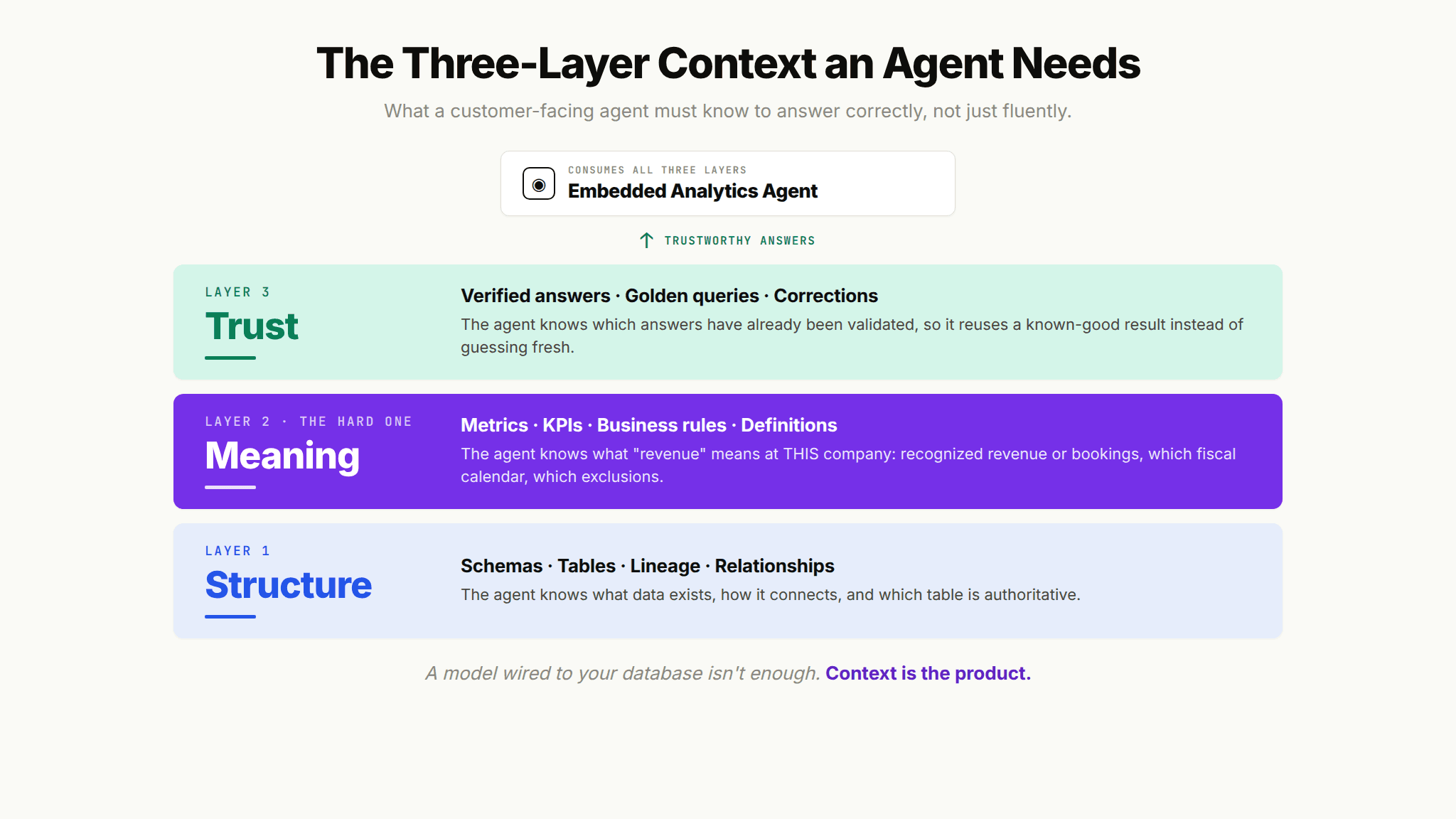
Reliable embedded analytics agents depend on three layers of context working together:
Structure: The schemas, tables, relationships, and lineage. The agent knows what data exists and how it connects.
Meaning: The metrics, KPIs, business rules, and definitions. The agent knows what a term means at your company specifically.
Trust: The verified answers, golden assets, and corrections. The agent knows which answers have already been validated.
Most tools solve one or two of these layers. A semantic layer, for example, addresses Meaning but not Trust. Delivering trustworthy answers to your customers requires all three, which is why context infrastructure, not just a model or a dashboard, is the real product underneath a good embedded agent.
Why Generic Embedded AI Breaks in Front of Customers
The lessons here are not theoretical. When OpenAI built its own internal data agent, the team found that high-quality answers depend on rich, accurate context, and the write-up documents how much of the work was context construction rather than model selection. Independent testing tells the same story. Analysts who benchmarked more than a dozen analytics agents found accuracy varied enormously based on how well each tool encoded business context, not on the underlying model. For a customer-facing product, that variance is the difference between a feature that drives retention and one that generates support tickets.
Build vs Buy: Shipping White-Label Analytics Without Building It
The last decision is whether to build embedded agents in-house or buy a platform. Building the model integration is the easy 20%. The hard 80% is everything wrapped around it: the context infrastructure, the evaluation suite, multi-tenant security, and the branding controls, and that is the part that routinely slips past its deadline.
Consideration | Build In-House | Buy a Context Infrastructure Platform |
|---|---|---|
Time to first customer-facing agent | Typically many months | Weeks |
Engineering cost | Diverts a full roadmap slot | Minimal integration effort |
Context encoding | You build it from scratch | Structured tooling provided |
Multi-tenant security | You design and maintain it | Built into the platform |
Accuracy evaluation | You build golden query testing yourself | Included |
Ongoing maintenance | Your team owns every edge case | Shared with the vendor |
The strategic point for a VP of Product is opportunity cost. Every engineering week spent building an analytics context layer is a week not spent on your core product. According to Upsolve's customer data, teams typically go live with production-ready embedded agents in about 14 days, compared with the multi-month timeline of an in-house build. To pressure-test your own decision, the evaluation framework in our guide to choosing an analytics agent builder platform is a useful place to start.
White-Label Analytics in Practice
Two examples show what agent-powered, white-label analytics looks like once it is live.
PAXAFE needed customized analytics dashboards embedded in its supply chain product that matched its own design system. As CTO Ashok Seetharam put it, the team could rapidly develop and deploy dashboards that aligned with their design system, and work that used to take weeks now takes days. You can read the full PAXAFE deployment story for the details.
Guac, a grocery technology company, faced the classic multi-tenant challenge: no two customers wanted the same thing. Rather than maintain one rigid dashboard for everyone, the team used embedded analytics to build custom dashboards for each customer's specific needs, a per-customer customization approach documented in the Guac case study. This is exactly the scaling problem that agent-driven generation is built to solve.
The pattern across both: The teams did not want to become BI vendors. They wanted to ship customer-facing analytics that felt native, without rebuilding an analytics stack. That is the core promise of white-label analytics done with an embedded agent.
Top-performing B2B SaaS companies sustain net revenue retention above 120%, and customer-facing analytics that customers actually rely on is one of the clearest levers for getting there. When your product answers your customers' questions instantly, under your brand, it becomes harder to leave.
Ready to Put Agent-Powered Analytics in Your Product?
If you are evaluating how to bring embedded, agent-powered insights into your product under your own brand, the fastest way to judge fit is to see it working with real data. Upsolve AI is a context infrastructure platform that gives your embedded agents the institutional knowledge they need to deliver trustworthy answers, with multi-tenant security and full white-label branding built in.
Book a demo to see Agent Studio in action and explore how production-ready embedded agents can ship in weeks, not months.
Frequently Asked Questions
What is white-label analytics?
White-label analytics is BI, dashboard, and reporting functionality that a company embeds in its own product and presents under its own brand, so end users see a native experience rather than a visible third-party tool. In SaaS, it lets you offer customer-facing analytics without building a full BI stack yourself.
What is the difference between white-label analytics and embedded analytics?
Embedded analytics means the analytics live inside your application. White-label analytics means those embedded analytics carry your branding with the vendor's identity fully removed. Most modern white-label analytics is embedded, but the defining feature of white-label is complete brand ownership of the experience, including exports and shared reports.
How much does white-label analytics cost?
Pricing varies by deployment model, number of tenants, and whether you build or buy. Building in-house diverts engineering for months, while buying a platform trades a subscription for a much faster time to market. The larger cost to weigh is opportunity cost: engineering time spent on an analytics context layer is time not spent on your core product.
How do I embed agent-powered analytics under my own brand?
Choose a deployment surface (commonly an embedded SDK or in-product chat), apply your branding and theme across every surface and export, encode your business context so the agent answers accurately, then set guardrails and test accuracy with golden query validation before customers use it. The context encoding step is the one that determines whether customers trust the answers.
How does multi-tenant white-label analytics keep customer data separate?
Through row-level security and strict tenant isolation, so each customer sees only their own data. A well-designed embedded agent operates within your existing security model and acts as an interface layer that enforces authorization, meaning users can never reach data they are not permitted to see.
Why do embedded AI analytics agents give wrong answers?
Almost always because they lack context, not because the model is weak. A generic agent does not know how your company defines a metric, which table is authoritative, or what a business rule says. Without a structured context layer covering Structure, Meaning, and Trust, the agent produces confident but incorrect answers, which is why context infrastructure is the core requirement for customer-facing analytics.

Try Upsolve for Embedded Dashboards & AI Insights
Embed dashboards and AI insights directly into your product, with no heavy engineering required.
Fast setup
Built for SaaS products
30‑day free trial