
Learn how multi-tenant analytics helps SaaS businesses scale securely by ensuring data isolation and dynamic filtering for improved efficiency.

Ka Ling Wu
Co-Founder & CEO, Upsolve AI
10 min

SaaS analytics getting messy as you grow?
Every SaaS company hits this wall when tracking user behavior, sharing insights, and keeping data secure becomes a full-
time headache.
That’s where multi-tenant analytics steps in.
It’s how companies like Salesforce and HubSpot scale analytics to thousands of users—without building separate setups
for each customer.
In this blog, you’ll learn:
• What multi-tenant analytics is
• How it works (without the fluff)
• And if it’s the right move for your SaaS
📌 TL;DR: Multi-tenant analytics lets you serve personalized data to multiple customers—securely, efficiently, and at scale—from one shared system.
What is Multi-Tenant Analytics & How Does It Work?
Multi tenant analytics is an analytics setup where a single platform serves multiple customers while keeping everyone's data completely separate, secure, and private.
For example, suppose you run a SaaS app with 500 clients. Instead of building 500 separate dashboards, multi-tenant analytics lets you serve all of them from one platform, each seeing only its own data.
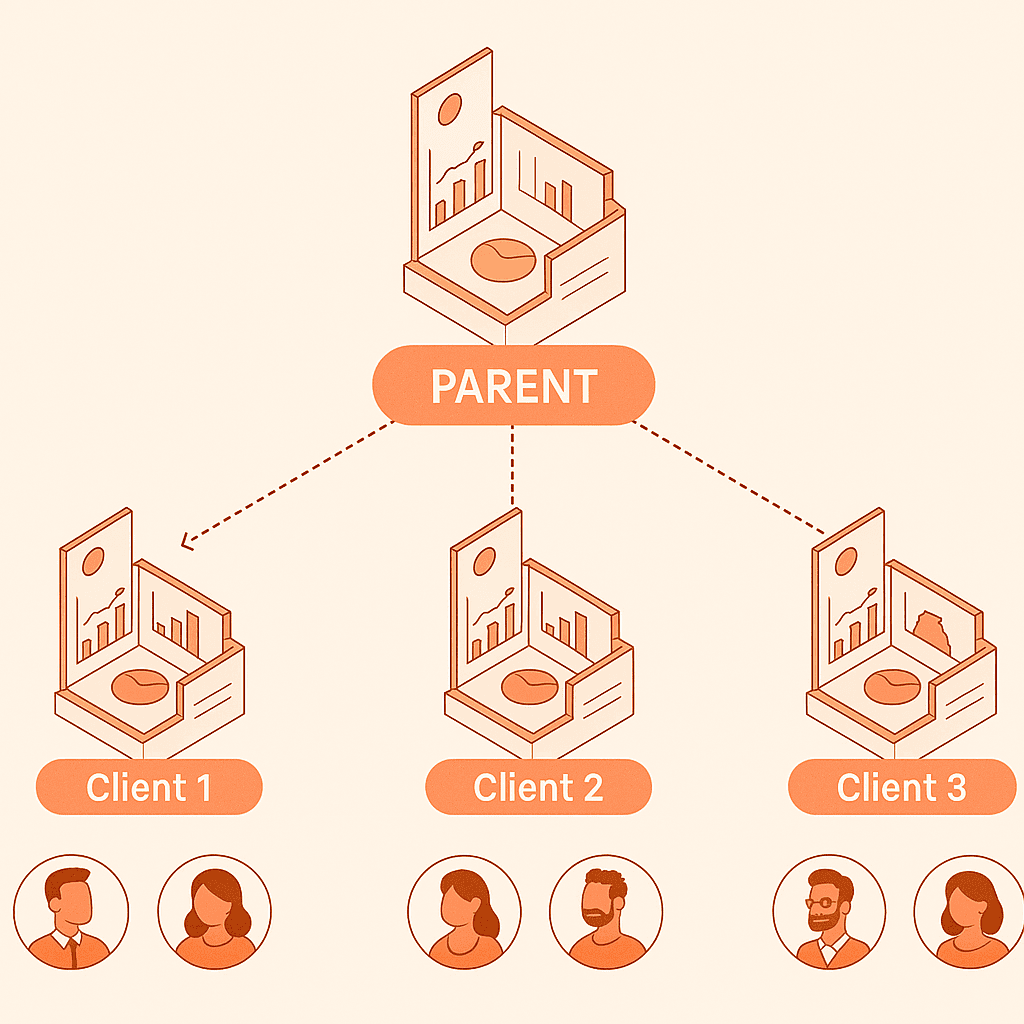
This approach makes it easier to scale, cheaper to maintain, and faster to roll out updates for SaaS platforms.
Multi-Tenant vs Single-Tenant Analytics
So, this is a table to show how single-tenant and multi-tenant analytics differ:
Feature | Single-Tenant Analytics | Multi-Tenant Analytics |
Setup per customer | Separate instance per tenant | One shared instance for all tenants |
Infrastructure cost | High—more resources per tenant | Low—shared resources reduce costs |
Scalability | Harder to scale with more tenants | Easily scales across many customers |
Maintenance & Updates | Manual updates per tenant | One update applies to all tenants |
Data Security | Fully isolated by separate systems | Isolated via metadata, RLS, access control |
Speed to onboard new users | Slower, needs manual provisioning | Faster—just tag new tenant in shared system |
As you see, multi tenant analytics often makes more sense when you're looking to scale fast and efficiently.
How Multi-Tenant Analytics Works?
1. Shared Resources:
Compute & Storage:
All customer data resides in the same database and is processed by the same analytics servers.
This significantly cuts down your infrastructure costs.
2. Tenant Isolation:
Tenant ID and Metadata:
Every data entry has a special identifier (tenant ID) marking which customer it belongs to.Row-Level Security (RLS):
Database rules ensure that users can only see data tagged with their tenant ID.
3. Dynamic Filtering:
When users log in, the analytics platform automatically recognizes their tenant ID and dynamically filters data.
Users never manually filter data. They only see the data that belongs to their account.
4. Authentication & Access Control:
Each tenant has its own user roles and permissions.
This ensures users within a tenant can only view and access data they're allowed to see.
This straightforward architecture ensures you deliver personalized and secure analytics to each tenant efficiently and reliably.
Why Do SaaS Companies Use Multi-Tenant Analytics?
SaaS businesses rely on multi-tenant analytics mainly because it solves three critical problems:
Cost efficiency
Scalability and,
Simplified management
When serving hundreds or thousands of customers, individual analytics setups become nearly impossible to manage efficiently.
And, there’s how multi-tenant analytics tackles this challenge smoothly.
Instead of setting up separate analytics infrastructures for each customer, companies use one unified analytics platform.
This reduces costs dramatically and simplifies updates, ensuring customers always get the latest features instantly.
Companies like HubSpot, Slack, and Salesforce have successfully adopted multi-tenant analytics to provide real-time, personalized insights to their massive customer bases.
Common SaaS use-cases include:
Customer-Facing Dashboards: Each customer logs in and views customized data visualizations relevant only to them.
Embedded Analytics: SaaS applications seamlessly embed analytics directly into their products for better customer experience.
Product Usage Tracking: Understand individual customer behavior without complicated infrastructure overhead.
By embracing multi-tenant analytics, SaaS companies can scale smoothly, save costs, and provide consistently secure and personalized analytics experiences to their customers.
Benefits and Drawbacks of Multi-Tenant Analytics
Like any other approach, multi-tenant analytics offers clear advantages and comes with certain limitations.
Understanding both sides will help you make an informed choice.
Here's a simple breakdown:
Benefits of Multi-Tenant Analytics
Lower Infrastructure Costs: By sharing resources, you drastically reduce the costs related to servers, storage, and compute power.
Streamlined Updates and Maintenance: With a single shared setup, you update and maintain only one infrastructure instead of managing multiple systems.
Rapid Scalability: Multi-tenant setups scale smoothly as you onboard new customers without heavy manual work.
Consistent Customer Experience: Customers receive timely updates and a unified analytics experience, keeping satisfaction high.
Drawbacks of Multi-Tenant Analytics
Initial Complexity: Setting up tenant isolation and dynamic filtering correctly at the start requires careful planning and technical expertise.
Performance Challenges: If poorly optimized, one tenant’s heavy queries might affect performance across other customers.
Security & Compliance Responsibility: Ensuring each tenant’s data privacy, compliance (GDPR, SOC 2), and secure isolation demands continuous attention and investment.
Here's a simple summary table:
Factor | ✅ Benefits | ❌ Drawbacks |
Costs | Lower due to shared resources | High initial setup complexity |
Maintenance & Updates | Simple, centralized management | Requires careful data isolation & testing |
Scalability | Fast onboarding | Can face performance bottlenecks if mismanaged |
Customer Experience | Unified, consistent analytics delivery | Potential risk of cross-tenant performance issues |
Security & Compliance | Centralized security management | Continuous responsibility to maintain isolation |
Evaluating both sides helps ensure that multi-tenant analytics is the right choice for your SaaS growth and customer experience goals.
How to Build Store Performance Dashboard (Including 5 Examples)
Is My Data Secure in Multi-Tenant Analytics?
Now, your question might be, “Is my data even secure in this kind of shared setup?”
That’s completely valid, and the short answer is yes, if done right.
In a multi-tenant architecture, each customer’s data is strictly isolated using smart software-level controls, not physical separation.
Here’s how it stays secure:
Tenant Isolation with Metadata: Every data row is tagged with a unique tenant ID. This ensures only users from that tenant can access it.
Row-Level Security (RLS): Database-level rules enforce data access boundaries, making it impossible for users to view other tenants' data.
Encryption: All data is encrypted, both at rest (in storage) and in transit (while being transferred), using strong encryption protocols.
Role-Based Access Control (RBAC): Each tenant has its own set of user roles and permissions. This prevents unauthorized access even within the same company.
Compliance Standards: Platforms built with multi-tenant security in mind often support compliance requirements like GDPR, SOC 2, and HIPAA.
With these layers in place, multi-tenant analytics becomes not only scalable but also trustworthy and secure enough for enterprise-grade use.
When Should You Use Multi-Tenant Analytics?
Adopting multi-tenant analytics makes sense when your SaaS starts growing rapidly, serving multiple customers with personalized analytics needs.
Certain factors decide when you should start using multi-tenant analytics, and considering these factors ensures you're adopting it at the right stage of your growth:
Rapidly Increasing Customer Base: You're quickly onboarding new customers and need a scalable analytics solution.
High Infrastructure Costs: Managing analytics separately for each customer is becoming expensive and resource-heavy.
Consistent Analytics Experience: You want customers to have unified analytics dashboards and reports without complexity.
Need for Simpler Maintenance: You're struggling to manage multiple analytics setups and want simpler maintenance.
If these factors match your expectations, then right before getting started, you need clarification.
Get clear answers by asking these critical questions:
Is your current infrastructure scalable enough to support future growth?
How important are compliance and data isolation for your customer base?
Do you have the internal resources and expertise to implement multi-tenant architecture?
What's the timeframe you have for launching analytics to your users?
When you ask these questions, you clarify whether to use a single tenant analytics or if it’s now a better time to shift to multi tenant analytics.
Use Cases by Department
Multi-tenant analytics benefits various departments within SaaS companies, helping each deliver more targeted outcomes.
Here are some use cases of multi-tenant analytics:
Marketing: Understanding customer engagement, tracking feature usage, and personalizing marketing campaigns effectively.
Product Management: Getting precise product usage data to identify trends and prioritize roadmap planning.
Customer Success: Monitoring customer health, usage patterns, and reducing churn through proactive alerts and insights.
Sales: Identifying upsell and cross-sell opportunities by analyzing usage data from current customer accounts.
Executive Teams: Making strategic, informed decisions with aggregated data from all customers in real-time dashboards.
Clearly, multi-tenant analytics provides clear, customized, and actionable data to multiple departments, improving overall productivity, efficiency, and customer satisfaction.
Build vs Buy: What You Should Do?
One crucial decision when considering multi-tenant analytics is whether to build your analytics solution or buy from a proven analytics provider.
Build Your Own: Choosing to build in-house analytics means you'll have complete control over customization. However, it comes with higher development costs, time investments, and ongoing maintenance complexities.
Buy a Proven Tool: Opting to buy means choosing an already optimized and tested solution. This dramatically reduces your time-to-market, costs, and the hassle associated with building from scratch.
Here's a quick comparison table to help you decide:
Factor | Building Yourself | Buying a Solution |
Setup Cost | High, due to initial development | Low, subscription-based |
Customization Level | High, fully custom-built | Moderate, depends on the provider |
Time-to-market | Slow, longer implementation cycle | Fast, readily deployable |
Maintenance Complexity | High internal maintenance needed | Low, provider-managed |
Considering your core business priorities, buying an optimized, trusted multi-tenant analytics solution is typically the smarter move.
You can use Upsolve AI, which is perfectly fit for this scenario, offering scalability, security, and ease of use without the development hassle.
The Shift: From Multi-Tenant Dashboards to Multi-Tenant Agents
Multi-tenant analytics has always meant giving each customer their own slice of a shared system. Until now, that slice was a dashboard: the same pre-built views, filtered per tenant. That is changing. The same move internal teams are making, from static dashboards to analytics agents, is arriving in customer-facing SaaS.
In an agent model, each of your customers does not just get their own dashboard. They get their own analytics agent: they ask a question in plain language ("how did my conversion rate trend last quarter?") and an embedded data agent builds the answer on the spot, scoped to their tenant and no one else's. It is the same reason self-service analytics is being reinvented around agents, now delivered to your customers rather than your internal team, and it is fast becoming the default expectation for customer-facing analytics.
Multi-tenancy makes the accuracy bar higher, not lower. A dashboard shows a fixed query, so isolation is mostly about filtering rows. An agent generates queries on the fly, which means tenant isolation has to hold even when the agent is writing new SQL. Two things must be true at once: the agent has to respect row-level security so it can never read another tenant's data (including working with your existing RLS, whether that is Supabase RLS or warehouse-native policies), and it has to carry the right context, what each metric means in your product, so the answer it builds is correct.
That second half is why context, not the model, is what makes or breaks an embedded agent. If you are evaluating platforms for this, it helps to know what to look for in an agent builder made for analytics.
How Upsolve AI Handles Multi-Tenant Analytics
Upsolve AI is an agentic analytics platform built for SaaS companies that serve many customers from a single product. Instead of shipping one dashboard filtered per tenant, you embed an analytics agent that answers each customer's questions in natural language, scoped to their own data.
It helps product, ops, and customer-facing teams deliver secure, isolated, real-time analytics to every customer without building the data infrastructure from scratch.
Key Features of Upsolve:
Built-in tenant isolation using row-level security and metadata tagging
Embedded analytics agents and dashboards with tenant-level filtering, so each customer sees only their own data
Role-based access control across multiple user levels and permissions
Auto-scalable infrastructure that grows with your customer base
Compliance controls for regulated environments, including data isolation, encryption, and role-based access
Upsolve AI Pros and Cons:
Pros | Cons |
Fast to integrate: no need to build your own analytics stack | Advanced visual customization may require support |
Secure, with enterprise-grade tenant data isolation | Might be more than an early-stage startup needs |
Rapid onboarding with minimal dev involvement | |
Centralized updates: no per-tenant deployments |
Upsolve AI Pricing
Upsolve AI offers a free plan plus three paid tiers; embedding and multi-tenant analytics start on the Team plan ($2,000/mo).
Free ($0): 2,000 one-time credits (~200 questions); all Pro features, to test-drive
Pro ($500/mo): 2,000 credits/month; 50+ data connections, unlimited agents, full observability
Team ($2,000/mo): 10,000 credits/month; adds embedding, RBAC/row-level security, multi-tenant, and semantic-layer generation
Enterprise (custom): on-prem/VPC, SAML SSO, BYOM, and compliance controls for regulated environments
Annual billing is 20% off.
👉 A free test-drive plan is also available. Visit the Upsolve Pricing page for the full breakdown across Free, Pro, Team, and Enterprise.
By clearly evaluating your options, understanding department-specific use-cases, and considering tools like Upsolve AI, you're ready to implement scalable and secure multi-tenant analytics for your SaaS.
Conclusion
Multi-tenant analytics simplifies delivering secure, scalable insights to all your SaaS customers without huge infrastructure headaches or excessive maintenance.
To recap clearly, start considering multi-tenant analytics when:
Your customer base is quickly growing.
You’re facing high analytics infrastructure costs.
You need faster onboarding and scalable analytics.
You want simpler updates and maintenance.
If you want to avoid building complex infrastructure yourself, a platform like Upsolve AI gives you built-in tenant isolation, role-based access, and agent-driven analytics you can embed in your product, including white-label, per-customer analytics.
FAQs about Multi-Tenant Analytics
1. Can multi-tenant analytics handle GDPR and other compliance needs?
Yes. Platforms like Upsolve AI support compliance efforts using tenant-level data isolation, encryption, and strict role-based access controls.
2. Do I need a separate database per customer?
No. Modern multi-tenant setups use a single shared database, isolating data securely at the tenant level using metadata and dynamic filtering.
3. How is tenant data isolated?
Tenant isolation is achieved using unique tenant IDs, row-level security (RLS), role-based access, and advanced encryption methods to ensure strict privacy.
4. Is this suitable for startups?
Absolutely. Multi-tenant analytics platforms are specifically designed to help fast-growing SaaS startups scale quickly, efficiently, and cost-effectively.
5. Can I migrate from single-tenant analytics later?
Yes, but it’s easier if you plan your data schema and authentication methods with multi-tenancy in mind right from the start.

Try Upsolve for Embedded Dashboards & AI Insights
Embed dashboards and AI insights directly into your product, with no heavy engineering required.
Fast setup
Built for SaaS products
30‑day free trial