
Evaluating AI agent builder platforms for analytics? Seven dimensions that separate demo-grade tools from production-ready ones.

Ka Ling Wu
Co-Founder & CEO, Upsolve AI
10 min
Disclosure: This article is published by Upsolve AI. Where our product is mentioned alongside competitors, we aim to provide balanced coverage based on publicly available information. We encourage readers to evaluate all options independently.
Choosing an AI agent builder for analytics is not the same problem as choosing a general-purpose agent platform. An analytics agent has to navigate schemas, decode business definitions, and produce numbers that hold up in a board meeting. Most of the platforms currently marketed as "ai agent builders" were not designed for any of that.
This guide walks through what an analytics agent builder actually needs to do, how the current platform categories stack up, and the evaluation criteria that separate a demo-stage product from one your team can run in production.
Key Takeaways |
|---|
|
What Is an AI Agent Builder for Analytics?
An AI agent builder for analytics is a platform that lets data teams configure, test, and deploy autonomous agents that answer analytical questions on top of organizational data. The agent receives a question in natural language, retrieves the relevant context (schemas, metric definitions, business rules), generates and executes a query, validates the output, and returns an answer (often a chart or a written analysis) to the user.
This is a meaningfully different problem from building a customer support agent, a coding agent, or a generic workflow automation agent. An analytics agent has to be right about numbers. The shape of "right" depends on which fiscal calendar your company uses, how you define a qualified opportunity, which tables are authoritative, and what last quarter's data exclusion rule was. None of that lives in a model's weights. It lives in your dbt project, your Confluence pages, and your team's collective memory.
An analytics agent that cannot find the right definition of revenue is not an analytics agent. It is a fluent guesser.
The platforms that handle this well treat context as infrastructure rather than as a prompt. Generic agent builders treat context as a prompt. That distinction is most of the buying decision.
How Analytics Agents Differ From Copilots
A copilot suggests. An agent acts. A SQL copilot might autocomplete your query or propose a JOIN. An analytics agent takes a question like "What was net new ARR last quarter, broken down by segment?" and returns the answer, with the chart, in seconds. The agent makes decisions: which table to use, which time grain, which segment definition, whether to exclude churn.
This distinction matters for platform selection because copilot-grade tools have very different infrastructure requirements than agent-grade tools. Copilots can ride on top of a model with thin context. Agents cannot. We unpack the practical implications in data copilot vs analytics agent.
The Shift From Dashboards to Agents
For two decades, the dominant pattern was: data team builds dashboards, business users navigate them. That pattern fails in two predictable ways. It does not answer the next question (the follow-up that the dashboard was not designed for), and it does not handle the long tail of one-off requests (which is why analytics teams still spend most of their time on ad-hoc tickets). The promise of an analytics agent builder is that it collapses both failure modes into one workflow: the user asks, the agent answers, and the dashboard gets generated on demand.
The catch is that this only works if the agent is reliable. Which brings us to the central problem.
Why Generic AI Agent Builders Fall Short for Analytics
The generic agent builder market is crowded. CrewAI, LangChain, AutoGen, n8n, Microsoft Copilot Studio, and a dozen others offer frameworks for orchestrating multi-step agent workflows. These tools are good at what they were designed for: chaining LLM calls, calling APIs, routing decisions across steps. They do not, by themselves, make an agent good at analytics.
Here is why.
A generic agent framework will happily let you wire up a tool that says "run this SQL query." But it will not tell the agent which of the 4,000 tables in your warehouse to query, which metric definition to use, which join keys are valid, or which historical exception applies to this quarter. Those decisions live in the layers of context that the framework does not provide and was never designed to manage.
a16z's March 2026 thesis piece on data agents put it directly: "data and analytics agents are essentially useless without the right context. They aren't able to tease apart vague questions, decipher business definitions, and reason across disparate data effectively." This is not a model problem. It is a context infrastructure problem.
OpenAI's own engineering blog confirms this from the inside. In "Inside OpenAI's in-house data agent," the team describes building an agent that serves 3,500+ employees across 600 petabytes and 70,000 datasets. The architecture is built around six layers of context: schema metadata, table lineage, curated descriptions, institutional knowledge from Slack and Notion, memory of past corrections, and live warehouse inspection. The model is GPT-5.2. The infrastructure is the differentiator.
The picture from independent benchmarks is consistent. The DABstep benchmark, built by Adyen and Hugging Face on 450+ real-world financial analytics tasks, found that even the strongest LLM-based agents achieved only 14.55% accuracy on the hardest tasks. The bottleneck was not raw reasoning. It was contextual grounding across heterogeneous documentation.
The failure was not the model. The failure was context.
For a structural treatment of why this is the failure pattern, see our piece on why AI data agents fail in production.
The Four Categories of Analytics Agent Builder Platforms
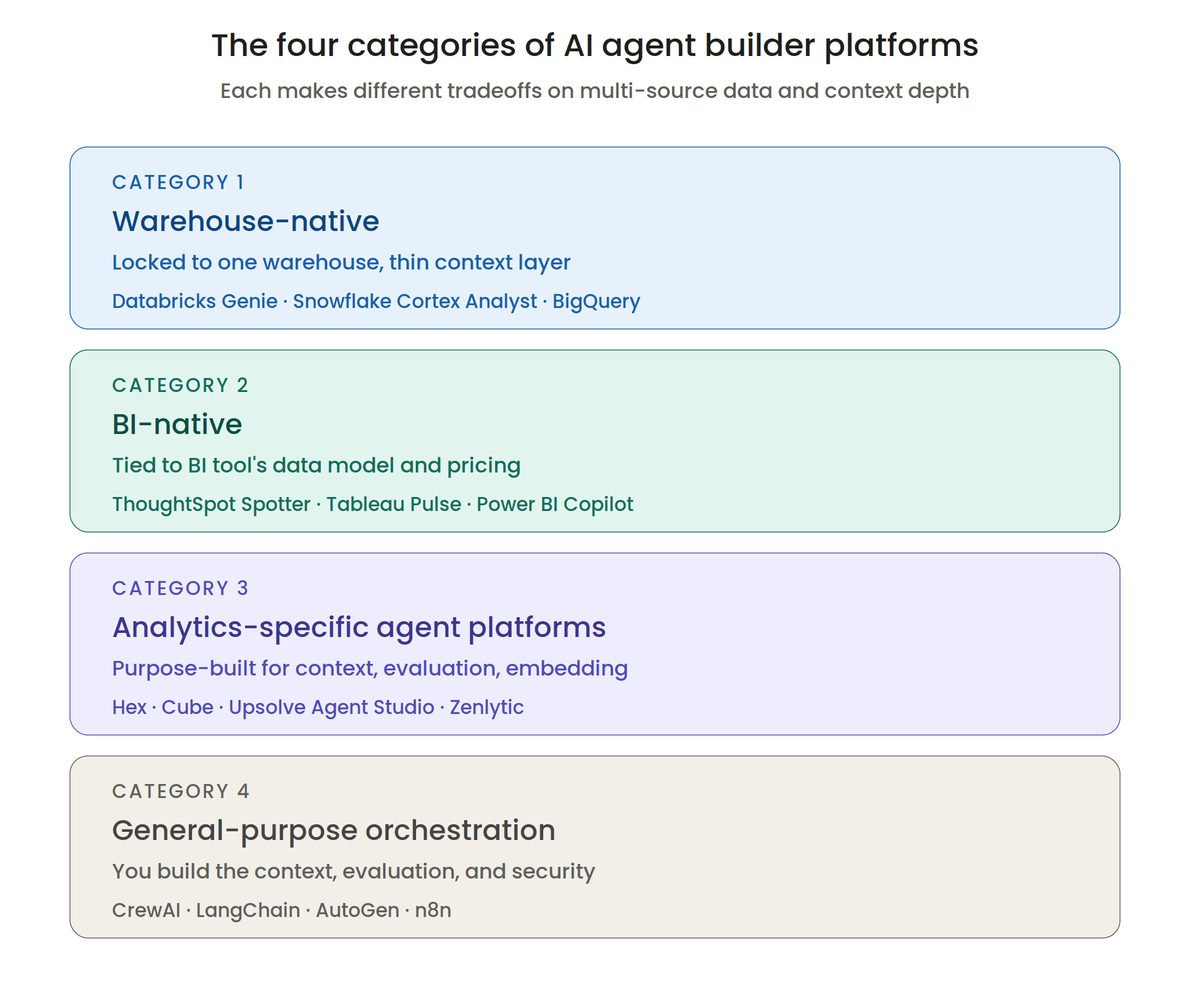
The market for AI agent builders that touch analytics splits into four meaningfully different categories. Each category solves a different slice of the problem, and each makes different tradeoffs.
Category 1: Warehouse-Native Agents
These are agent capabilities bolted onto cloud data warehouses. Databricks ships Genie (part of AI/BI). Snowflake ships Cortex Analyst. BigQuery ships Gemini-powered analytics. The pitch is convenience: the agent runs next to your data, no separate vendor, no extra contract.
Strengths: Native integration with the warehouse, no data movement, often included with existing licensing, leverages whatever semantic model lives in the warehouse (Unity Catalog for Databricks, semantic views for Snowflake).
Weaknesses: Each one is locked to its parent warehouse. If your data is split across Snowflake for analytics, Postgres for operations, and a lakehouse for ML, a warehouse-native agent can only see one of them. The context customization layer is also typically thin, since these were built as features rather than as standalone products.
For in-depth assessment of one of the leading entries here, see our Databricks Genie review.
Category 2: BI-Native Agents
These are agent layers added on top of existing BI tools. ThoughtSpot ships Spotter and Analyst Studio. Tableau ships Tableau Pulse. Power BI ships Copilot. Looker ships Conversational Analytics.
Strengths: Inherit the BI tool's existing semantic layer, visualization library, and user base. Strong on chart generation and pre-built KPIs.
Weaknesses: Constrained by the BI tool's data model. ThoughtSpot Spotter, for example, can only reason over content modeled in ThoughtSpot's proprietary semantic layer; for organizations not already standardized on that layer, the lift is significant. The agent is also typically tied to the BI tool's pricing model, which often does not match agent-style usage patterns. Read our ThoughtSpot Spotter review for a closer look.
Category 3: Analytics-Specific Agent Platforms
These are platforms built from the ground up to deliver analytics through agents. Hex Context Studio (Hex's January 2026 launch on top of its notebook product), Cube (open-source semantic layer expanding into agent territory with D3), Zenlytic, and Upsolve Agent Studio sit in this category. Most are venture-backed; several appeared on Claire Gouze's January 2026 benchmark of 14 analytics agents and her updated benchmark of 21 agents.
Strengths: Purpose-built for the analytics use case. Most provide explicit infrastructure for context management, evaluation tooling, and agent guardrails. Database-agnostic. Designed to work with the modern data stack (dbt, Snowflake, Databricks, BigQuery, Postgres, and others) rather than against it.
Weaknesses: Newer category, fewer reference customers than the warehouse and BI incumbents, and the platforms differ significantly in their architectural choices. The category is not yet standardized, which makes evaluation more involved.
Category 4: General-Purpose Agent Orchestration
CrewAI, LangChain, LangGraph, AutoGen, n8n, and Microsoft Copilot Studio. These are frameworks for building agents broadly, not platforms for building analytics agents specifically.
Strengths: Maximum flexibility. If you have a strong engineering team and a clear vision for a custom agent, these frameworks let you build it.
Weaknesses: Almost everything else. You inherit responsibility for the context layer, the evaluation suite, the semantic integration, the multi-tenancy, the embedding, the security review, the deployment infrastructure, and the maintenance. MIT's research found that internal AI builds succeed about one-third as often as vendor partnerships, which tracks with what most analytics engineering leaders eventually discover the hard way. For more on this distinction, see CrewAI and analytics agents: general orchestration vs analytics-specific platforms.
How the Categories Compare
Category | Multi-source data | Built-in context layer | Embedded for customers | Evaluation tooling | Time-to-production |
|---|---|---|---|---|---|
Warehouse-native (Databricks Genie, Snowflake Cortex) | No (locked to warehouse) | Basic (whatever the warehouse semantic model provides) | Limited | Minimal | Fast if you are already on the platform |
BI-native (ThoughtSpot, Tableau Pulse, Power BI Copilot) | Limited (tied to BI tool's data model) | Inherits the BI tool's semantic layer | Possible, varies by tool | Limited | Fast if BI tool is already deployed |
Analytics-specific agent platform (Hex, Cube, Upsolve) | Yes | Purpose-built; varies in depth | Varies (Upsolve and a few others; not Hex Context Studio for customer-facing) | Yes, built-in | 1 to 4 weeks typical |
Generic orchestration (CrewAI, LangChain) | Yes, if you build it | None (you build it) | Possible, if you build it | None (you build it) | 4 to 9 months internal build |
The right category depends on what you are optimizing for: convenience and existing vendor relationship (warehouse or BI-native), purpose-built capability and flexibility (analytics-specific), or maximum customization at the cost of build time (generic orchestration).
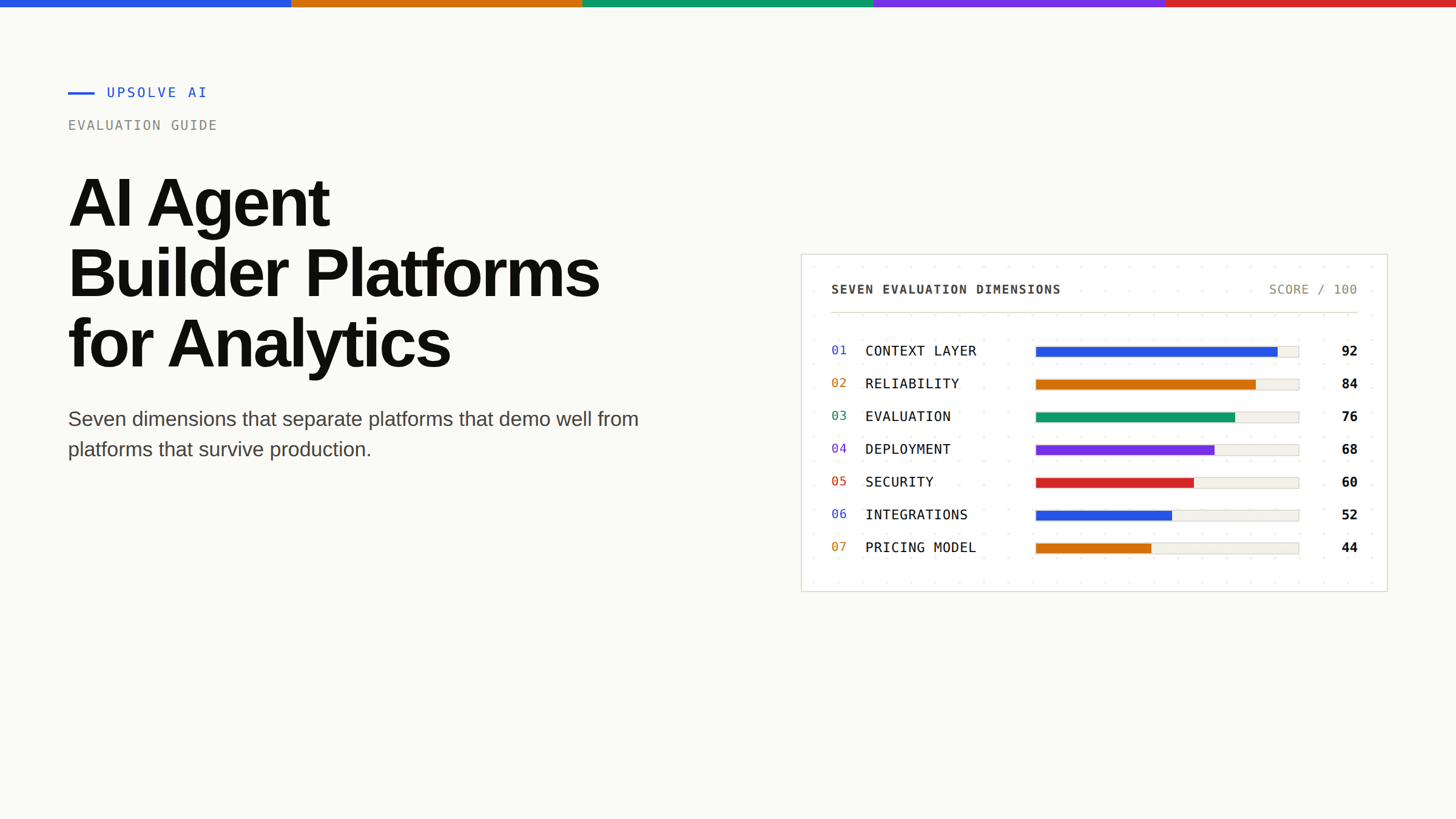
What to Evaluate: Seven Dimensions That Matter
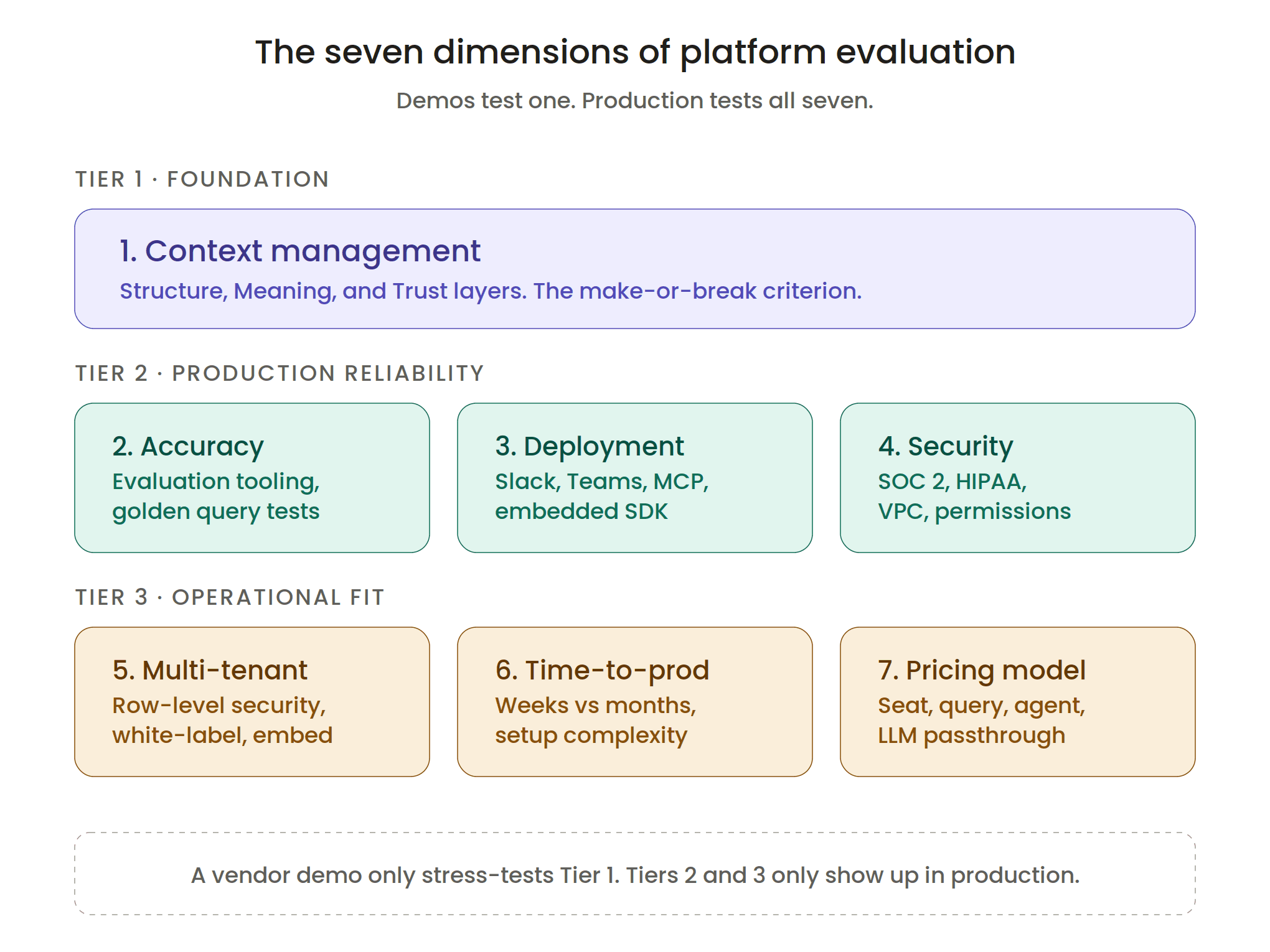
Once you have narrowed the category, the real evaluation begins. These are the seven dimensions that separate a platform that demos well from a platform you can run in production.
1. Context Management
This is the most important criterion, and it is the one that is hardest to evaluate from a demo. Ask the vendor how the agent handles the following:
Structure: Schemas, tables, columns, relationships, lineage, usage patterns. Can the agent figure out which table to query and which join keys are valid?
Meaning: Metric definitions, KPI calculations, business rules, the difference between "ARR" and "run rate," the handling of fiscal calendars, the exception rules that apply to specific quarters.
Trust: Which queries are validated? Which dashboards are canonical? When the agent gives an answer, can it cite the source? Can it learn from a user correction?
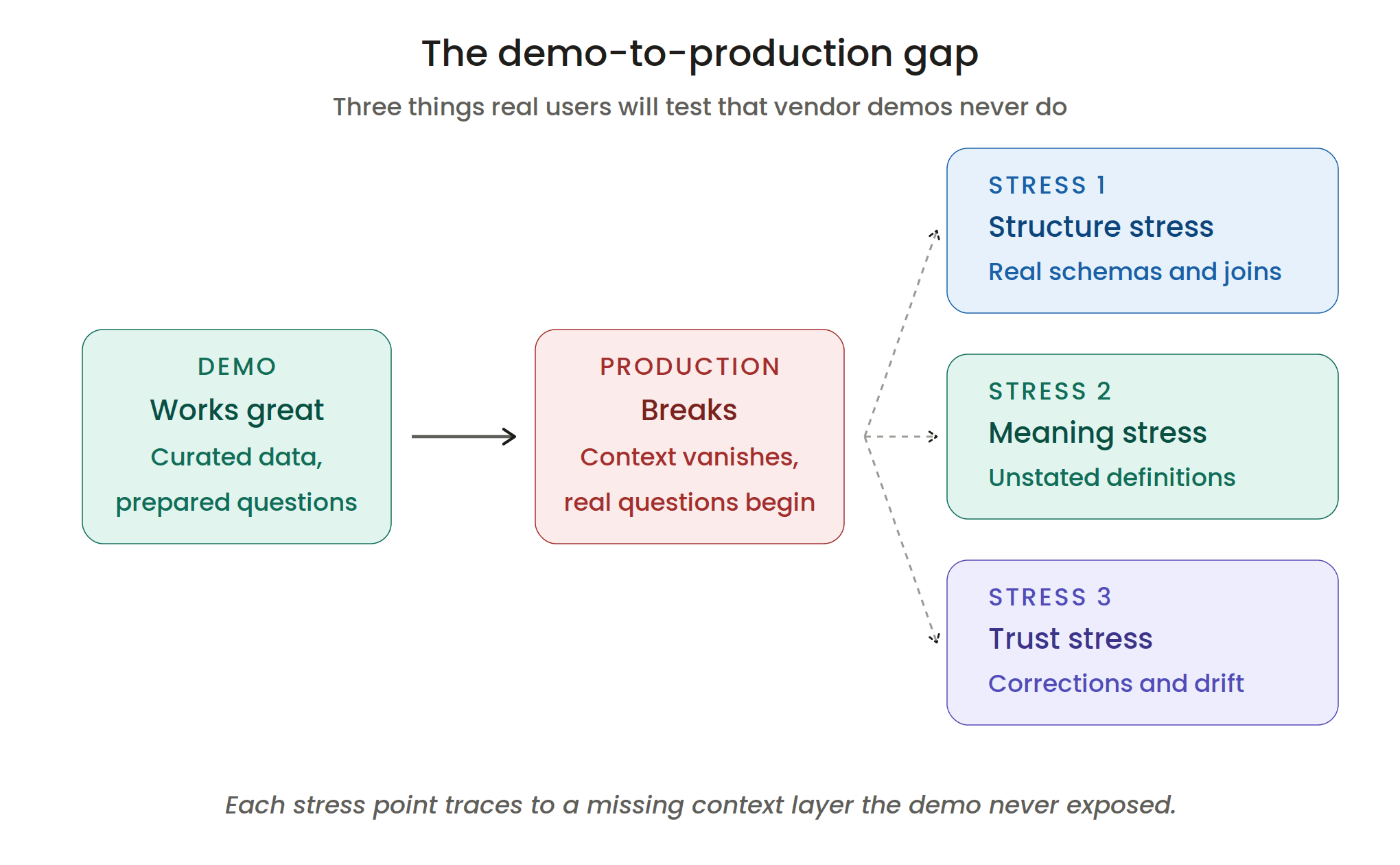
These three layers (Structure, Meaning, Trust) are what determine whether an agent's answers hold up in production. Most platforms cover one or two layers reasonably well. Far fewer cover all three. For a comprehensive treatment, see context engineering for AI, which is the cluster pillar on this topic.
2. Accuracy and Evaluation Tooling
The honest answer to "how accurate is your agent?" is "it depends on the context you encode." But you can still evaluate the platform's tooling for measuring and improving accuracy over time.
Look for:
Golden query testing: Can you write unit tests for the agent? Define a set of known questions with verified answers, then run them on every change?
LLM-as-judge evaluation: Does the platform automatically grade agent responses, or do you have to build that yourself?
Conversation logs and feedback loops: Can users flag wrong answers? Do those flags feed back into the context layer?
Benchmark performance: Has the platform been tested against independent benchmarks (BIRD, Spider, DABstep) or third-party reviews like Gouze's analytics agent comparison?
OpenAI's data agent team uses the Evals API to test against curated question-answer pairs with manually authored golden SQL queries. That pattern is becoming the standard, and any serious analytics agent platform should offer something equivalent.
3. Deployment Surfaces
Where does the agent actually live? The platforms differ widely here:
Web interface: Standard for every platform.
Slack and Microsoft Teams: Critical for adoption. The biggest predictor of whether an analytics agent gets used is whether it meets users in the tools they already open every morning.
Embedded SDK (React or iframe): Required if you are putting the agent in your own product (more on this in Dimension 4).
MCP and IDE surfaces: Cursor, Claude, ChatGPT, and other tools that consume the agent via the Model Context Protocol. Increasingly relevant for technical users.
If a platform only ships a web interface, it is a dashboard product with an agent layer, not an agent platform.
4. Multi-Tenant and Embedding Support
This dimension applies to B2B SaaS product teams building analytics into their own products. Your customers should not see each other's data, your customers should see your branding, and the deployment should not require you to rebuild the platform's UI from scratch.
Evaluate:
Row-level security: Can the agent enforce per-tenant data isolation natively, or does that get bolted on?
White-label theming: How much of the UI is customizable? CSS variables? Full React components?
Tenant-scoped context: Can context (definitions, validated queries) be scoped to a specific customer, or is it global?
For depth on this topic, see white-label analytics and multi-tenant analytics architecture.
5. Security and Compliance
For most enterprise buyers, this is a gate, not a dimension. Check the basics:
SOC 2 Type II: Standard for any enterprise sale.
HIPAA: Required if any customer touches healthcare data.
Self-hosting or VPC deployment: Required by some financial services and regulated industries.
PII handling and data residency: Important for European deployments.
Permission inheritance: The agent should operate within the user's existing data access permissions, not bypass them.
A platform that does not pass your security review is not in the running, regardless of how good the demo was.
6. Time-to-Production
This is the dimension that gets misrepresented most often. Every vendor claims "fast deployment." In practice, time-to-production depends on three things: the platform's setup complexity, the state of your existing data infrastructure, and whether the platform requires a pre-built semantic layer.
For platforms that require a fully modeled semantic layer as a prerequisite, time-to-production includes the time it takes to build that layer (often months). For platforms that can bootstrap context from your existing warehouse, dbt project, and documentation, time-to-production is typically 2 to 4 weeks. For internal builds on a generic orchestration framework, MIT's research suggests realistic timelines run 4 to 9 months at best, with many never reaching production.
Ask vendors for specific reference customers with specific deployment timelines. Vague answers are an evaluation signal.
7. Pricing Model
Pricing for agent platforms is still evolving, and the model matters as much as the headline number. Look for:
How is usage metered? Per query, per seat, per LLM token, per agent? Each has different cost implications at scale.
Are LLM costs included? Some platforms pass through, others bundle. Bundled is usually cheaper at scale; pass-through gives you more control.
What is the floor? Some platforms have aggressive starting prices but steep step functions; others have a higher floor and predictable scaling.
Is there a startup or growth tier? Important if you are early stage.
The economics of agent usage (especially conversational usage) look different from dashboard licensing. Be careful with platforms that priced themselves for the dashboard era.
Common Mistakes When Choosing an AI Agent Builder
A few patterns show up repeatedly in evaluations that end in regret. Here is what to watch for.
1. Over-Indexing on the Demo
Every vendor will give you an impressive demo. The demo is on curated data, with curated questions, with curated context. Production looks nothing like the demo. The way to avoid this is to evaluate with your data, your questions, and your context. Most serious vendors will support a paid or unpaid proof-of-concept on your actual warehouse. Insist on it.
Vendor demos run on clean schemas with controlled volume. Production runs on years of inconsistent, poorly governed, under-documented data. That gap is where most agent projects die.
2. Confusing Copilots With Agents
If the product autocompletes SQL, it is a copilot. If it returns an answer with a chart in response to a natural-language question, and decides for itself which tables to use, it is an agent. Both are useful. They are not interchangeable. Some platforms market themselves as agents but only ship copilot functionality. The test: can the product answer a question that requires choosing between two similar tables, applying a non-obvious business rule, and producing a chart? If not, it is a copilot.
3. Underestimating Context Complexity
The most common reason agent projects stall in months 3 to 6 is that the team underestimated how much institutional knowledge was uncodified. The metric definitions that "everyone knows" turn out to vary by team. The dbt project is partially documented. The fiscal calendar exception from Q2 2024 is not written down anywhere.
A platform that helps you surface and encode this context (automatically where possible, manually where required) is fundamentally different from one that assumes you already have it. This is the single biggest architectural difference among analytics-specific agent platforms.
4. Building Internally Without a Clear Reason
There are good reasons to build internally: unique competitive differentiation, proprietary data advantages, regulatory requirements preventing data sharing. There are bad reasons: "we have engineers," "vendor lock-in," "it looks simple in the demo."
MIT found that internal AI builds succeed about one-third as often as vendor partnerships, with a 67% success rate for vendor-led projects versus 33% for internal builds. The reason is not engineering capability. It is the breadth of infrastructure required (context, evaluation, deployment, security, observability) that internal teams systematically underestimate. For a deeper look at this decision, see our framework on build vs buy analytics in the agent era.
5. Treating Context as a One-Time Setup
Context drifts. Definitions change. Pipelines change. A query that worked last month might quietly return the wrong number today because someone renamed a column upstream. The platforms that handle this well treat context as a continuously maintained system with detection, correction, and evaluation built in. The platforms that do not will gradually accumulate errors that no one notices until a quarterly board meeting goes sideways.
Where Upsolve Agent Studio Fits
Upsolve Agent Studio is one option in the analytics-specific agent platform category. It is purpose-built around the three-layer context architecture: Structure (schemas, lineage, usage patterns), Meaning (metrics, KPIs, business rules), and Trust (verified queries, golden assets, usage signals). It is database-agnostic, supports both internal and customer-facing deployment, and is designed for production teams that need to ship in weeks rather than months.
It is not the right choice for every team. Teams already deeply standardized on a single warehouse's semantic layer (and with no multi-source requirement) may get a faster path with a warehouse-native option. Teams with a small data footprint and no production accuracy bar may not need a dedicated platform at all. Teams that need maximum flexibility for a custom agent workflow may be better served by a general orchestration framework.
What Agent Studio is built for: organizations where business stakeholders wait days for answers, where 40% or more of the data queue is repeat questions, where the existing BI stack does not handle the long tail, and where the bar is production-grade accuracy on top of multi-source data.
If you want to see whether it fits, the fastest evaluation is uploading a CSV and asking it questions, or scheduling a working session with our team on a real slice of your data.
Ready to See What an Analytics Agent Looks Like in Production?
The fastest way to evaluate whether Upsolve Agent Studio is the right fit is to see it running on real data. You can upload a CSV and start asking questions, or book a working session with our team on a slice of your warehouse to see how the three-layer context architecture handles your actual use cases.
Try Upsolve with your data or book a demo.
Frequently Asked Questions
What is an AI agent builder for analytics?
An AI agent builder for analytics is a platform that lets data teams configure, test, and deploy autonomous agents that answer analytical questions on top of organizational data. The agent takes a natural-language question, retrieves the relevant business context, runs the appropriate query, validates the result, and returns an answer. It is distinct from a general-purpose agent builder (which orchestrates agents broadly) and from a SQL copilot (which only assists rather than acts).
How is an analytics agent platform different from a BI tool?
A BI tool builds dashboards. An analytics agent platform answers questions. A BI tool requires the user to know what dashboard to look at, or to build the dashboard themselves. An analytics agent platform lets the user ask in natural language and returns the answer (often as a generated chart) in seconds. Most BI vendors are now bolting agent capabilities on top of their dashboard products, but the underlying architecture, pricing, and deployment model differ from purpose-built agent platforms.
How much does an AI agent builder platform cost?
Pricing varies widely by category and usage model. Warehouse-native options (Databricks Genie, Snowflake Cortex Analyst) are typically bundled into existing warehouse licensing and metered on compute. BI-native options (ThoughtSpot, Tableau Pulse) are typically per-seat add-ons to existing BI subscriptions, with starting prices commonly in the tens of thousands annually for mid-market deployments. Analytics-specific agent platforms vary, with most charging on a combination of seats, agents, and query volume. General-purpose orchestration frameworks like CrewAI and LangChain are typically free or low-cost, with the real cost being engineering time to build and maintain the surrounding infrastructure.
Can I build an analytics agent in-house instead of buying a platform?
You can, and some teams do. The risk is that you are signing up for a longer and more uncertain path than the demo suggests. MIT's research found that internal AI builds succeed about one-third as often as vendor partnerships. The hidden costs are the breadth of infrastructure required: context management, evaluation tooling, multi-source integration, security review, observability, and ongoing maintenance. For teams with unique competitive differentiation or regulatory constraints, internal builds can make sense. For teams that just want production-grade analytics agents, the math usually favors buying.
What's the most important thing to evaluate in an AI agent builder?
Context management. Every other dimension (accuracy, deployment, embedding, security, pricing) is downstream of how well the platform handles the three layers of context: Structure, Meaning, and Trust. A platform with strong context infrastructure can be made to work in almost any scenario. A platform with weak context infrastructure will hit an accuracy ceiling that no amount of model improvement can fix. This is the single largest predictor of whether a platform survives the move from POC to production.
How long does it take to deploy an analytics agent in production?
For analytics-specific platforms that can bootstrap context from your existing warehouse and dbt project, deployment typically runs 2 to 4 weeks. For warehouse-native or BI-native options that ride on top of an already-deployed platform, deployment can be faster (sometimes days), with the caveat that you inherit the parent platform's limitations. For internal builds on a generic orchestration framework, realistic timelines run 4 to 9 months at minimum, with many never reaching production.

Try Upsolve for Embedded Dashboards & AI Insights
Embed dashboards and AI insights directly into your product, with no heavy engineering required.
Fast setup
Built for SaaS products
30‑day free trial





