
Learn how the dbt Semantic Layer and MetricFlow define trusted metrics once, helping BI tools and AI agents query data accurately.

Ka Ling Wu
Co-Founder & CEO, Upsolve AI
10 min
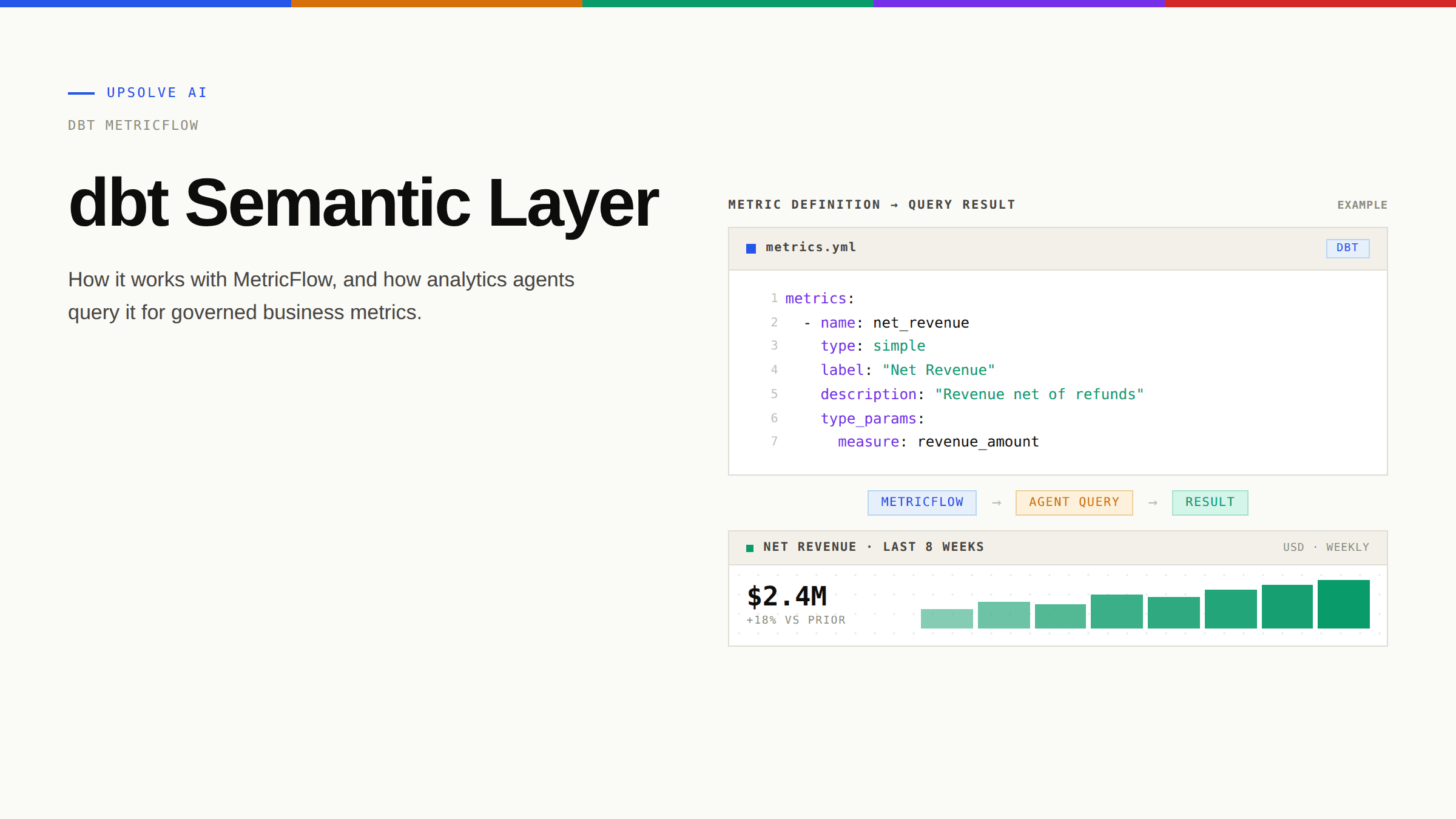
The dbt Semantic Layer, powered by MetricFlow, lets your team define business metrics once in version-controlled YAML and serve them consistently to every BI tool, notebook, and AI agent that queries your data. If you have ever watched "monthly revenue" disagree across three dashboards or seen an analytics agent confidently produce the wrong number, you have already met the problem the dbt Semantic Layer is built to solve.
This guide walks through how the dbt Semantic Layer actually works under the hood, how to set it up, and (most importantly for the agent era) how AI systems query it to produce trustworthy answers. It also covers where the dbt Semantic Layer fits in a broader context architecture, and where data teams need additional infrastructure to ship production-grade analytics agents.
Key Takeaways |
|---|
|
What Is the dbt Semantic Layer?
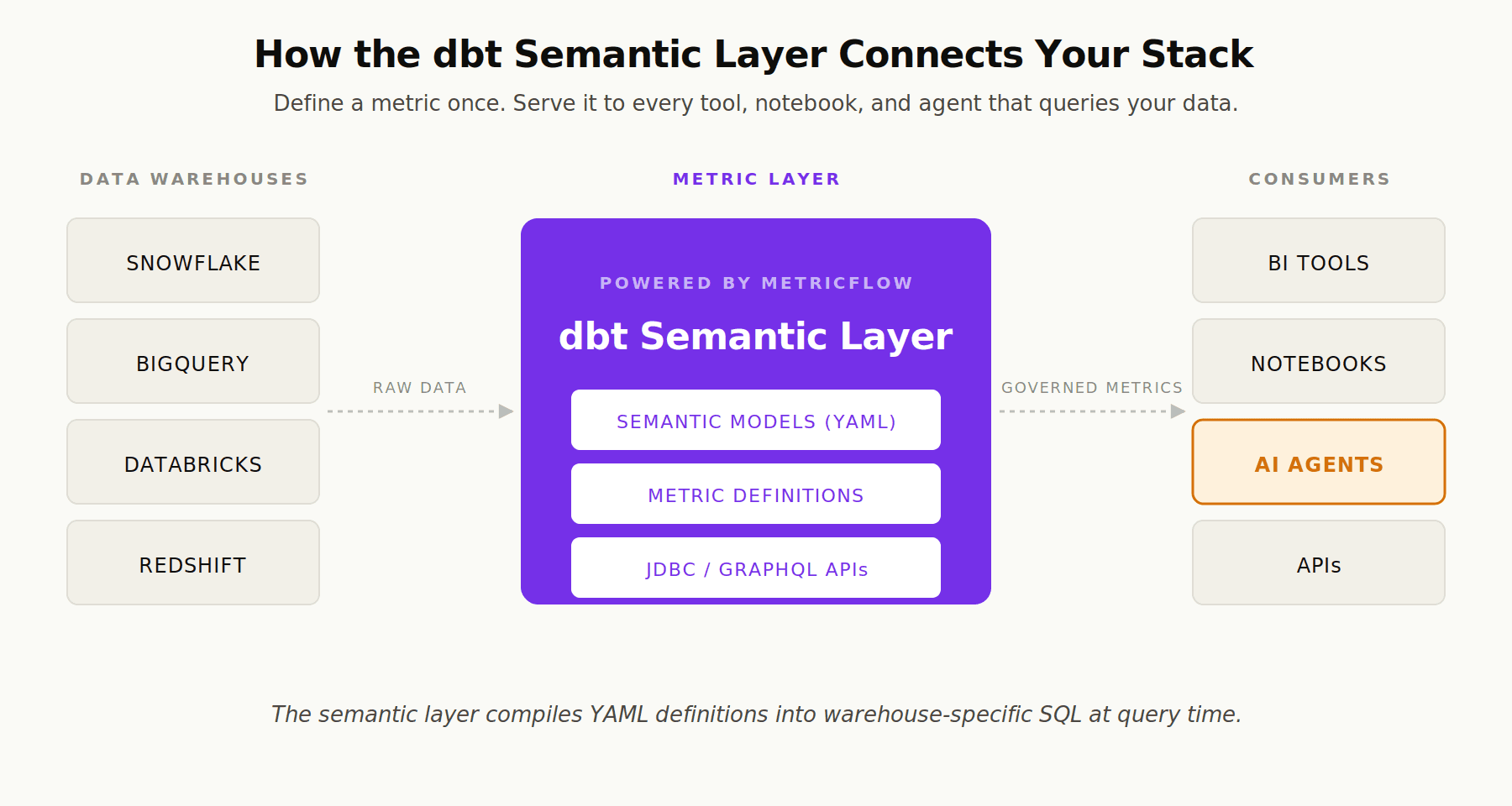
The dbt Semantic Layer is a framework that lets data teams define business metrics centrally in their dbt project and expose them to any downstream consumer through a unified API. It sits between your warehouse (Snowflake, Databricks, BigQuery, Redshift) and the tools that query it (BI platforms, notebooks, AI agents), translating natural language requests into governed, provably correct SQL.
Under the hood, the Semantic Layer is powered by MetricFlow, a SQL query generation engine that simplifies the process of defining and using critical business metrics, like revenue in the modeling layer (your dbt project). MetricFlow takes YAML configurations describing your semantic models and metrics, then constructs platform-specific SQL on the fly at query time.
The core problem it solves is metric drift. Without a semantic layer, "monthly active users" might be defined once in Looker, again in a Mode notebook, and a third time in a Jupyter analysis. Each definition is technically correct in isolation; collectively, they erode trust. Moving definitions into the dbt project means a single change propagates everywhere a metric is consumed.
For analytics engineering leads, the practical pitch is simple: stop defining metrics inside BI tools, where they are tool-specific, not version-controlled, and invisible to consumers like AI agents or APIs. Define them once, in code, alongside the models that produce them. For a broader treatment of why this matters, see our pillar on what a semantic layer is and how it powers AI agents.
How the dbt Semantic Layer Works: MetricFlow Under the Hood
MetricFlow operates on a semantic graph, a data structure connecting semantic models (the nodes) through entities (the edges). When a user or agent requests a metric, MetricFlow walks the graph to determine which tables to join, generates SQL specific to your warehouse dialect, and either returns the compiled query or executes it directly.
Semantic Models
Semantic models are the foundation of the dbt Semantic Layer. According to dbt's documentation on building semantic models, each semantic model maps one-to-one with an existing dbt model and declares three types of metadata:
Entities: Join keys (primary, foreign, unique, or natural) that define how this semantic model connects to others
Dimensions: The categorical or time-based columns you want to group and filter by
Measures: Numerical columns with an aggregation type (sum, count, average, count_distinct, max, min)
Here is a minimal example, adapted from the dbt MetricFlow documentation:
Measures are not yet metrics. They are private building blocks. Metrics are the public interface that users and agents query.
Metrics
Metrics sit on top of measures and express the calculations stakeholders actually care about. The Semantic Layer supports four metric types that are composable: simple, ratio, cumulative, and derived. Each can reference others, so you define logic once and recombine it freely.
For a deeper treatment of metrics specifically and how they relate to semantic models, see our companion article on understanding the metrics layer.
Query Construction
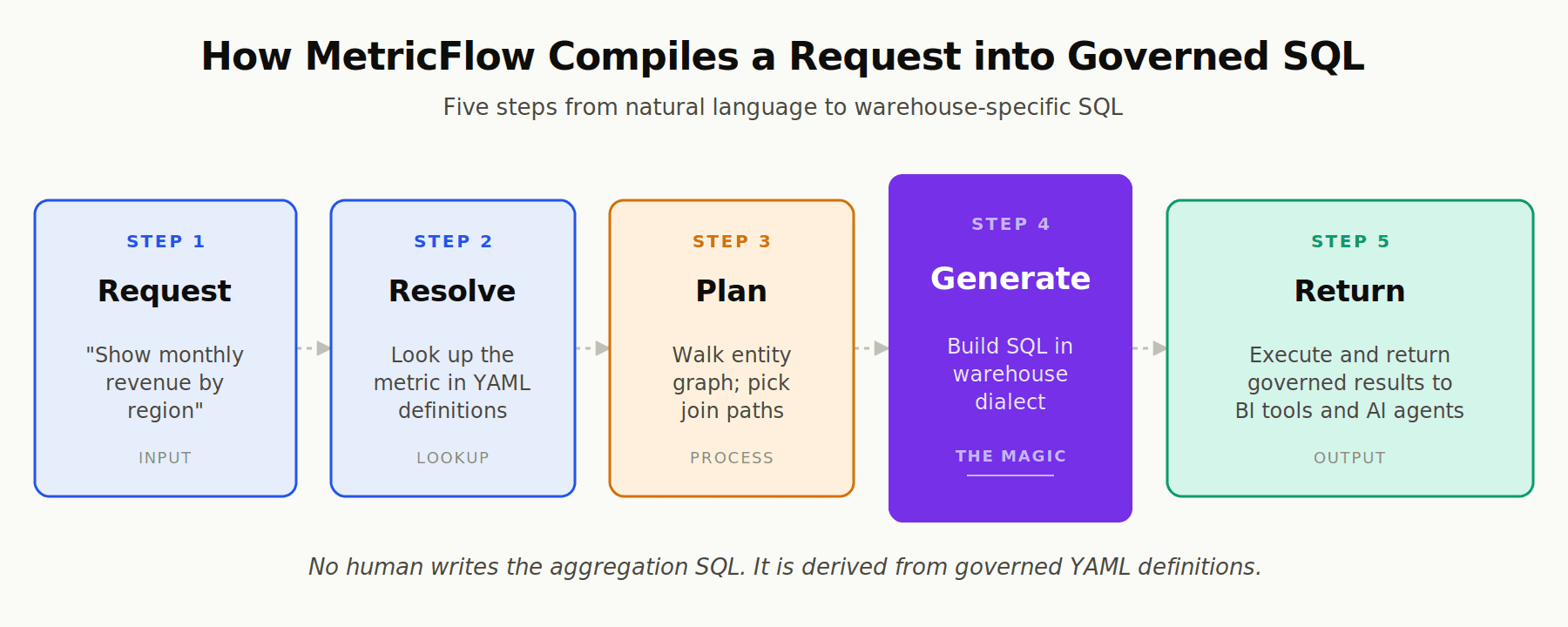
When a downstream tool requests a metric, MetricFlow performs a sequence that one Towards Data Engineering walkthrough of MetricFlow's internals describes well: it resolves the metric by looking up the YAML definition, plans the optimal join path using entity relationships, generates warehouse-specific SQL (Snowflake, Databricks, BigQuery, Redshift), and either returns the compiled SQL or executes it.
The critical point is that no human writes the aggregation SQL. It is derived from governed definitions, not hand-written under time pressure. As MetricFlow's documentation puts it, the engine "compiles these metric definitions into clear, reusable SQL, ensuring consistent and accurate results when analyzing data by relevant attributes."
Setting Up the dbt Semantic Layer: A Practical Walkthrough
Getting started requires four phases: define semantic models, define metrics, validate locally with MetricFlow commands, then expose metrics to downstream tools through the Semantic Layer APIs.
Step 1: Confirm Prerequisites
The dbt Semantic Layer requires dbt v1.6 or higher and runs on Snowflake, BigQuery, Databricks, or Redshift, according to the dbt Semantic Layer FAQs. To query metrics dynamically in downstream tools, you need a dbt Starter, Enterprise, or Enterprise+ account. MetricFlow itself can run locally on dbt Core for development and validation.
Step 2: Build Your First Semantic Model
A practical pattern, recommended in dbt's best practices for building semantic models, is to start with a single, well-modeled fact table (typically a stg_ or fct_ model already in your dbt project) and define entities, dimensions, and measures on it before moving on.
Pro tip: Use
exprto specify the actual column name and reserve thenamefield for the readable singular form. For example, name an entitylocationwithexpr: location_id. This makes metric definitions far more legible later on.
Step 3: Test Locally with MetricFlow Commands
Once your YAML is in place, validate it locally before publishing. The MetricFlow commands documentation lists the essentials:
Run these in CI on every pull request. Catching a broken metric in CI is orders of magnitude cheaper than catching it in a stakeholder's dashboard.
Step 4: Connect Downstream Tools
Once your Semantic Layer is deployed, downstream consumers query it through JDBC and GraphQL APIs. dbt Labs maintains integrations with Tableau, Hex, Mode, Google Sheets, and others, while custom tools (including analytics agents) can use the APIs directly to fetch governed metrics by name.
Why the dbt Semantic Layer Matters for AI Agents
This is where the conversation has shifted dramatically in the past year. Before LLMs, the value of a semantic layer was mostly about reducing dashboard duplication and protecting executives from contradictory KPIs. With analytics agents in the picture, the semantic layer has become foundational infrastructure for trustworthy AI.
The Hallucination Problem
When an LLM writes SQL directly against your warehouse, it has to infer everything: which tables are authoritative, how "revenue" is actually defined at your company, which joins are valid, what the fiscal calendar looks like. Each inference is a chance to be confidently wrong. As a16z argued in "Your Data Agents Need Context", data and analytics agents are essentially useless without the right context. A semantic layer provides that grounding by giving agents pre-defined metrics they can reference by name instead of hallucinating table joins.
dbt Labs put it directly in a recent post: a semantic layer creates a single source of truth that serves both human and AI consumers, restricting access to sensitive metrics and tracking definition changes with clear audit trails.
2026 Benchmark Results
Skeptics reasonably ask: with how good frontier models have gotten at SQL, do we still need a semantic layer? dbt Labs reran their 2023 comparison in 2026 to find out. The result: with 2026's best models, the dbt Semantic Layer hits near-100% accuracy for covered queries. Text-to-SQL on raw, highly normalized tables continues to fail in subtle ways: misinterpreted column names, broken joins, fiscal calendar confusion, ambiguous metric definitions.
In a related replication, AI answered 83% of addressable natural language questions correctly through the dbt Semantic Layer, with several metric categories at 100% accuracy. The headline lesson: structured semantics materially improve accuracy over prompting alone.
This matches the broader pattern documented in OpenAI's writeup of their internal data agent, where the team found that high-quality answers depend on rich, accurate context, not just bigger models.
How Agents Query the Semantic Layer
In practice, an analytics agent integrates with the dbt Semantic Layer through one of three patterns: a direct API call to the Semantic Layer JDBC or GraphQL endpoint, the dbt MCP server (which exposes metric definitions as Model Context Protocol tools), or a platform layer that wraps the Semantic Layer with additional context engineering. Each approach lets the agent ask for a metric by name (total_revenue grouped by region for last quarter) and receive provably correct SQL plus results, rather than guessing.
For analytics engineering leads building or evaluating agents, this is the single most important reason to invest in a semantic layer now. To go deeper on how dbt feeds the broader context model that agents need, see our piece on how dbt feeds the Meaning layer for agents.
The Meaning Layer in the Three-Layer Context Architecture
Here is where it gets nuanced. The dbt Semantic Layer is a phenomenal solution to a specific slice of the problem. It is not, by itself, a complete context infrastructure for analytics agents.
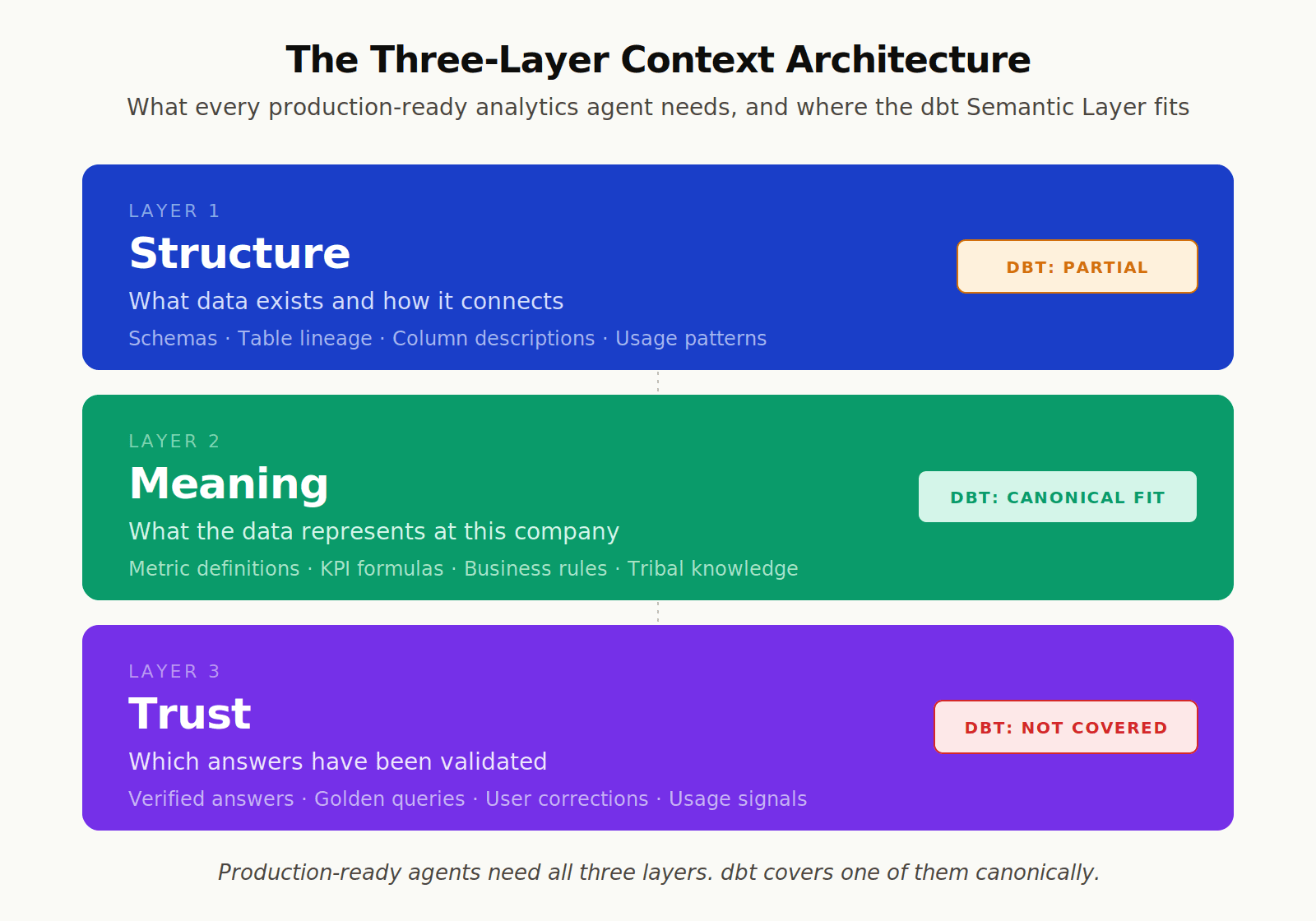
Production-ready analytics agents need three layers of context working together:
Layer | What It Contains | Where dbt Fits |
|---|---|---|
Structure | Schemas, tables, lineage, relationships, usage patterns | dbt provides lineage; full coverage needs warehouse metadata, query logs, usage signals |
Meaning | Metric definitions, KPIs, business rules, tribal knowledge | dbt Semantic Layer is the canonical solution |
Trust | Verified answers, golden queries, corrections, observability | dbt does not address this; needs separate infrastructure |
What dbt Solves Well: The Meaning Layer
The dbt Semantic Layer is purpose-built for the Meaning layer. It encodes:
Metric definitions: What "monthly recurring revenue" actually means at your company, with the exact aggregation logic
Business rules: Filters that distinguish food orders from beverage orders, paying customers from trial users
Time grains: Fiscal calendars, custom periods, semi-additive measures
Join logic: Provably correct paths between fact and dimension tables based on entity relationships
For organizations already using dbt for transformations, layering MetricFlow on top is the most natural way to capture the Meaning layer in code. It also gets you OSI-compatible artifacts that other tools can read, future-proofing your investment.
What dbt Does Not Solve: Structure and Trust
The Structure layer is partially covered (dbt has lineage, model documentation, and column descriptions), but it does not include warehouse usage signals, query patterns, or the ambient knowledge of which tables analysts actually use versus which ones are abandoned. Agents need that to disambiguate between "the orders table" and "the orders_archive table that nobody has queried in two years."
The Trust layer is essentially absent. dbt does not, on its own, give you:
A library of verified, golden queries an agent can reference when an analyst has already answered a question correctly
Observability over agent conversations to surface where context is missing
A feedback loop where corrections from data team members improve future agent answers
LLM-as-judge evaluation against a test set to track accuracy over time
This is not a criticism of dbt. It is just outside the project's scope. As one independent semantic layer comparison observed, MCP without a structured semantic layer is a shortcut that creates reliability problems at scale, but the semantic layer alone is not enough either; it needs to be combined with the rest of the context stack.
Bottom line: The dbt Semantic Layer is the right answer for the Meaning layer. It is one of three layers your agents need. Teams that conflate "we have a semantic layer" with "we have context infrastructure" tend to discover the gap during the first production deployment.
To understand how all three layers fit together for analytics agents in production, see our deeper piece on context engineering for AI.
Common Pitfalls and Limitations
Even within its scope, the dbt Semantic Layer has real friction points. Knowing these in advance saves weeks of debugging.
Adoption Stalls Before Coverage Reaches Critical Mass
The semantic layer pays off only when it covers most of the metrics stakeholders actually ask about. Teams often build twenty semantic models, declare victory, then watch analysts continue to query raw tables because the metrics they need are not in the layer yet. dbt Labs has acknowledged this directly: user adoption challenges emerge when the semantic layer fails to deliver on its promise, which usually means coverage gaps or stale definitions.
YAML Sprawl
Once you cross a few dozen metrics, YAML files multiply. Standards drift. Different analytics engineers name dimensions differently. As one Medium walkthrough on adopting MetricFlow at scale put it: prefix everything with your domain name, always add expr to dimensions, never sum pre-calculated percentages, and treat the time spine as mandatory rather than optional.
The Denormalization Tradeoff
MetricFlow works best on normalized data with clear entity relationships. Highly denormalized "one big table" patterns reduce the granularity MetricFlow can use to aggregate metrics. The pitfall is the inverse problem: feeding MetricFlow raw, ungoverned tables and then wondering why join logic feels brittle.
dbt Cloud Dependency for Production Consumption
MetricFlow itself is open source under Apache 2.0, but the dbt Semantic Layer APIs that let downstream tools query metrics dynamically require a dbt Starter, Enterprise, or Enterprise+ subscription. Teams running pure dbt Core can still define semantic models and query them locally, but the production multi-tool consumption story currently runs through dbt Cloud.
Multi-Source Limitations
A semantic layer defined in dbt covers metrics from one warehouse at a time. If your business runs analytics across Snowflake and a separate operational Postgres, you will need to either replicate data into a single warehouse first or layer additional infrastructure on top. This is a real consideration for teams whose data is genuinely federated.
The Open Semantic Interchange and What It Means for Your Stack
The most consequential recent development is the Open Semantic Interchange (OSI) initiative. In October 2025, dbt Labs announced at Coalesce that it was open-sourcing MetricFlow under Apache 2.0 specifically to align with OSI, committing to vendor-neutral standards for semantic data exchange. The v1.0 OSI specification was released in January 2026 with participation from dbt Labs, Snowflake, Salesforce, Databricks, ThoughtSpot, Atlan, Alation, and Denodo.
The practical implication: if you define metrics in OSI-compatible formats today, you preserve the ability to migrate or pluralize semantic layers tomorrow. Organizations that lock into proprietary semantic modeling languages with no OSI export path are taking on portability debt the market is actively trying to eliminate.
For analytics engineering leads making infrastructure decisions in 2026, OSI compatibility belongs on the evaluation checklist. dbt MetricFlow is among the OSI-native options, which makes it a defensible choice even if your stack later evolves.
Where to Go From Here
The dbt Semantic Layer is the canonical solution for the Meaning layer, and for teams already invested in dbt, it should be the default choice. The harder question is what wraps around it.
Upsolve Agent Studio integrates natively with dbt MetricFlow, treating your semantic layer as the Meaning layer in a three-layer context architecture that also encodes the Structure and Trust layers your agents need. That includes warehouse metadata and usage signals on one side, and verified golden queries, observability, and continuous evaluation on the other. Teams that already have dbt semantic models in place tend to be live with production-ready agents in about two weeks; teams without one still start with whatever validated SQL and KPI definitions they have, since a dbt Semantic Layer is not a prerequisite.
If you are evaluating what an analytics-specific agent platform actually needs to do (and where general agent builders fall short), see our buyer's guide on evaluating AI agent builder platforms for analytics.
Frequently Asked Questions
What is the dbt Semantic Layer in plain terms?
The dbt Semantic Layer is a framework that lets data teams define business metrics (like revenue or active users) once in YAML inside their dbt project, then expose those metrics to any downstream tool (BI platforms, notebooks, AI agents) through APIs. It is powered by MetricFlow, which compiles metric definitions into warehouse-specific SQL at query time.
How is the dbt Semantic Layer different from the deprecated dbt_metrics package?
According to the dbt Semantic Layer FAQs, dbt_metrics relied on templated Jinja and had no real join handling. MetricFlow replaces it with a proper query construction engine that iteratively builds queries using a dataflow plan, supports sophisticated joins, and handles complex metric types (ratio, cumulative, derived) natively. dbt_metrics has been deprecated and dbt Labs recommends migration.
Which data warehouses does the dbt Semantic Layer support?
MetricFlow currently generates optimized SQL for Snowflake, BigQuery, Databricks, and Amazon Redshift. Microsoft Fabric is not supported at this time. The full list and current status is maintained in the dbt Developer Hub.
Do I need a dbt Cloud subscription to use the Semantic Layer?
You can define and query semantic models locally with dbt Core and MetricFlow at no cost. However, to expose metrics to downstream tools dynamically through the JDBC and GraphQL APIs, you need a dbt Starter, Enterprise, or Enterprise+ subscription. MetricFlow itself is open source under Apache 2.0.
Does a dbt Semantic Layer make analytics agents accurate on its own?
It dramatically improves accuracy for queries the layer covers. The dbt Labs 2026 benchmark showed near-100% accuracy for covered queries, and an 83% success rate across natural language questions. But the semantic layer covers the Meaning layer only. For production-ready analytics agents, you also need Structure (warehouse metadata, lineage, usage signals) and Trust (verified queries, observability, feedback loops). The semantic layer is necessary, not sufficient.
How long does it take to implement the dbt Semantic Layer?
A small team with an existing well-modeled dbt project can stand up a first semantic model and a handful of metrics in a few days. Reaching meaningful coverage (the metrics analysts actually ask about every week) typically takes weeks to months, depending on how many distinct business domains you have and how clean your underlying models are. Bootstrapping is usually the bottleneck, not the YAML spec.

Try Upsolve for Embedded Dashboards & AI Insights
Embed dashboards and AI insights directly into your product, with no heavy engineering required.
Fast setup
Built for SaaS products
30‑day free trial





