
Data copilot or analytics agent? Learn the autonomy gap, architecture differences, and how to choose the right AI analytics tool.

Ka Ling Wu
Co-Founder & CEO, Upsolve AI
10 min

Two vendors demo what looks like the same product. One finishes the task while you watch. The other waits for you to approve its next move, then the one after that, then the one after that. Both got called "AI analytics" in the sales deck. Only one of them is an agent, and if you sign the wrong contract you will spend the next quarter wiring integrations a copilot was never built to handle.
Here is the line that separates them: a data copilot assists you through a task while you keep control of every decision. An analytics agent takes a goal and owns the work end to end, planning, executing, and checking itself along the way. Assistance versus autonomy. That is the whole distinction, and almost every other difference, architecture, cost, where each one belongs in your stack, falls out of it. Get it right and you buy the thing your team actually needs. Get it wrong and you pay for capability you cannot use, or you ship a tool that stalls the moment a real question arrives. The same divide runs underneath every platform you will compare, which is why it pays to be precise about it before you evaluate analytics agent builder platforms in earnest.
Key Takeaways |
|---|
|
What Is a Data Copilot?
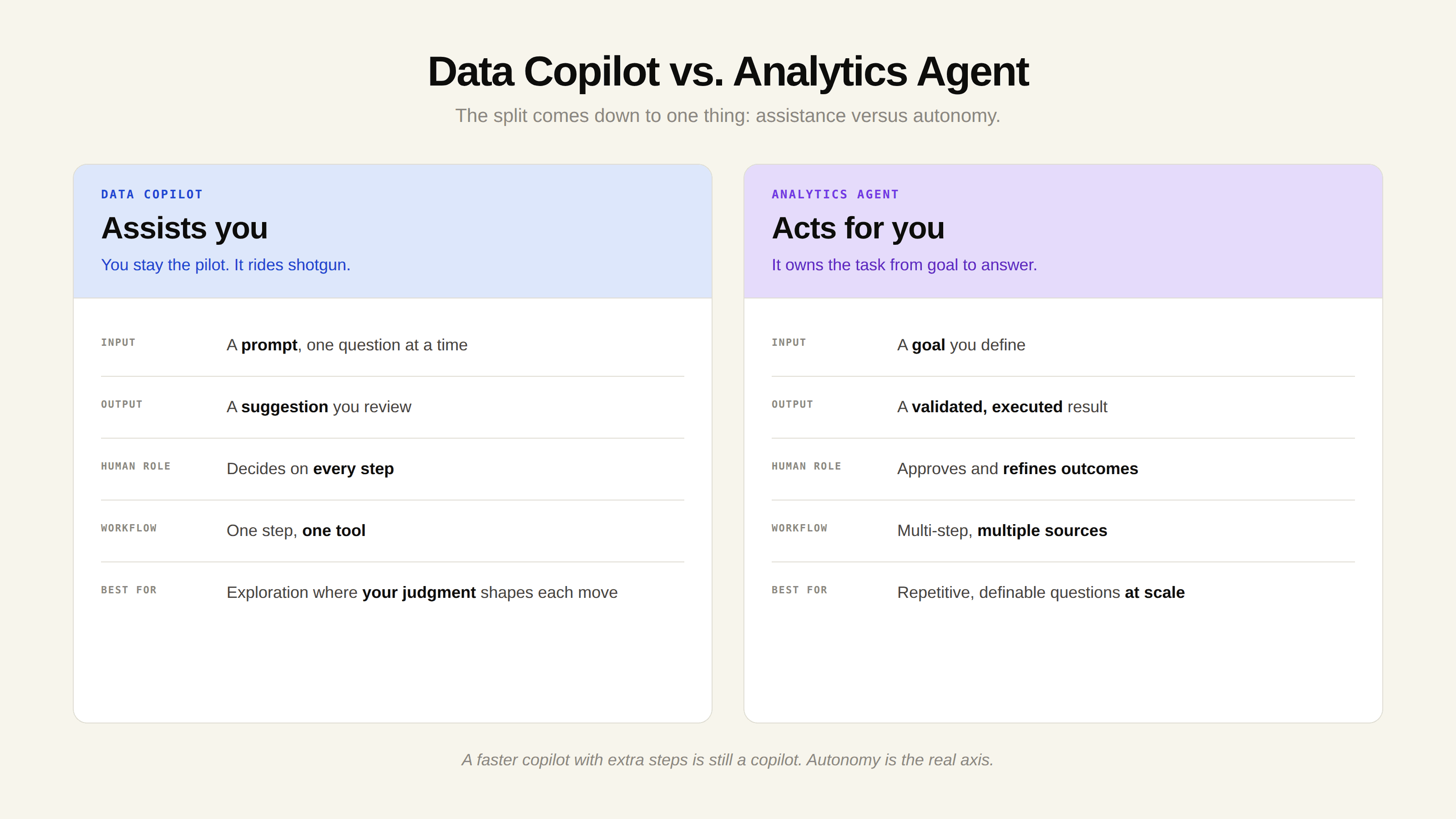
A data copilot is an AI assistant that works alongside you inside an analytics tool, responding to prompts and surfacing suggestions in real time while you keep decision-making authority. The name says it plainly: you are the pilot, and the AI rides shotgun. You ask, it responds, and nothing changes until you decide what to do with the output.
Copilots became popular fast because they slot into workflows you already have. You stay inside Power BI, Tableau, or your notebook, ask for help, and the AI answers. A few traits show up across every data copilot regardless of vendor:
On-demand responsiveness: The copilot responds when you ask, inside the tool you are already using. It does not run on its own.
Human-in-the-loop by design: Every output needs a person to review it before anything happens. The copilot produces; you decide.
Task support, not task ownership: A copilot helps with one step in a workflow. It does not run the full process end to end.
Conversational interface: Most copilots take natural language. You ask a question or give an instruction, and it responds directly.
Pro Tip: If you still have to prompt the system through each step of an analysis, you are working with a copilot, no matter what the marketing label says. The handoff back to you after every step is the tell.
In the data and analytics space specifically, GoodData frames the copilot as more than a search box: it acts like an intelligent data assistant that can reason through complexity, suggest insights, and generate analytics on demand. That is real value for analysts and power users exploring unfamiliar data. But the workflow itself does not change. You are still the one driving.
What Is an Analytics Agent?
An analytics agent is a system that autonomously plans, reasons, and executes a multi-step analytical task based on a goal you define, using tools and data sources to complete the work with minimal human involvement. Give it an objective and it breaks the goal into subtasks, decides which tools and tables to use, retrieves what it needs, runs the analysis, and checks whether the result actually answers the question. If it does not, the agent adjusts and tries again.
This is the structural break from a copilot. Resonate captures the distinction cleanly: a copilot works from a prompt while an agent works from a goal; a copilot returns a response while an agent executes a decision chain. The copilot stops and waits for you. The agent keeps going until the objective is met.
To understand what an analytics agent actually does step by step, see our breakdown of what an analytics agent is and how it works. The short version: it receives a question, retrieves the relevant context, generates the analysis, and validates the output before handing it back.
Copilot vs Agent: The Architecture Behind the Difference
The capability gap is not a matter of one model being smarter than the other. It comes from how each system is wired. Put the two architectures side by side and the difference is a single feedback loop.
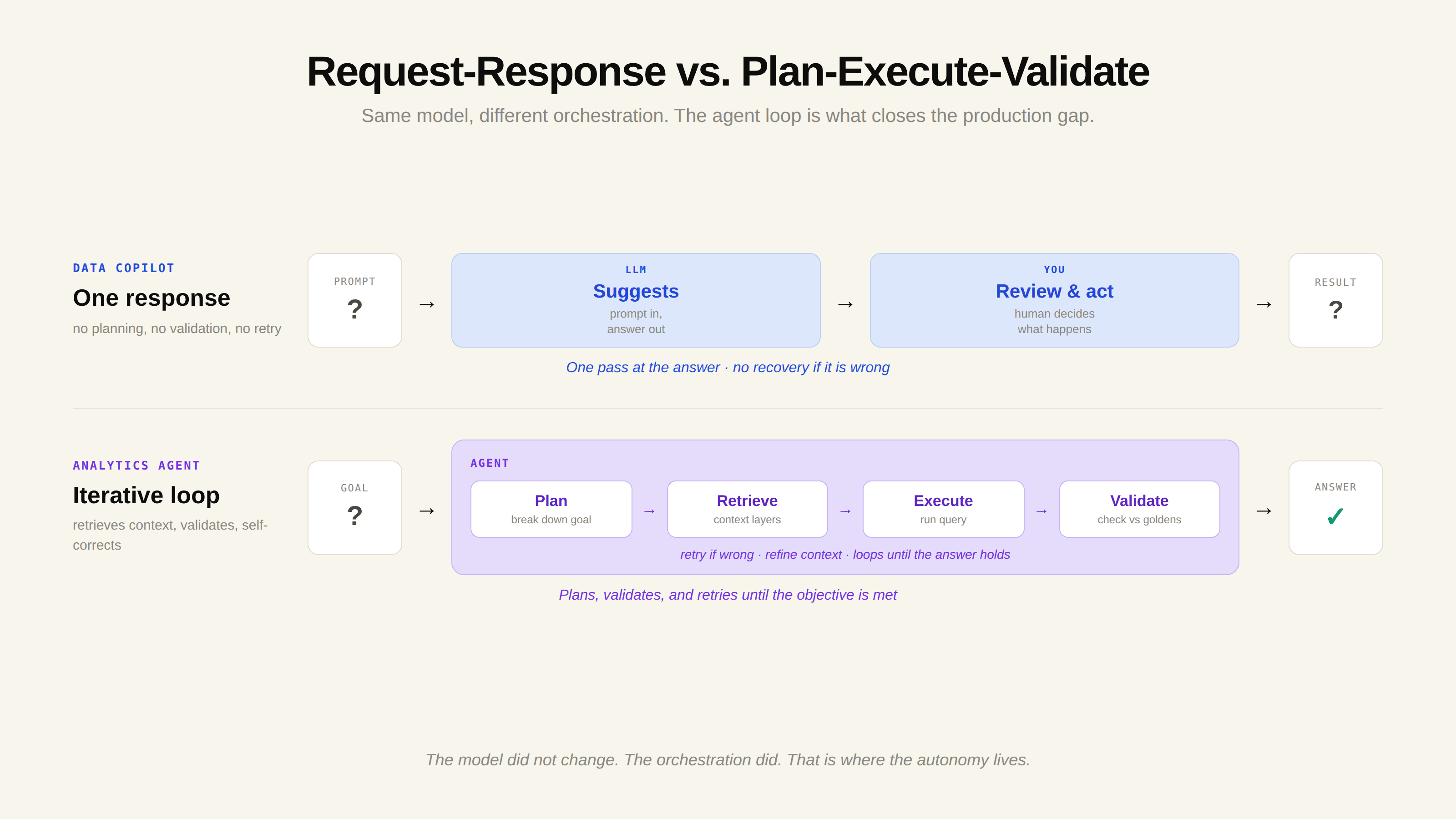
The copilot architecture is a simple request-response loop. The user provides input, the LLM generates a response, and the user decides what to do with it; there is no planning layer, no tool execution, and no feedback loop. That is the whole cycle. It is fast, it is predictable, and it never acts on its own.
The agent architecture adds the parts a copilot lacks. It includes a planning module that decomposes goals into tasks, a tool-use layer that executes actions across external systems, and an evaluation step that determines whether the result meets the objective; if it does not, the agent loops back and adjusts its approach. That planning-execution-evaluation loop is what lets an agent own a task instead of just assisting with it.
Here is how the two stack up across the dimensions that matter for a buying decision.
Dimension | Data Copilot | Analytics Agent |
|---|---|---|
Input | A prompt | A goal |
Output | A suggestion you review | A validated, executed result |
Autonomy | Acts only when asked | Plans and executes independently |
Human role | Decides on every step | Approves and refines outcomes |
Workflow span | One step, one tool | Multi-step, multiple data sources |
Best for | Exploration with your judgment in the loop | Repetitive, definable questions at scale |
The line between the two is blurring as platforms add agent capabilities to conversational interfaces, sometimes called "agentic copilots." But the underlying question stays the same, and the decision rule is practical: if the task needs data from more than one source, or needs to run on its own on a schedule or trigger, you need an agent; if a human has to validate every output anyway, a copilot is enough.
Power BI Copilot vs. Fabric Data Agent: The Split in a Tool You Know
If you want to see the copilot-versus-agent split in a tool you already know, Microsoft's own ecosystem draws the line for you. Power BI Copilot and Fabric data agents are positioned as different things, and the difference maps almost exactly onto the assistance-versus-autonomy axis.
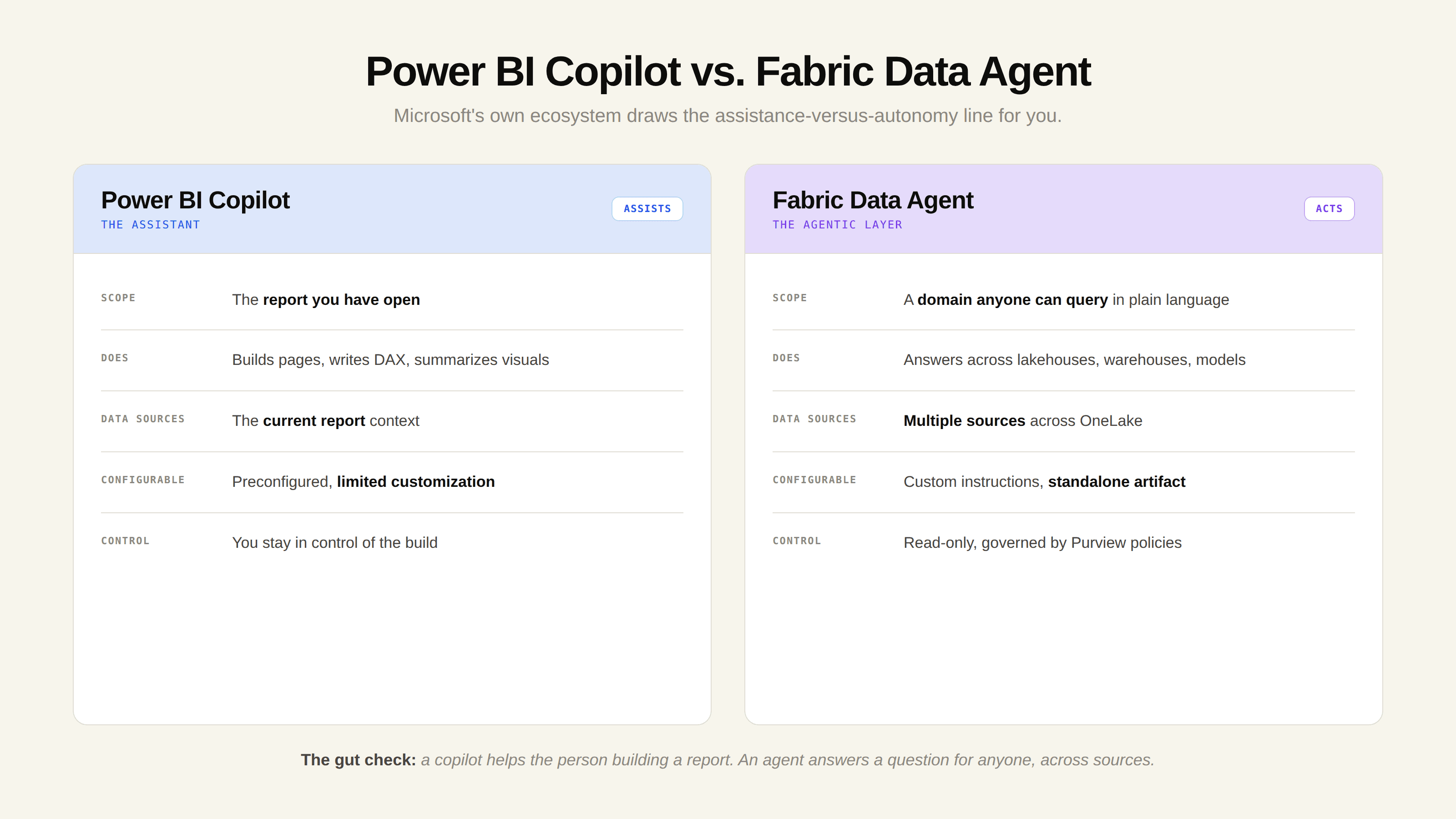
Power BI Copilot is the assistant. Microsoft's documentation describes the report Copilot pane as sitting on the right side of a report, scoped to the report you currently have open. It helps you build report pages, write DAX, and summarize visuals. You stay in control of the report you are building. That is copilot behavior: support inside the tool, on demand.
Fabric data agents are the agentic layer. Microsoft describes them as conversational Q&A systems you build on top of OneLake data, connecting to lakehouses, warehouses, semantic models, and KQL databases so anyone can ask questions in plain language and get answers back. Crucially, they are highly configurable, accept custom instructions and examples, and operate as standalone artifacts that query across OneLake and semantic models, whereas Fabric copilots come preconfigured and assist with tasks inside Fabric without that level of customization.
The Microsoft framing is a useful gut check. A copilot helps the person building a report. An agent answers a question for anyone who needs it, across sources, governed by the same permissions. One assists a step; the other owns the task.
There is one nuance worth flagging. Even Fabric data agents are intentionally bounded: as Plainsight's breakdown notes, they are read-only, meaning they query data but never modify it, and access is governed by row-level security and Purview policies so users only see data they are authorized to access. Bounded autonomy, not unlimited autonomy, is the norm in production analytics agents, and that is a feature, not a limitation.
Why the Distinction Matters for Your Stack
Choosing the wrong model is expensive. Buy a copilot when you needed an agent and you inherit the gap: custom integrations to bolt the thing onto other systems, more analyst headcount to cover what it cannot do alone, or a tool that quietly gets abandoned. A copilot embedded in a single application will not carry cross-platform analytics, automated reporting, or self-service access on its own, because it was never designed to leave the application it lives in.
The deeper reason this matters connects to the broader shift toward the agentic analytics paradigm. Traditional BI answered the questions you anticipated and built dashboards for. The questions your stakeholders actually ask are unbounded, follow-up driven, and arrive faster than any dashboard backlog can absorb. A copilot speeds up the analyst answering those questions. An agent removes the analyst from the critical path entirely for the repetitive ones.
That is the structural payoff. When a large share of incoming data requests are variations on questions that have already been answered, a copilot still requires a human to handle each one. An agent can field them directly, which is what makes the autonomy distinction more than semantic.
Three Ways Buyers Misread the Comparison
1. Treating "agentic" as a feature checkbox
Nearly every analytics tool announced in the last 18 months mentions something "agentic." Most of those represent faster automation, not genuine agency. The test is simple: does it act on a goal, or respond to a prompt? If you still prompt it through each step, it is a copilot wearing an agent's label. Stress-test any "agentic" claim before you buy.
2. Assuming more autonomy is always better
It is not. Copilots are the right call when judgment, nuance, and trust are essential at every step, like drafting an executive narrative or exploring data where the question itself is still forming. Agents win when the work is repetitive, definable, and high-volume. Match the tool to the task, not to the hype cycle.
3. Ignoring the context problem entirely
This is the one that sinks deployments. Whether you choose a copilot or an agent, the system needs to know what "revenue" means at your company, which table is authoritative, and which answers have been validated. Without that, both fail on real questions. The a16z analysis is blunt about why early agent deployments collapsed: data and analytics agents are essentially useless without the right context. The failure was not the model; it was the missing context. We cover this in depth in why context engineering is the missing piece.
How to Decide Which One You Need
Run your use case through three questions:
Does the task require data from more than one source? If yes, you are looking at an agent. Copilots are typically scoped to a single application or dataset.
Does the work need to run without you, on a schedule or trigger? If yes, you need an agent. Copilots respond only when prompted.
Does every output require human validation before it is used? If yes, a copilot is enough, and the simpler architecture is the safer choice.
For exploratory analysis where your expertise shapes every step, a copilot is the lower-risk, faster-to-value entry point. For the repetitive, well-defined questions that clog your data team's queue, an analytics agent is the structural fix. Many of the strongest platforms in 2026 blend both: a conversational interface backed by autonomous, multi-tool orchestration. When you evaluate those platforms, the criteria that separate the good from the impressive-but-brittle are context management, reliability, and how well the system encodes your institutional knowledge. We walk through the full evaluation framework in our guide to choosing an analytics agent platform that scales.
This is also where context infrastructure becomes the deciding factor. Platforms like Upsolve's Agent Studio approach the problem by encoding the three layers of context an agent needs to answer reliably (Structure, Meaning, and Trust), so the agent knows what data exists, what it means at your company, and which answers have been validated. That is one example of how the autonomy of an agent only pays off when it is paired with production-grade context, not a model bolted onto a database.
The Bottom Line on Copilots and Agents
The copilot-versus-agent decision comes down to autonomy, and autonomy is only worth buying when the system has the context to act accurately. A copilot makes a capable analyst faster. An agent takes the repetitive, well-defined questions off the analyst's plate entirely, but only if it knows your data well enough to be trusted without a human checking every answer. If your team is weighing the two, the real question to interrogate is not which label a vendor uses; it is how the platform encodes your institutional knowledge.
Frequently Asked Questions
What is the difference between a data copilot and an AI agent?
A data copilot assists you with analytics tasks one prompt at a time while you stay in control and review every output. An AI agent takes a goal and autonomously plans, executes, and validates the multi-step work to complete it. The core difference is autonomy: copilots assist, agents act.
Is Power BI Copilot an agent?
Not exactly. Power BI Copilot is an assistant that answers questions about the report you have open and helps you build pages and write DAX inside Power BI. Microsoft's Fabric data agents are the more agent-like layer: configurable, read-only virtual analysts that query across multiple data sources and can be consumed from Power BI, Microsoft 365 Copilot, and other surfaces.
Are AI agents better than copilots?
Neither is universally better; they solve different problems. Copilots are ideal for exploratory work that requires human judgment at every step. Agents are better for repetitive, well-defined, high-volume questions that can run with minimal oversight. The right choice depends on how much of the workflow you want the system to own.
How do I know if a tool is a real agent or just a copilot?
Ask whether it acts on a goal or responds to a prompt. If you still have to guide it through each step of a workflow, it is a copilot, regardless of how it is marketed. A genuine agent decomposes a goal into tasks, executes across tools, and evaluates its own output before returning a result.
Do data copilots and analytics agents need a semantic layer to work?
Both need business context to answer real questions accurately, and a semantic layer is one important source of that context (the Meaning layer). However, context goes beyond a semantic layer to include data structure, validated answers, and tribal knowledge. As a16z noted, data agents are essentially useless without the right context, which is why context infrastructure, not just the model, determines whether either system is reliable.
Can a platform be both a copilot and an agent?
Yes. The line between the two is increasingly blurred, and many platforms combine a conversational, copilot-style interface with agent-level autonomy underneath, sometimes called agentic copilots. The user interacts conversationally, but the system can plan, orchestrate across tools, and execute multi-step tasks on its own.

Try Upsolve for Embedded Dashboards & AI Insights
Embed dashboards and AI insights directly into your product, with no heavy engineering required.
Fast setup
Built for SaaS products
30‑day free trial





