
Learn what an analytics agent is, how it replaces dashboards, and why business context is key to trusted AI data answers today.

Ka Ling Wu
Co-Founder & CEO, Upsolve AI
10 min
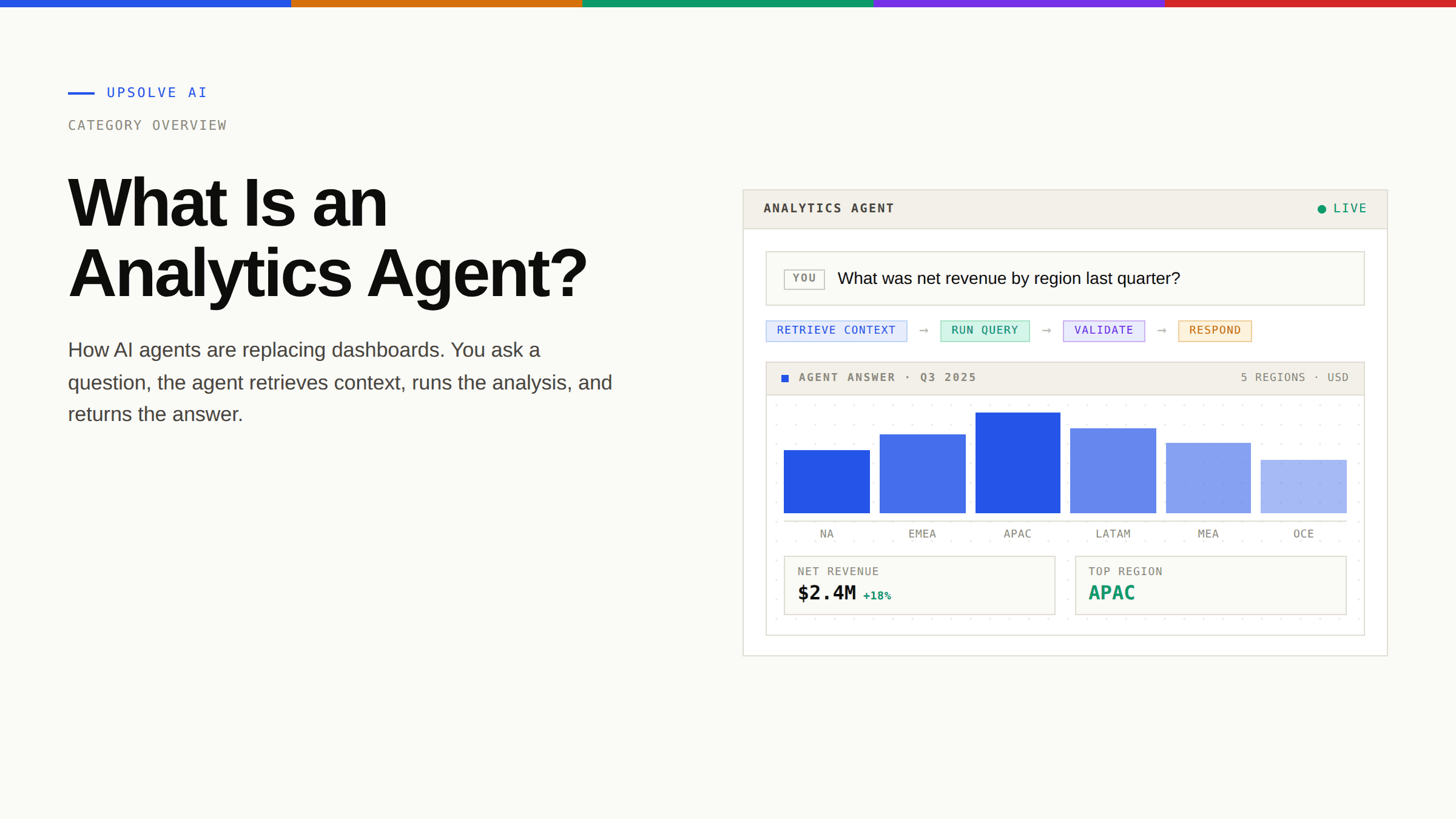
An analytics agent is an AI system that receives a question in natural language, retrieves the right business context, generates the analysis (typically by writing and running SQL or Python against your data), and validates the output before returning an answer. Unlike a dashboard that displays pre-built charts, or a copilot that suggests queries for a human to run, an analytics agent acts on its own. You ask, it answers, and it does the analytical work in between.
For the past decade, the standard way business users got answers from data was a dashboard. Build the dashboard, refresh it nightly, send the link. Anything off-script became a ticket for the data team. That model is breaking down, and analytics agents are the technology meant to replace it. This guide explains what an analytics agent actually is, how it differs from a chatbot or a copilot, why most early attempts to build one have failed, and what separates a production-ready agent from an impressive demo.
Key Takeaways |
|---|
|
What Is an Analytics Agent?
Strip the jargon away and an analytics agent is just a piece of software that does what a data analyst does for routine questions. A stakeholder asks something like "what was revenue growth last quarter, broken down by region?" The agent figures out where that data lives, what "revenue" actually means at this company, what time window counts as "last quarter," writes the query, runs it, checks that the answer is sensible, and returns it. All of that happens in seconds, not days.
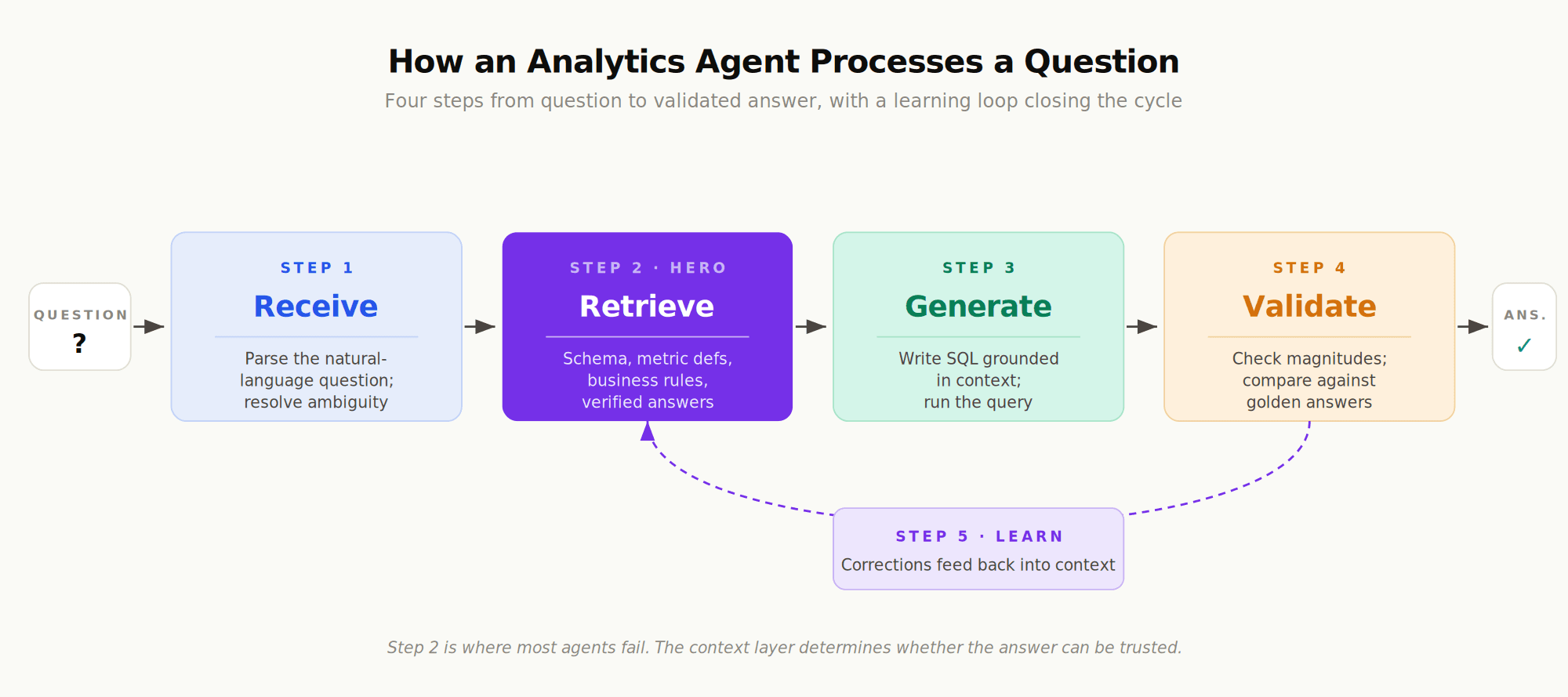
The technical definition is more precise. An analytics agent is a loop:
Receive a question in natural language from a user (or from another system, like a Slack channel or an embedded chat widget).
Retrieve context about the question. What data exists? How is the relevant metric defined? Are there business rules or filters that always apply? Has this kind of question been answered before?
Generate the analysis. Typically this means writing SQL, sometimes Python, occasionally orchestrating multiple queries that build on each other.
Validate the output. Does the result match known constraints? Is it close to historical answers for similar questions? Are the numbers in the expected order of magnitude?
The validation step is what separates an agent from a chatbot. A chatbot returns the first plausible answer the model produces. An agent checks its work.
The Difference Between an Analytics Agent and an AI Chatbot
It's tempting to lump analytics agents in with generic AI chatbots, but the difference matters. A chatbot is a thin layer over a large language model. You type, it responds, and whatever it returns is whatever the model came up with. There's no separate retrieval step grounded in your data, no validation, no memory of how your business defines its own metrics.
An analytics agent is structured around a specific job: producing trustworthy answers from your data. It has access to your warehouse, your semantic layer (if you have one), your historical query patterns, your team's verified answers. It has guardrails that prevent it from inventing tables that don't exist or applying definitions that contradict what your finance team uses. Think of it like the difference between asking a friend at a bar about quarterly revenue and asking the analyst who actually runs your books. Same question, very different reliability.
Copilots vs. Analytics Agents: The Difference Between Assist and Act
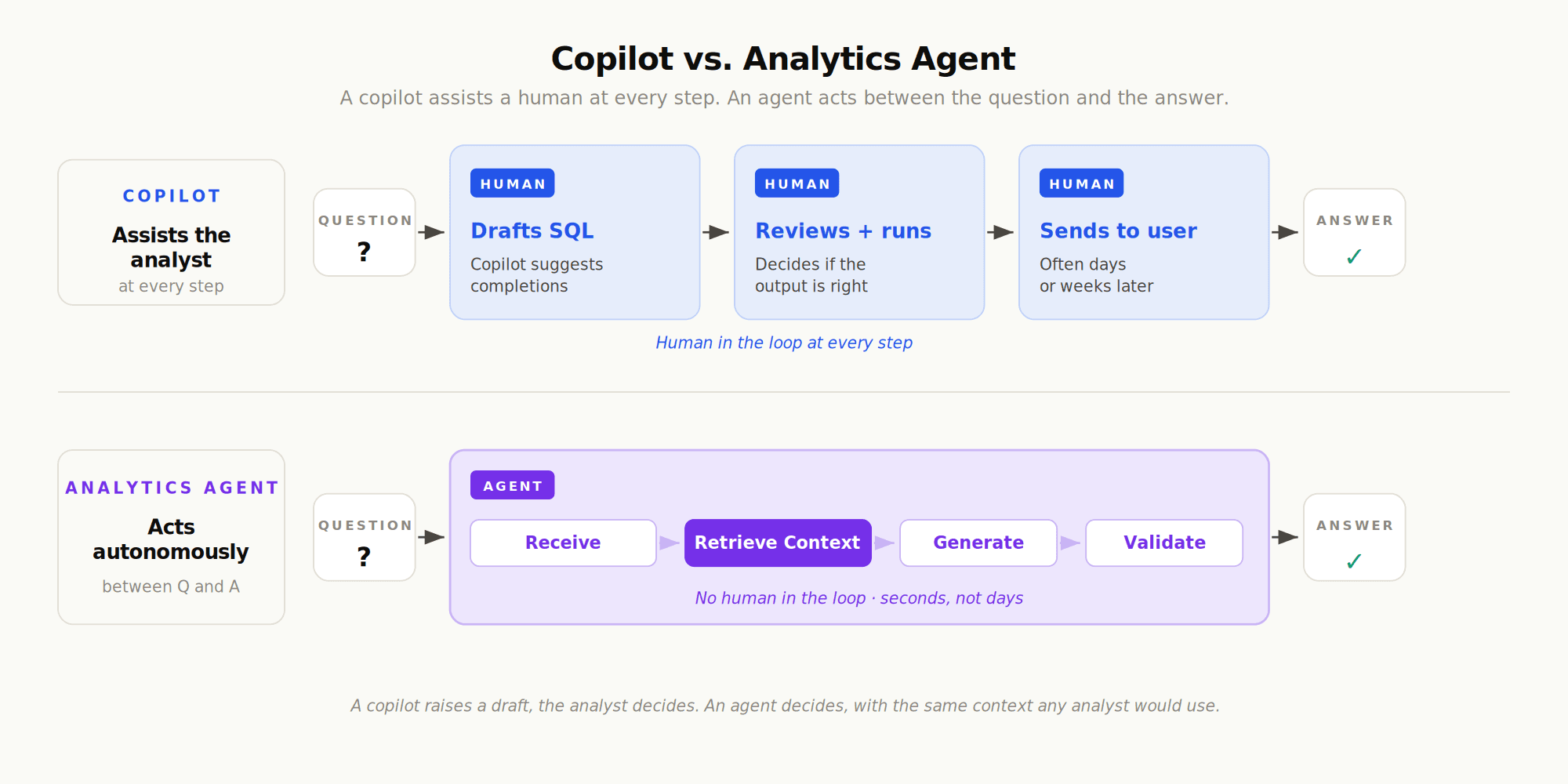
The terms "copilot" and "agent" get used interchangeably, and they shouldn't be. A copilot assists a human who's doing the work. An agent does the work. That distinction sounds small, but it changes everything about how the system is designed, evaluated, and trusted.
A copilot lives inside the analyst's workflow. The analyst is writing SQL in a notebook, the copilot suggests the next clause. The analyst is building a Tableau dashboard, the copilot proposes a chart type. The human is always in the loop, and the copilot's failure mode is "you ignored a suggestion." The cost of a bad suggestion is approximately zero.
An agent operates without the analyst in the loop. The business user asks a question in Slack and the agent answers. There is no human reviewer between the question and the response. The failure mode is "the agent gave a wrong answer that influenced a decision." The cost of a bad answer is whatever bad decision it produced.
Dimension | Copilot | Analytics Agent |
|---|---|---|
Primary user | Data team / analyst | Business stakeholder |
Mode of operation | Assists the human | Acts autonomously |
Output | Suggestions, drafts, completions | Direct answers, charts, analyses |
Trust requirement | Low (human reviews everything) | High (no human in the loop) |
Failure cost | Wasted keystroke | Wrong decision |
Context requirement | Low (human supplies context) | High (agent supplies context) |
Evaluation needed | Optional | Essential |
This is why an agent has to be more conservative, more grounded, and more rigorously evaluated than a copilot. A copilot can guess. An agent cannot. For a deeper breakdown of where each one belongs, see our piece on how copilots and analytics agents differ in practice.
Why Dashboards Can't Keep Up: The Short Half-Life of Data
The case for analytics agents starts with what dashboards can't do. A dashboard is a fixed answer to an anticipated question. Someone, at some point, decided that the business needed to track these specific metrics, sliced these specific ways, with these specific filters. That decision was made before the business ran into the situation that's actually motivating your question today.
Let's be honest, this is the experience most people have with their BI tool. You open the dashboard, see something interesting, want to drill into it differently, and discover the dashboard doesn't support that view. So you ping the analyst. The analyst is already three tickets deep. Two days later you get the cut you needed, by which point the meeting is over and the decision has been made on instinct.
The problem isn't laziness or bad dashboard design. It's structural. Dashboards encode the questions a team thought to ask at the time the dashboard was built. Real business questions don't politely stay inside that frame. As InfoWorld's analysis of time-to-insight puts it, if days are your unit of measure for getting answers from data, you already have a problem. Most organizations are still measuring in days. Some in weeks.
A few patterns that emerge in nearly every data team:
Repeat questions dominate the queue. Analysts consistently report that a large fraction of their requests are variations on the same handful of questions, asked by different stakeholders, often answered by an existing dashboard the requester couldn't find.
Analysts become ticket-takers. Fabi.ai's analysis of ad-hoc analytics found that analysts often spend 70-80% of their time on repetitive requests, leaving little room for the strategic work they were hired for.
Business teams stop asking. When the wait gets long enough, stakeholders stop submitting tickets and start making decisions on gut feel. The data exists; it just isn't accessible at the speed decisions need to happen.
Context loss compounds. As BlazeSQL's review of ad-hoc query tools notes, the "why" behind a question gets lost between the request and the answer, which means the answer often misses what the requester actually needed.
The half-life of a data question is short. If a stakeholder needed an answer to make a decision and got it three days later, the answer arrived after the decision. Whatever value the data could have provided is gone. This is why "fast enough" matters as much as "correct."
Building more dashboards isn't a solution. It's a symptom. Every additional dashboard increases the burden of discovery (now there are more places the answer could live) and rarely reduces the queue (the next question is still off-script). The good news is that this is exactly the problem analytics agents are designed to solve. An agent answers the off-script question, because that's its job description.
The Trust Failure: Why Most AI Analytics Tools Break Down
Here's where the story gets harder. If analytics agents are so clearly useful, why hasn't every organization deployed one? Why do most attempts stall before they reach production?
The honest answer is that trust collapses. A demo of a working analytics agent is genuinely impressive. The agent answers a question in seconds, the chart looks right, the executive nods. Then the team deploys it to actual business users, and within a few weeks the agent has produced enough wrong answers that nobody uses it anymore. MIT's State of AI in Business 2025 report found this pattern at scale: 95% of generative AI pilots delivered no measurable business impact, with the most common failure modes being brittle workflows, lack of contextual learning, and misalignment with day-to-day operations.
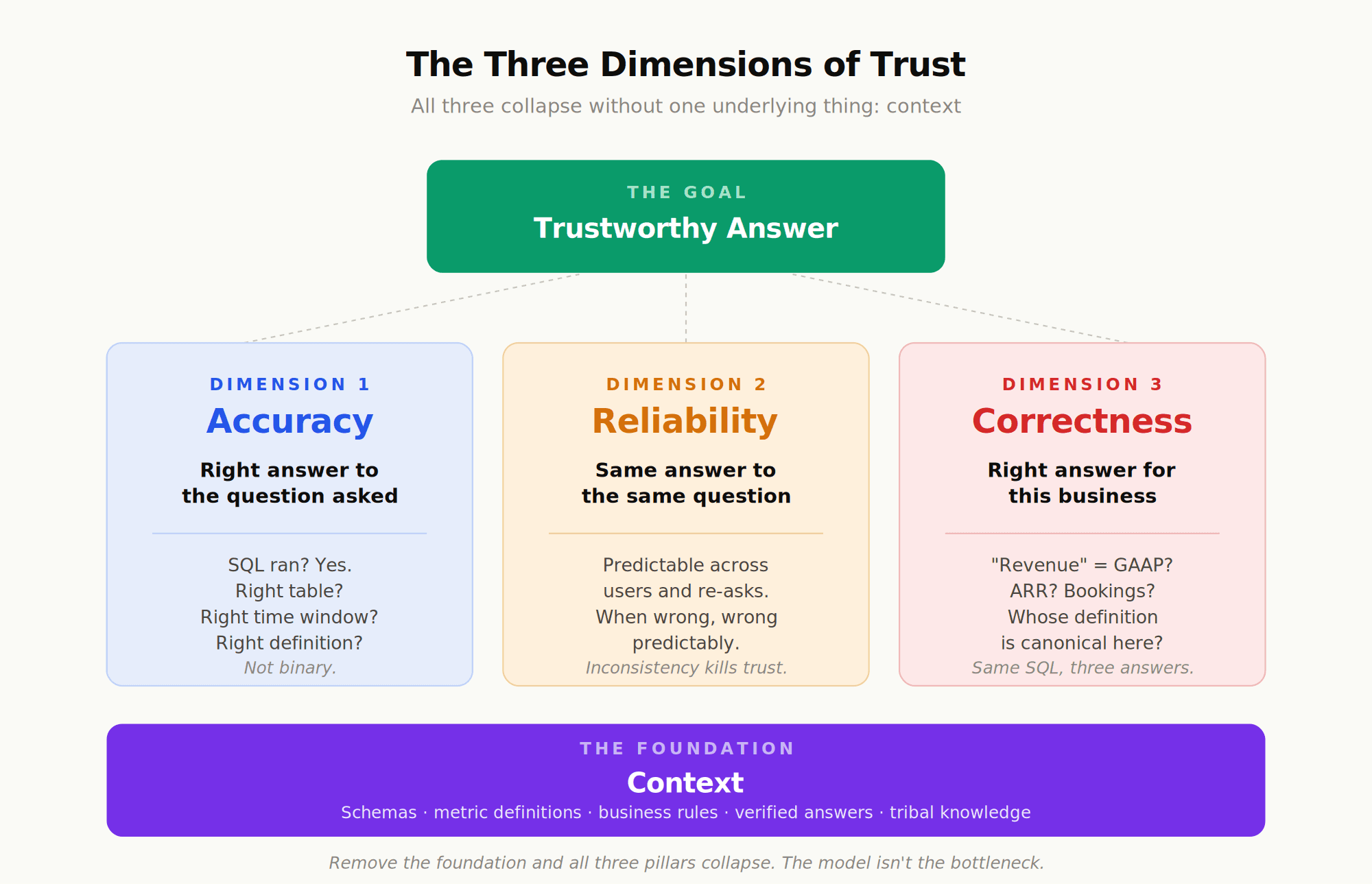
What does "trust collapses" actually mean? It breaks into three dimensions, and an agent needs to get all three right.
Accuracy: Did the Agent Return the Right Answer?
Did the agent return the correct answer to the question that was asked? This is the most obvious dimension and the one most discussions focus on. But accuracy isn't binary. An answer can be technically correct (the SQL ran, the numbers are real) and still wrong (the wrong table was queried, the wrong time window applied, the wrong definition of revenue used).
Reliability: Does the Agent Behave Consistently?
Does the agent give the same answer to the same question, asked twice? Does it behave consistently across users? An agent that's right 90% of the time but wildly inconsistent the other 10% is harder to use than one that's right 80% of the time but predictable about when it fails. Inconsistency makes every answer suspect.
Correctness: Is It the Right Answer for This Business?
Even when the agent's answer is accurate, is it the right answer for this business? "Revenue" at one company means recognized GAAP revenue. At another, it means run-rate ARR. At a third, it means bookings net of churn. The same SQL against the same data produces three different numbers depending on which definition is canonical. Without that context, the agent will pick one and not tell you which.
Why All Three Collapse Without Context
All three dimensions collapse without one underlying thing: context. As a16z's recent piece on the topic puts it, "data agents are essentially useless without the right context. They aren't able to tease apart vague questions, decipher business definitions, and reason across disparate data effectively." It's not a model problem. The models are remarkably good at writing SQL when given the right inputs. The failure is upstream of the model. The agent doesn't know which table is authoritative, which metric definition is current, which filter the finance team always applies, which experiment ID identifies the cohort the marketing team is asking about.
This is the gap that context engineering addresses. Context engineering is the discipline of giving an agent the institutional knowledge it needs to be accurate, reliable, and correct: not just the schema of your tables, but the meaning of your metrics, the trust signals from verified answers, and the tribal knowledge that lives in Slack threads and dbt YAMLs. Done well, it organizes that knowledge into three layers (what data exists, what it means, which answers are validated) so the agent can ground every response.
How an Analytics Agent Actually Works
It helps to walk through what happens inside an analytics agent when a question comes in. The high-level steps are the same loop introduced earlier (receive, retrieve, generate, validate), but the work inside each step is where the engineering happens.
Step 1: Interpret the Question
The agent parses what the user asked. "How did we do last quarter?" is ambiguous in three ways: "how did we do" (revenue? new customers? margin?), "last quarter" (calendar? fiscal?), and "we" (the whole company? a specific business unit the user is responsible for?). A good agent either resolves the ambiguity from context (the user works in the EMEA sales org, so "we" likely means EMEA sales) or asks a clarifying question.
Step 2: Retrieve the Right Context
This is where most agents fail. The agent needs to pull in the schema of the relevant tables, the canonical definition of the metric being asked about, any business rules that apply, and ideally any previously verified answers to similar questions. OpenAI's writeup of their internal data agent describes building this around multiple layers of context, including schema metadata, table lineage, automated extraction of definitions from pipeline code, and institutional knowledge pulled from Slack and Notion. Without this scaffolding, even strong models can produce wrong results, such as vastly misestimating user counts or misinterpreting internal terminology.
Step 3: Generate the Analysis
With context in hand, the agent writes a query (or a sequence of queries) and runs it. This step is the one most early conversations about "AI for data" focused on (text-to-SQL accuracy on benchmarks like BIRD and Spider). It matters, but it's downstream of the context problem. A perfect SQL writer fed bad context still produces wrong answers; a merely-good SQL writer fed good context produces right ones.
Step 4: Validate the Output
The agent checks its work before returning the answer. Does the result match expected magnitudes? Is the row count plausible? Does it agree with previously verified answers to similar questions? Production-ready agents treat this like unit testing: maintain a set of golden questions with known correct answers, and run new queries through sanity checks against that suite.
Step 5: Learn From the Interaction
This step is the one most agents skip and the one that compounds value over time. When a user corrects an answer ("you used the wrong definition of churn"), that correction should feed back into the context layer. The next time someone asks about churn, the agent knows. OpenAI's writeup makes this point explicitly: their agent's memory system retains "non-obvious corrections, filters, and constraints that are critical for data correctness but difficult to infer from the other layers alone."
The first three steps are table stakes. The last two (validation and learning) are what move an agent from impressive demo to dependable infrastructure.
Production-Ready vs. Demo-Ready: What Separates Real Agents from Toys
A working demo of an analytics agent is easy. A working production deployment is hard. The gap is wide enough that the same team can build something that looks great in a sales meeting and then fail to ship it to actual users.
What goes into closing that gap?
Evaluation infrastructure. Production agents are tested against a set of "golden" questions with known correct answers, run continuously, with regressions flagged before they reach users. This is the practice OpenAI describes in their writeup: treat the agent like production code, with continuous testing baked in.
Guardrails that scope behavior. A production agent has rules about what it will and won't answer, which data it can touch, which filters it always applies, what to do when a question is ambiguous. These rules are encoded explicitly, not left to the model's discretion.
Permission-awareness. The agent inherits the data access permissions of the user asking the question. A salesperson asking about deal velocity sees their region's data; the VP sees the global view. Without this, an agent becomes a security problem the day it ships.
Memory that survives across sessions. Corrections stick. If a user explains last week that the new product line uses a different revenue definition, the agent remembers next week.
Multi-surface deployment. Business users don't all live in the same tool. Production agents deploy where the work happens, which usually means Slack, Microsoft Teams, embedded chat widgets, sometimes Cursor or Claude or ChatGPT for power users.
Honest failure modes. When the agent isn't sure, it says so. When the question is outside its scope, it doesn't fabricate an answer. As an industry analysis of OpenAI's agent put it, the goal isn't perfection, it's fewer bad decisions, faster, with clearer accountability.
Production-ready beats POC-ready, every time. A demo that works in a controlled setting tells you almost nothing about how the agent will perform with messy real-world questions from non-technical users. The 95% pilot failure rate isn't a model failure. It's a context, evaluation, and operational maturity failure.
The teams that ship analytics agents successfully tend to spend most of their effort on the infrastructure around the model, not the model itself. Encoding institutional knowledge, building evaluation suites, designing guardrails, instrumenting for observability. The model is a commodity. The context and operational scaffolding are the product.
Where Analytics Agents Fit in Your Data Stack
The last practical question worth answering: where does an analytics agent live, architecturally? It sits above your data warehouse and your semantic layer (if you have one), and below the surfaces where your users actually ask questions.
Concretely:
Below the agent: Your warehouse (Snowflake, Databricks, BigQuery, Redshift), your transformation layer (typically dbt), your semantic layer (dbt MetricFlow, Cube, LookML, or no formal semantic layer yet, which is more common than the industry likes to admit).
At the agent: The context layer, the agent runtime, the evaluation harness, the memory system, the guardrails. This is where the agent "lives."
Above the agent: The surfaces where users interact with it. Slack and Microsoft Teams for chat-based questions. Embedded chat widgets inside your product if you're shipping customer-facing analytics. ChatGPT, Claude, Cursor, or MCP-compatible tools for power users who already work in those environments. A web interface for everyone else.
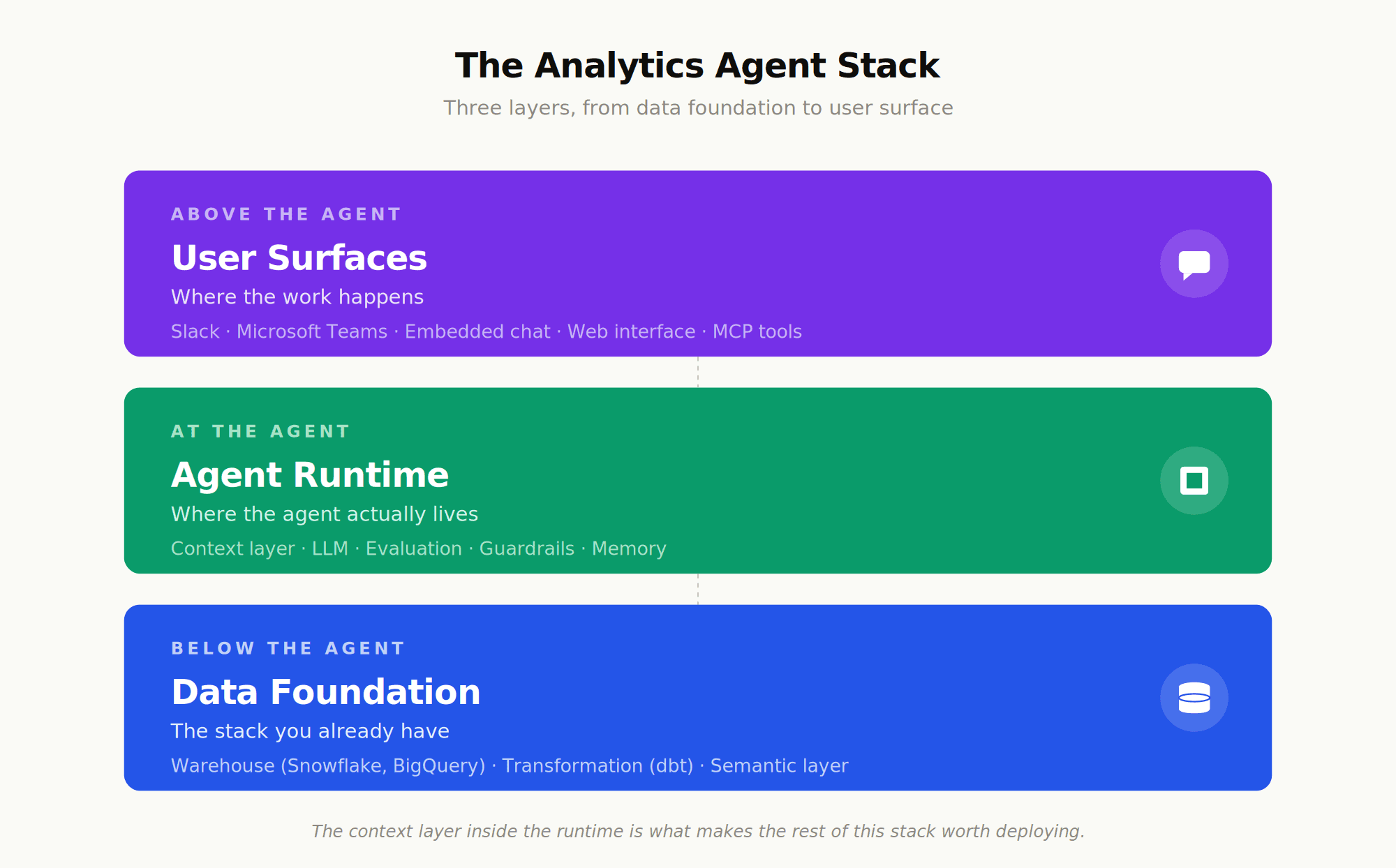
This layered architecture is important because it explains why an analytics agent isn't a feature inside an existing BI tool. The agent needs to span multiple surfaces (it isn't owned by Tableau or Looker), it needs to operate at the metric definition level (not the chart level), and it needs to be model-agnostic enough that the same agent can use different LLMs as they evolve. Building it as a feature of an existing dashboard product locks all of those choices in the wrong place.
Where to Go Next
If you're starting to evaluate whether an analytics agent makes sense for your team, two reads are worth your time. For the broader category and how analytics agents fit into the shift from dashboards to agents, see our full guide to agentic analytics. For a practical look at how to evaluate the platforms that build and deploy these agents, what to look for in context infrastructure, evaluation tooling, and deployment surfaces, see our guide to analytics agent platforms.
Frequently Asked Questions
What is an analytics agent?
An analytics agent is an AI system that autonomously receives a natural-language question, retrieves relevant business context, generates an analysis (usually by writing and running SQL), and validates the output before returning an answer. Unlike a chatbot, it's grounded in your specific data and business definitions. Unlike a copilot, it operates without a human in the loop.
How is an analytics agent different from a BI tool like Tableau or Looker?
Traditional BI tools display pre-built charts and dashboards that someone constructed in advance. They're great at showing anticipated questions and limited at answering off-script ones. An analytics agent is conversational and dynamic. It produces the analysis on demand, in response to whatever question the user asks, including ones nobody pre-built for. Most organizations end up using both: dashboards for the standard view, agents for the follow-up questions.
Do I need a semantic layer to use an analytics agent?
A well-maintained semantic layer helps a lot, because it gives the agent canonical metric definitions to ground its answers in. But it isn't always required. Some modern agent platforms construct or augment context on top of warehouses that don't have a formal semantic layer. As a16z's analysis notes, a modern context layer is "a superset of what a semantic layer would traditionally cover," so the requirement is the context, not the specific tool name.
How accurate are analytics agents today?
Accuracy varies widely by implementation. On standardized benchmarks like BIRD-SQL, even top systems plateau well short of 100%. In production, the gap between accurate-looking and actually-reliable is even wider, because accuracy depends on the agent having correct business context, not just correct SQL. The most rigorous teams measure their agents against a curated set of "golden" questions with known answers and treat regressions like production bugs.
What's the difference between an analytics agent and an AI copilot for data?
A copilot assists a human who is doing the analytical work, by suggesting queries, completing code, or recommending visualizations. The human remains in the loop and reviews everything. An analytics agent acts autonomously. The end user, who may not be a data professional, gets the answer directly. Copilots are common inside data teams; agents are aimed at the much larger population of business stakeholders who don't write SQL.
Why do most AI analytics projects fail to reach production?
The dominant failure mode is a lack of context, not a lack of model capability. Without canonical metric definitions, business rules, and validated answers to ground it, even a strong model produces inconsistent results that users stop trusting. MIT's 2025 research found that 95% of generative AI pilots fail to deliver business impact, with brittle workflows and lack of contextual learning identified as the most common causes. The teams that ship successfully invest heavily in context infrastructure, evaluation, and operational maturity.

Try Upsolve for Embedded Dashboards & AI Insights
Embed dashboards and AI insights directly into your product, with no heavy engineering required.
Fast setup
Built for SaaS products
30‑day free trial





