
ThoughtSpot Spotter up close: capabilities, Analyst Studio, cost, and how much modeling work it takes to get accurate answers.

Ka Ling Wu
Co-Founder & CEO, Upsolve AI
10 min

Disclosure: This article is published by Upsolve AI. Where our product is mentioned alongside competitors, we aim to provide balanced coverage based on publicly available information. We encourage readers to evaluate all options independently.
ThoughtSpot Spotter is an AI analyst that lets business users ask questions of their data in plain language and get governed, explainable answers back. It sits on top of ThoughtSpot's search-driven analytics platform, translating natural language into the company's proprietary search tokens rather than generating raw SQL directly, and it is the centerpiece of ThoughtSpot's push into agentic analytics.
This review covers what Spotter is, how it works, where it is genuinely strong, and what a data leader should check before committing. The goal is a useful assessment whether or not you ever look at another vendor.
Key Takeaways |
|---|
|
What Is ThoughtSpot Spotter?
Spotter is ThoughtSpot's conversational AI analyst, launched in November 2024 as what the company called an agentic AI analyst for the autonomous business. In practice, it is the interface a business user talks to: you type a question like "number of claims per city" or "what is my churn by age group," and Spotter returns an answer, a visualization, and a trail you can inspect.
According to ThoughtSpot's launch announcement, Spotter was designed to bring the reasoning skills of a data analyst to every user, with row-level security and role-based access control built in and support for leading models including OpenAI's GPT family and Google Gemini.
The important thing to understand is that Spotter is not a standalone product you drop onto any warehouse. It is one layer of the broader ThoughtSpot platform, and it depends on the semantic model, governance, and search engine underneath it.
That coupling is the source of both its strengths and its constraints, and it runs through the rest of this review.
How Spotter Works: Search Tokens Instead of Raw SQL
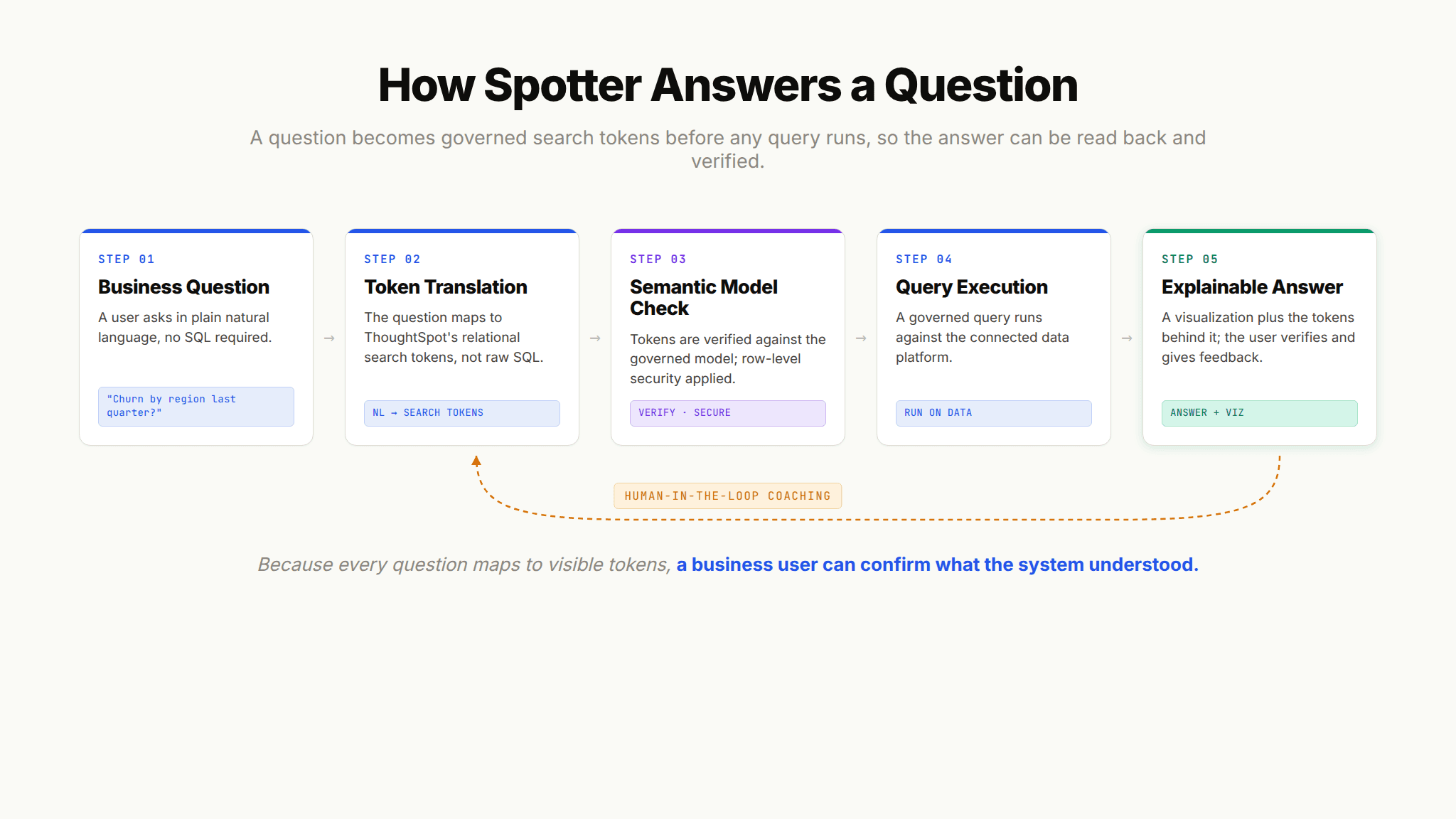
Most natural language query tools try to have a language model write SQL directly. ThoughtSpot took a different path. As described in the company's introduction to Spotter, when you ask a question, Spotter translates it into ThoughtSpot search tokens, a taxonomy derived from your data by the platform's relational search engine, and then verifies that question against the semantic model before executing it.
ThoughtSpot's framing is that language models are better at translation than at SQL generation, so routing through tokens sidesteps a class of text-to-SQL errors.
This design has a practical consequence that matters for trust. Because every question maps to visible search tokens, a business user can read back what the system understood and confirm it, rather than needing to read SQL.
That verification step, plus human-in-the-loop feedback that lets analysts coach the system on company vocabulary, is central to how ThoughtSpot positions Spotter as explainable rather than a black box.
Spotter, SpotterModel, SpotterViz, and SpotterCode
Spotter is no longer a single feature. ThoughtSpot has expanded it into a family of agents, and the ThoughtSpot agents page lays out the current lineup. Spotter is the core reasoning engine that answers questions and checks its own work. SpotterModel turns raw data into governed semantic models with human review. SpotterViz builds dashboards and visual stories. SpotterCode brings AI-assisted embedding and code generation into the developer workflow. The company's latest release, Spotter 3, adds Python coding and forecasting and can reason across structured and unstructured data.
ThoughtSpot has also shipped an MCP server, which lets you surface Spotter's capabilities inside custom agents, other LLMs, and tools like Slack, Salesforce, and ServiceNow. For teams that want analytics to appear where employees already work, that distribution story is a real asset.

Analyst Studio: Where the Context Gets Built
If Spotter is the consumer-facing side, Analyst Studio is the workshop behind it. According to ThoughtSpot's automated analytics product page, Analyst Studio gives data analysts and engineers code-first tools (SQL, Python, and R) to take messy enterprise data and shape it into an AI-ready foundation, with an AI Assist feature to speed up SQL writing. This is where schemas get optimized, table relationships get defined, and synonyms get layered on so the system recognizes intent accurately.
Analyst Studio is what makes Spotter's answers reliable, and it is also where the labor lives. The quality of a Spotter deployment is a direct function of how well the underlying model is built and maintained. That is not a criticism unique to ThoughtSpot; every serious analytics agent depends on encoded context.
It does mean that evaluating Spotter means evaluating the modeling work Analyst Studio requires, not just the chat experience on top.

Where Spotter Is Strong
A fair review has to give ThoughtSpot credit where it has genuinely earned it. Several of Spotter's strengths come from years of platform maturity, and they are hard for newer entrants to match quickly.
Search-First UX That Business Users Actually Use
ThoughtSpot pioneered search-driven analytics long before the current agent wave, and that heritage shows in the interface. Asking a question feels like using a search bar, and follow-ups work conversationally: after asking for claims per city, you can say "just the top five" and Spotter carries the context forward. For business users who never learned SQL and never will, this is a low-friction way to get to an answer, which is the whole point of self-service analytics.
Mature Embedded Analytics and Liveboards
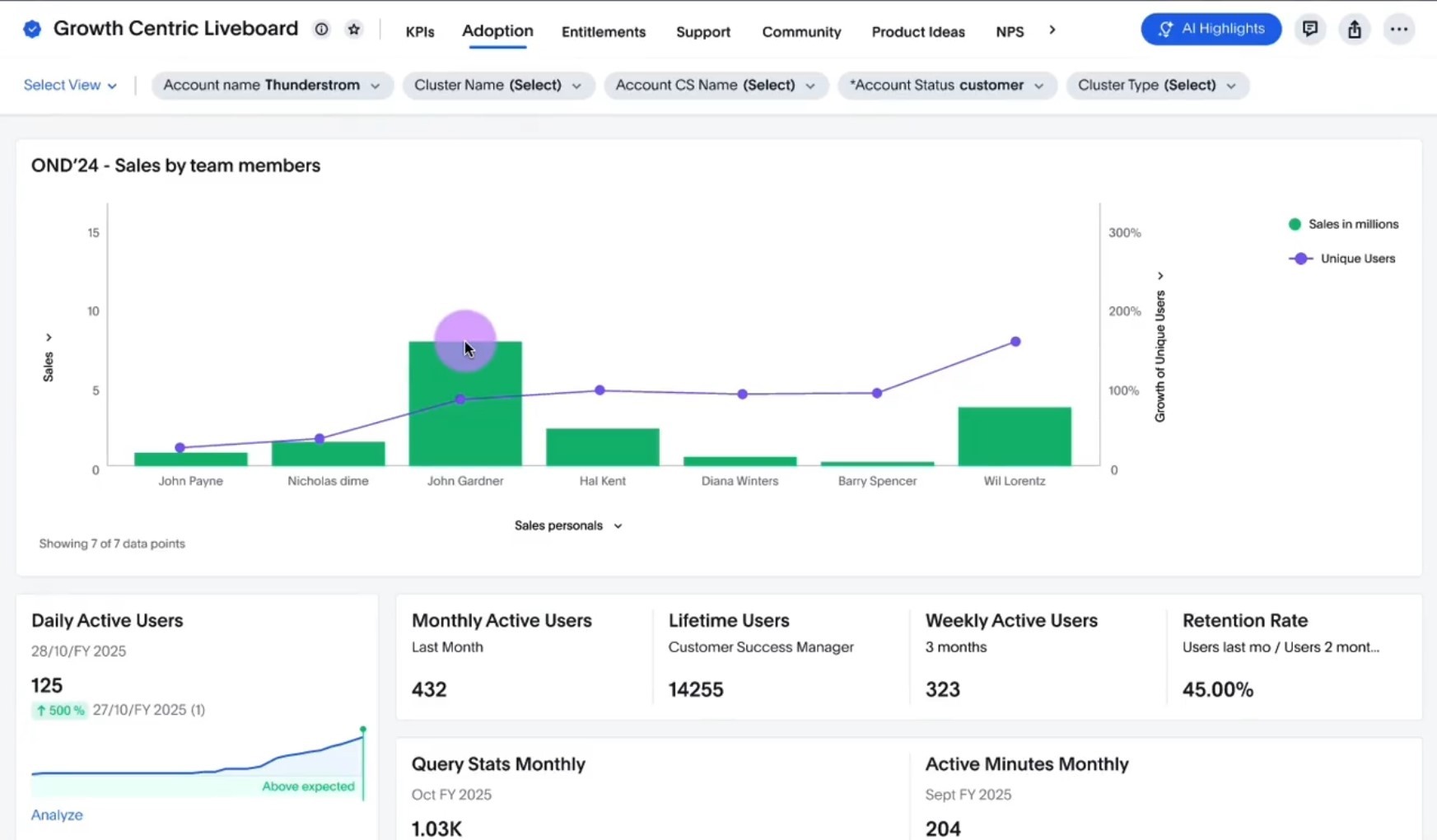
ThoughtSpot treats embedding as a first-class capability rather than an afterthought. Spotter is available through the platform's web API and SDK, and it can be embedded into custom applications and customer-facing products. Liveboards, ThoughtSpot's interactive dashboards, let users click into any visual and ask Spotter follow-up questions directly from a KPI, pulling the context of that analysis into the conversation. For product teams that need analytics inside their own software, this is a well-developed path.
Enterprise Governance and Human-in-the-Loop Trust
Governance is where ThoughtSpot's enterprise focus pays off. Spotter enforces row-level security and role-based access control, and the AI services it uses do not retain data for model training.
The human-in-the-loop system is more than a checkbox: every natural language question maps to search tokens that are stored for analysts and administrators to review, and users can submit training feedback in plain language.
For regulated industries and large organizations that need an audit trail on how an answer was produced, this is a meaningful capability.
What to Check Before You Commit to Spotter
Spotter's strengths are real, and so are the trade-offs. None of these are reasons to rule it out; they are the questions that separate a good fit from an expensive mismatch. Walk through each before you sign.
Context Is Bound to a Proprietary Semantic Model
The single most important thing to understand about Spotter is that its intelligence about your business lives inside ThoughtSpot's own semantic model.
The synonyms, relationships, business terms, and definitions you encode in Analyst Studio make Spotter accurate, but they are expressed in ThoughtSpot's format and are tied to ThoughtSpot's platform.
ThoughtSpot does let you import a dbt archive or connect to dbt Cloud, which softens the lock-in somewhat, but the working context that drives day-to-day accuracy is curated inside the tool.
There is a second edge to this. Spotter's answers are bounded by what has been explicitly defined in the model. It is strong on the questions you anticipated and modeled for, and weaker on the ones you did not, because a concept the model does not know about is a concept Spotter cannot reason over reliably.
That places a premium on thorough, well-maintained modeling, and it means coverage grows only as fast as your team encodes it.
This matters because that context is some of your most valuable institutional knowledge. If it can only be consumed by one vendor's engine, you have limited ability to reuse it across other agents, other surfaces, or a future platform decision.
Portability of the Meaning and Trust layers is a strategic question, and it is worth reading up on the context limits of a proprietary semantic layer before you concentrate all of that knowledge in one place.
The Setup Burden Is Real
Spotter is powerful, and getting there takes work. Independent testing (more on that below) describes ThoughtSpot as long to set up, with a modeling process that requires putting tables on a canvas, defining joins between them, and selecting columns, table set by table set. You cannot even save a data connection without building a data model on top of it. For organizations with clean, well-governed data and dedicated analytics engineers, this is a manageable investment. For teams hoping to point a tool at a warehouse and start asking questions in an afternoon, the ramp is steeper than the marketing suggests.
Cost Climbs Fast Beyond the Entry Tier
ThoughtSpot publishes its list pricing, and it splits into two products: ThoughtSpot Analytics for internal BI and ThoughtSpot Embedded for customer-facing analytics, so embedding is a separate purchase from internal use. Within Analytics, the ThoughtSpot pricing page lays out three tiers.
Essentials starts as low as $25 per user per month billed annually, covering 5 to 50 users and up to 25 million rows, with interactive dashboards and actionable insights but without the Spotter agent. Pro starts as low as $50 per user per month billed annually, offers a usage-based billing option alongside per-user pricing, adds the Spotter AI Agent, and scales from 25 to 1,000 users and up to 250 million rows. Enterprise is custom-quoted for unlimited users and unlimited data.
Two details matter for budgeting. First, Spotter is metered: the published Pro and Enterprise plans both list the Spotter AI Agent at 25 queries per user per month, so teams that rely on the AI analyst heavily will run into that ceiling and need the usage-based option or negotiated Enterprise terms.
Second, Enterprise is negotiated rather than listed, and for a platform aimed at large organizations that generally means the real figure lands well above the per-seat tiers once data volume, user count, security requirements, and implementation are added in.
Budget for the platform, the implementation, and the ongoing modeling labor together, not just the entry sticker price.

Fit Weakens at Mid-Market
ThoughtSpot is built for scale, and its economics and implementation model reflect that. Minimum contracts, professional services, and the modeling effort required to get Spotter accurate all favor larger organizations with data teams and budgets to match. Smaller and mid-market companies often find the total cost of ownership hard to justify against lighter-weight alternatives, and the setup complexity can outweigh the payoff when the user base is modest. This is a positioning reality, not a flaw, but it should shape your expectations if you are under a few hundred users.
Customization Has Limits
Because so much of the experience is governed by ThoughtSpot's model and platform conventions, teams that want deep control over behavior, branding, or bespoke agent logic can run into ceilings. The trade-off ThoughtSpot makes, consistency and governance in exchange for flexibility, is defensible and often correct for large enterprises. Just confirm that the specific customizations your use case needs are supported before you assume they are.
Spotter and the Three-Layer Context Architecture
A useful way to evaluate any analytics agent is to map it against the three layers of context every agent needs to be reliable: Structure (what data exists and how it connects), Meaning (what the data means at your specific company), and Trust (which answers have been validated). This framework is not ThoughtSpot's; it is a lens, and Spotter maps onto it revealingly.
On Structure, ThoughtSpot is strong. Its relational search engine, semantic model, and Analyst Studio give it a solid grasp of schemas, relationships, and lineage. On Meaning, it is also capable: business terms, synonyms, and metric definitions are exactly what the model is designed to capture, and the human-in-the-loop coaching feeds that layer well. On Trust, the search-token verification, feedback storage, and governance controls give it a real mechanism for validated answers.
The nuance is not whether Spotter addresses the three layers, but where that context can live. All three layers are encoded in ThoughtSpot's proprietary model. That is what makes the platform coherent, and it is also what makes the context non-portable.
If your strategy assumes agents will proliferate across many surfaces and tools over the next few years, concentrating your Meaning and Trust context inside a single vendor's engine is a decision to make deliberately, not by default.
This is the deeper point that the broader industry has converged on, captured in a16z's argument that data agents are essentially useless without the right context: context is the bottleneck, and where you build it determines how far it travels.

How Spotter Shows Up in Independent Testing
Vendor claims are one thing; outside evaluation is another. Data leader Claire Gouze added ThoughtSpot to her expanded benchmark of analytics agents, and her write-up of twenty-one analytics agents tested on real data is worth reading in full. Her assessment of ThoughtSpot lines up closely with the trade-offs above: she found it very powerful but also painful and slow to set up, with significant vendor lock-in. Her specific note was that you cannot save a data connection without creating a data model on top of it, and that modeling means placing every table on a canvas and defining joins by hand, one model per set of tables.
She also noted the ability to import dbt context and add business terms, calling the context capability promising but heavy on setup inside the tool.
That independent read is consistent with ThoughtSpot's own positioning. The platform trades ease of onboarding for governance, transparency, and depth. Whether that is the right trade depends entirely on your organization's resources and priorities.
Spotter Compared to a Context-First Approach
For completeness, and with the disclosure above in mind, it is worth naming where our own product sits relative to Spotter, because the contrast illustrates a genuine architectural choice rather than a feature race.
ThoughtSpot builds context inside a proprietary semantic model that powers a mature, governed, search-first experience. Upsolve AI is a context infrastructure platform for analytics agents, built around the three-layer architecture, where the emphasis is on encoding institutional knowledge in a way that does not require a pre-existing semantic model to get started and is not bound to a single consumption surface.
ThoughtSpot's strength is platform depth and enterprise governance for organizations that standardize on it.
The context-first approach prioritizes portability and speed to a production-ready deployment across both internal and customer-facing use. Neither is universally correct. If you already run ThoughtSpot at scale and value its governance, Spotter is a natural extension. If you are wary of concentrating your institutional knowledge in one vendor's model, that is the specific trade-off to weigh.
Readers evaluating the category can compare agent builder platforms for analytics against their own requirements.
Is ThoughtSpot Spotter Right for Your Team?
Spotter is a serious, mature product, and this review should not read as anything less. Its search-token architecture gives it explainability that many text-to-SQL tools lack, its governance and embedding capabilities are enterprise-grade, and its search-first UX genuinely lowers the barrier for business users. Those are earned strengths.
The verdict comes down to fit. If you are a large, well-resourced organization that can invest in modeling, standardize on ThoughtSpot, and values governance over flexibility, Spotter is one of the strongest options in the agentic analytics space, and independent testing supports that. If you are leaner, want to stay warehouse-agnostic, or see your encoded context as strategic infrastructure that should travel across tools and surfaces, look hard at the setup burden, the cost curve, and the portability constraints before you commit.
The right question is not whether Spotter is good. It is whether ThoughtSpot's proprietary, governed model is where you want your institutional knowledge to live for the next several years. Answer that, and the decision follows. For the underlying concepts, it helps to understand how semantic layers work before you evaluate any agent that depends on one.
Frequently Asked Questions
What is ThoughtSpot Spotter?
Spotter is ThoughtSpot's AI analyst, a conversational agent that lets users ask questions of their data in natural language and get governed, explainable answers back. It runs on top of ThoughtSpot's search-driven analytics platform and translates questions into the platform's search tokens rather than generating SQL directly, which is what allows business users to verify results without reading code.
How is Spotter different from a text-to-SQL tool?
Most text-to-SQL tools ask a language model to write SQL from a question, which can fail silently when the model misunderstands business definitions. Spotter instead translates questions into ThoughtSpot search tokens and checks them against a governed semantic model before running anything. The practical difference is transparency: users can read the tokens to confirm the system understood their question, and analysts can coach it over time.
How much does ThoughtSpot Spotter cost?
Spotter is bundled into ThoughtSpot's paid tiers rather than priced on its own. On ThoughtSpot's published plans, Essentials starts as low as $25 per user per month billed annually but does not include the agent, Pro starts as low as $50 per user per month and adds the Spotter AI Agent (metered at 25 queries per user per month), and Enterprise is custom-quoted with unlimited users and data. Because Enterprise is negotiated and aimed at large organizations, plan for a total well above the per-seat tiers once data volume, users, and implementation are included.
Does Spotter work with any data warehouse?
Spotter connects to major cloud data platforms and supports leading language models, but it requires building a data model inside ThoughtSpot before it can answer questions, and its working context lives in ThoughtSpot's proprietary semantic model. You can import dbt context, but the day-to-day accuracy depends on modeling done inside the platform, so it is best thought of as warehouse-connected rather than fully warehouse-agnostic.
Is ThoughtSpot Spotter a good fit for mid-market companies?
It can be, but the economics and setup effort favor larger organizations. Minimum contracts, professional services, and the modeling work required to reach reliable accuracy tend to suit enterprises with dedicated data teams. Mid-market companies should compare the total cost of ownership and implementation timeline against lighter-weight alternatives before committing.
Where does Spotter fit in agentic analytics?
Spotter is one of the more mature agentic analytics offerings, with strong coverage of the Structure, Meaning, and Trust layers of context that any reliable agent needs. Its main constraint is that all of that context is encoded inside ThoughtSpot's proprietary model, which limits how portable your institutional knowledge is across other agents and surfaces. That trade-off, depth and governance versus portability, is the central thing to evaluate.

Try Upsolve for Embedded Dashboards & AI Insights
Embed dashboards and AI insights directly into your product, with no heavy engineering required.
Fast setup
Built for SaaS products
30‑day free trial