
Customer or User Facing Analytics: Why You Shouldn't Be Building?
Thinking about building user facing analytics for your SaaS product? I totally get it. Adding customer-facing analytics sounds like a great idea, and it feels like the next big step to impress your users. But what if I told you that this path might lead to unexpected problems, big expenses, and lots of wasted time?

Ka Ling Wu
Co-Founder & CEO, Upsolve AI
Nov 14, 2025
10 min

Thinking about building user facing analytics for your SaaS product?
I totally get it. Adding customer-facing analytics sounds like a great idea, and it feels like the next big step to impress your users.
But what if I told you that this path might lead to unexpected problems, big expenses, and lots of wasted time?

In this blog, I'm going to share why building user-facing analytics yourself might not be the best move.
I'll show you the hidden challenges, the pitfalls others have faced, and better ways to give your users the insights they want.
Here's what's waiting for you inside:
What user-facing analytics actually means and why it’s different.
Why building it yourself can be harder and more expensive than you think.
How third-party tools can make your life easier and save money.
Tips to help you pick the best customer-facing analytics platform.
By the end, you'll know the smart way to give your users the necessary analytics without the headaches.
What is Customer Facing Analytics?
Customer facing analytics are data insights you share directly with your customers through your product or service.
Instead of keeping all the data analysis within your company, you let your users see relevant information that helps them understand and use your platform better.
For example, if you have a fitness app, you might show users their workout statistics, progress charts, and health metrics right inside the app.
Related Read: Customer Facing Analytics vs Customer Analytics
Customer Facing Analytics Features and Benefits
Customer-facing analytics offers more than just showing data. It helps you to engage customers, personalize their experience, and open up revenue opportunities.
Here’s a breakdown of the major benefits and how they add value:
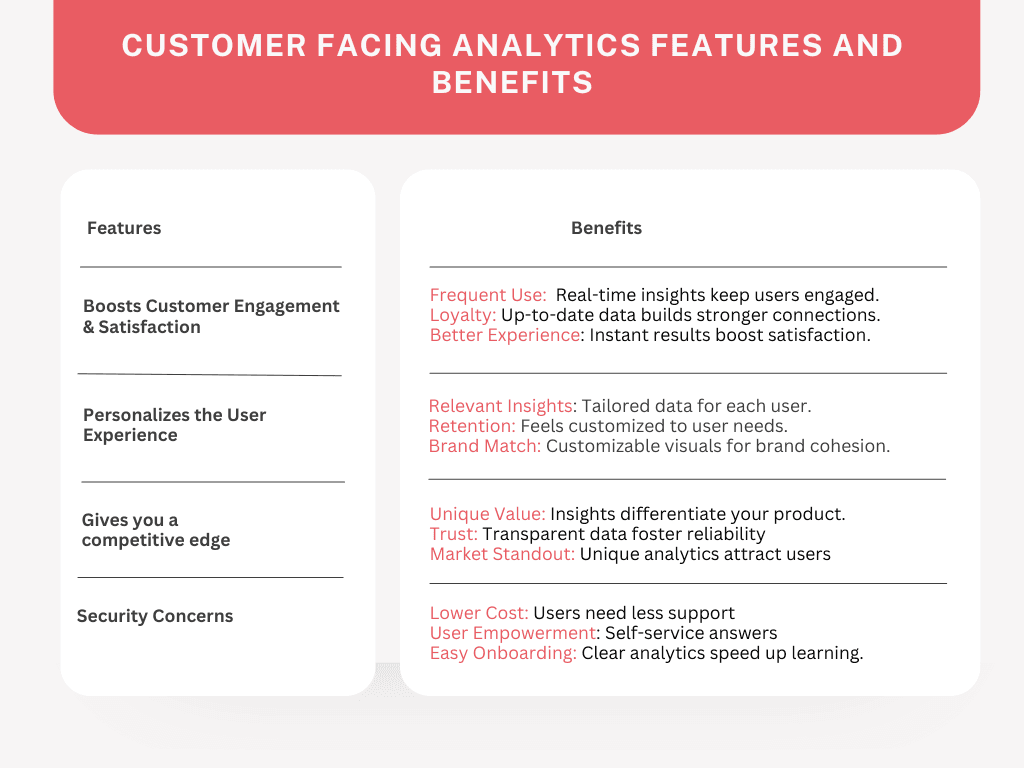
Using user-facing analytics smartly enhances customer engagement, strengthens loyalty, and creates new revenue opportunities, making it a strong strategy for driving growth.
Customer-Facing Analytics Examples
Let’s look at customer-facing analytics—how businesses use data to create amazing experiences for you.
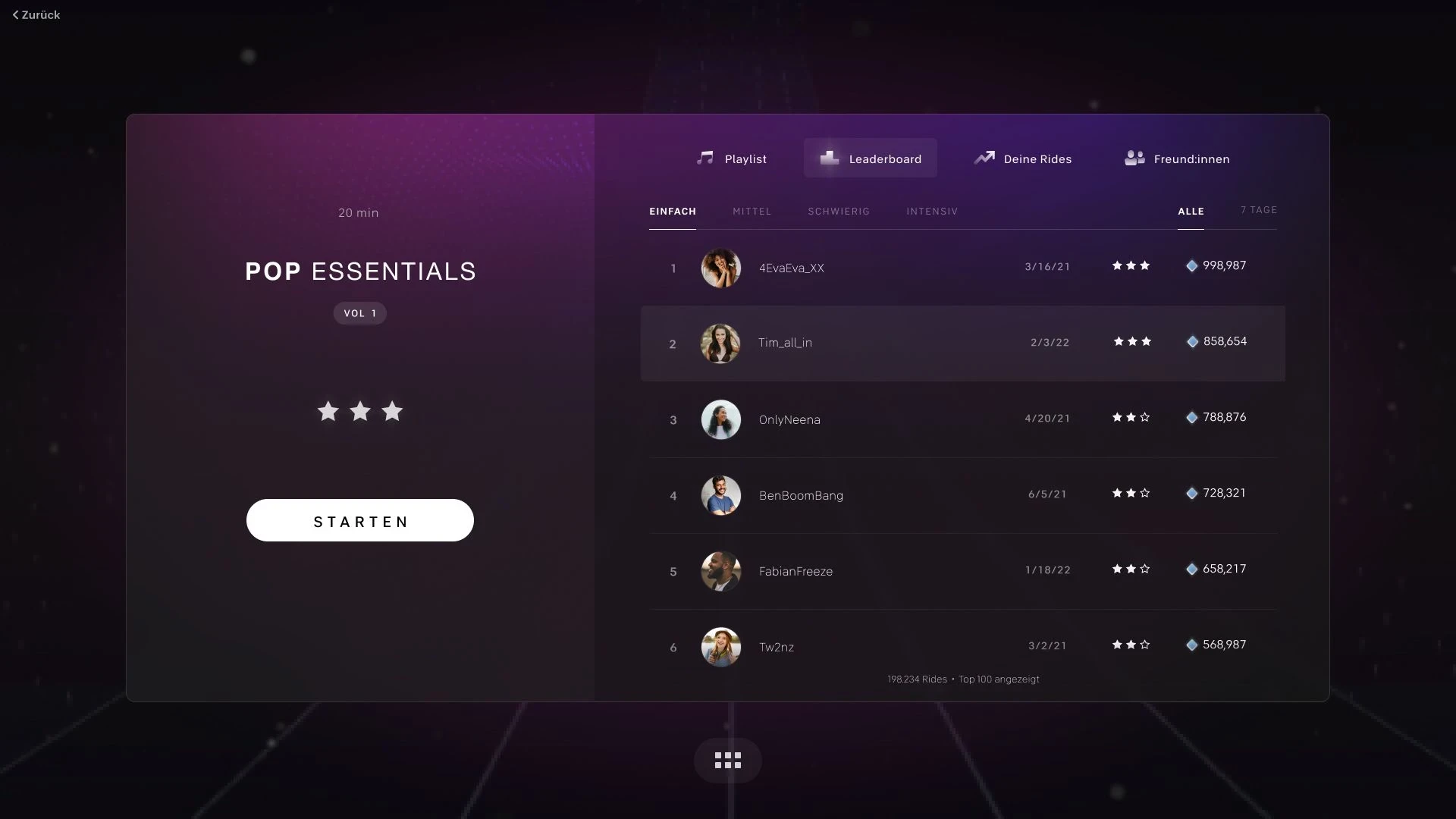
Peloton Leaderboards
Peloton turns workouts into a game. Their leaderboard shows who’s ahead and motivates you to pedal faster.
Fitness Tracker Weekly Summaries
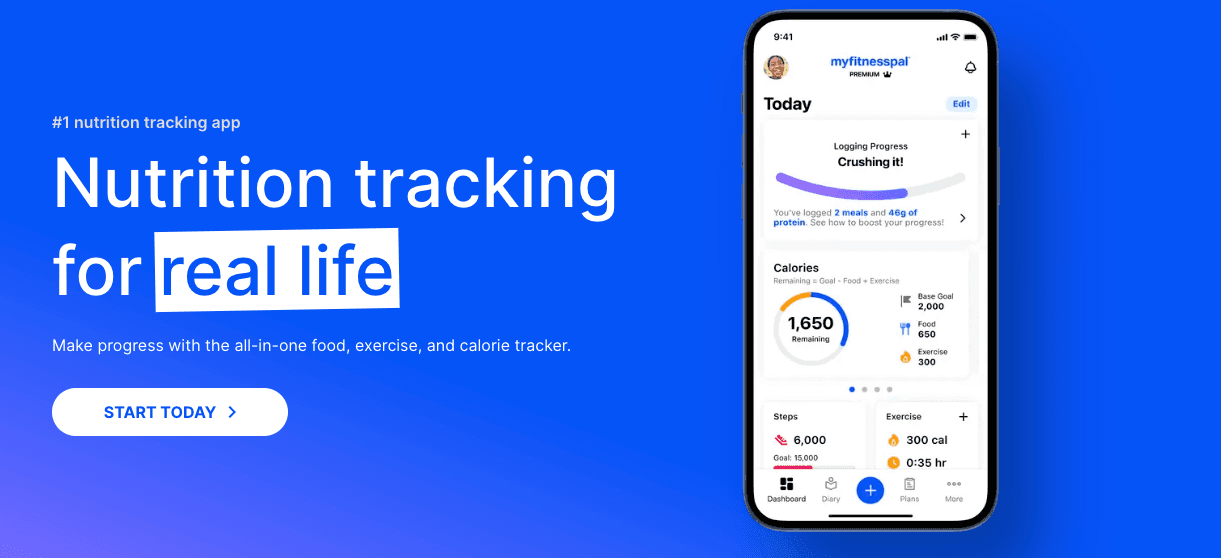
Your fitness tracker doesn’t just count steps; it gives weekly summaries of your activity. “You’ve burned enough calories for three pizzas!” That’s analytics keeping you motivated (and hungry).
Duolingo Streaks and Rewards

Learning languages is tough, but Duolingo makes it fun. It tracks your progress, rewards your streaks, and cheers you on.
How Does It Differ from Internal Analytics or Business Intelligence Tools?
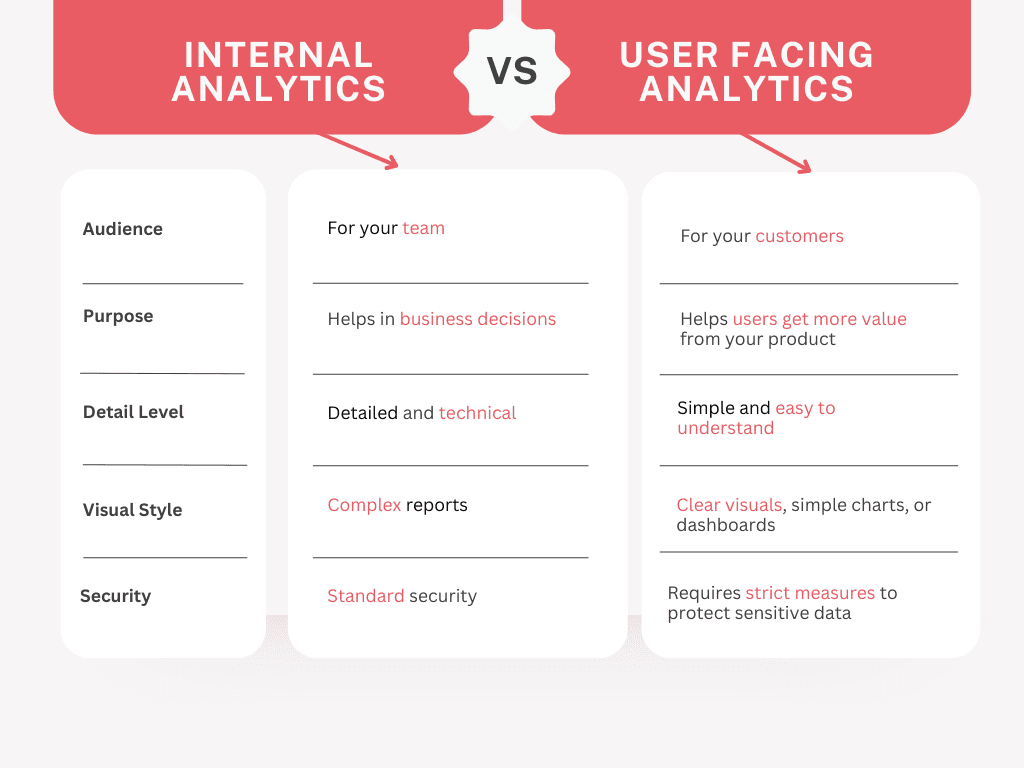
User-facing analytics are different from internal analytics in a few key ways:
Related Read: 10 Best Business Intelligence Dashboards
Why is Customer Facing Analytics Necessary for Modern SaaS Businesses?
Because they play a crucial role in enhancing the customer experience:
By providing insights, you help users make informed decisions.
Interactive analytics keep users engaged with your product.
Offering analytics can make your product more valuable compared to competitors.
Transparency through shared data builds trust with your customers.
Customer Facing Analytics vs Traditional Business Analytics
Before we highlight making a difference between "How are customer-facing analytics different from the traditional analytics we use internally?" let me simply tell you what they are.
Customer-facing analytics are insights and data that you share directly with your customers through your product or service. This helps them understand their own activities, progress, or any relevant information that adds value to their experience.
For example, if you run a project management tool, showing users their project timelines and task completions is customer-facing analytics.

Traditional Business Analytics, on the other hand, are the insights your company uses internally to make informed decisions. This data helps you understand market trends, sales performance, operational efficiency, and more.
Below is the table for you to get a better understanding of how customer-facing analytics differ from traditional business analytics:
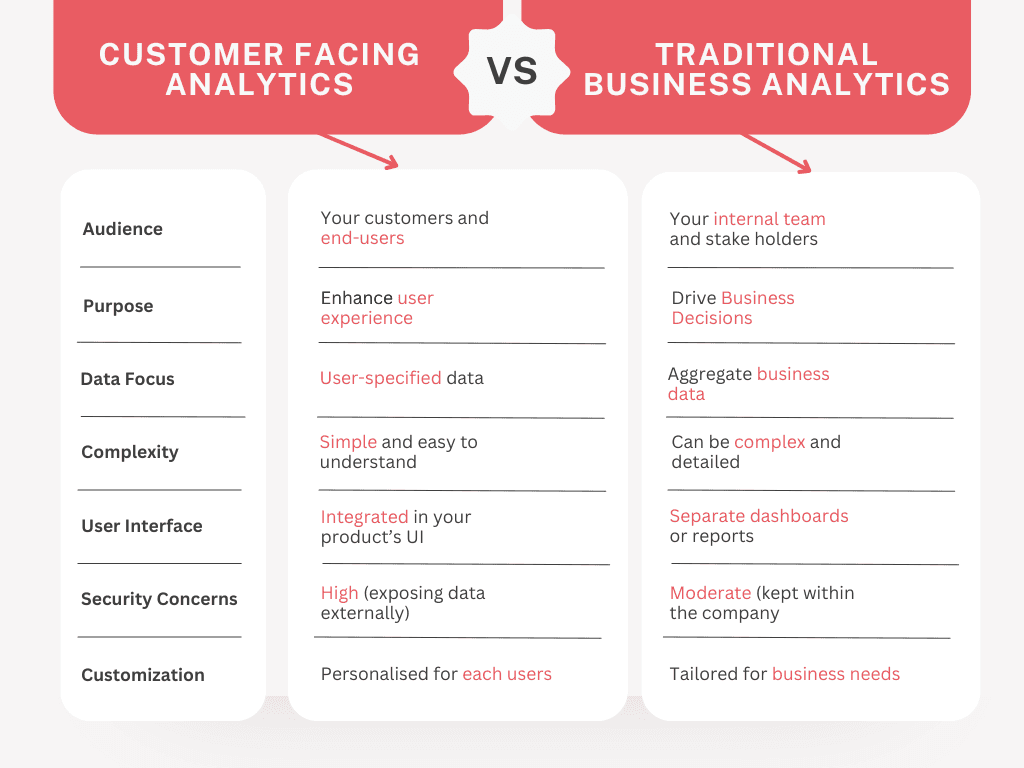
Related Read: Customer Facing Analytics Vs Traditional Business Analytics Detailed Comparison
Challenges of Building User Facing Analytics In-House
Building your own user-facing analytics system might seem appealing, but it comes with significant challenges. Here’s what you might encounter:
Technical Challenges
Data Integration: Combining data from different sources can be complicated, requiring careful planning to ensure seamless operation.
Real-Time Updates: Users expect real-time data, so you’ll need an efficient system for instant updates without slowing down performance — a complex and resource-intensive task.
Scalability Issues
Handling High Traffic: A scalable solution is essential, as you potentially serve thousands of customers, not just a small team.
Maintaining Speed: As user numbers grow, you’ll need to ensure that loading times remain fast and the system doesn’t slow down, preserving a smooth experience for everyone.
Ongoing Costs and Maintenance
High Maintenance Costs: Beyond the initial build, there are ongoing expenses for servers, updates, and bug fixes, which can add up quickly.
Constant Upgrades: Technology evolves rapidly, requiring regular updates to keep the system up-to-date, which means ongoing work and additional costs.
Security and Compliance
Data Protection: With customer data at stake, suitable security measures are essential to prevent breaches, as even a minor incident could cause major issues.
Legal Compliance: You must adhere to data usage and sharing regulations, which can be challenging but necessary to avoid legal trouble.
Building Trust: Your customers trust you with their data. Any mishap could harm that trust, impacting your brand’s reputation.
Why You Shouldn’t Build Customer Facing Analytics from Scratch? [3 Reasons]
Building customer-facing analytics from scratch might sound like a solid plan.
But trust me, there are several reasons why taking this route can be costly, time-consuming, and tricky experience.
High Cost of Development and Maintenance
Developing customer-facing analytics isn’t just about writing code and making charts. It involves:
Costly Infrastructure: You’ll need powerful servers, databases, and tools to handle large amounts of data securely and quickly.
Ongoing Maintenance: After building the system, keeping it up-to-date and fixing any bugs adds up. These costs can quickly blow up your budget.
Long Development Timelines and Launch Delays
Creating analytics features from scratch takes time, and not a little. You could face:
Extended Development Time: Analytics isn’t a quick add-on. It requires planning, testing, and careful execution.
Potential Delays in Product Launch: Building this feature could delay your entire product timeline, meaning customers have to wait longer.
Difficult User Experience for Non-Technical Users
Customer-facing analytics should be simple enough for anyone to understand. But building a user-friendly design from scratch brings its own challenges:
Complex User Interface (UI) Needs: Creating a clean, intuitive UI that’s easy for non-technical users takes extra work.
Balancing Simplicity with Detail: You want to give your users insights without overwhelming them, which isn’t easy to achieve without a lot of testing.
Real-Life Example: Paxafe's Struggle
Let me share a story about Paxafe, a company that tried to build customer-facing analytics on its own and got several expected problems:
Unexpected High Costs: They spent much more money than they initially thought.
Significant Delays: Their product launch was delayed because building the analytics took too long.
User Frustration: Customers found the analytics hard to use and didn't get the value they expected.

They eventually realized that building from scratch wasn't working and switched to a third-party solution, which saved them time and money.
You can read more about their experience in the Paxafe Impact Study.
So, when it comes to creating user-facing analytics, using third-party tools can make life a whole lot easier.
Instead of building everything yourself, you can save time, cut costs, and deliver a better user experience.
Benefits of Leveraging Third-Party Tools for Customer-Facing Analytics
Let’s look at the benefits of using these ready-made analytics solutions.
Saves Time and Speeds Up Launches
Building an analytics system from scratch can take months, even years. Third-party tools, like Upsolve.ai, come pre-built, meaning you can get your analytics up and running quickly.
Quick Setup: Get started in days instead of months.
No Long Development Phases: You skip the need for coding and testing complex analytics systems.
Reduces Costs
Using a third-party tool can be much cheaper than building your own. With third-party solutions, you avoid paying for extensive development, server infrastructure, and ongoing maintenance.
Lower Upfront Costs: You don’t need a full team of developers.
Fewer Maintenance Expenses: The provider handles updates, so you save on maintenance costs.
Flexible Pricing Plans: Many tools offer subscription models, so you only pay for what you need.
Improved Performance and Reliability
Third-party tools are designed to handle large user bases and provide reliable data analytics, which means you’re delivering a smooth, consistent experience for your users.
Optimized for Scalability: Third-party platforms are built to grow with your business.
Better Uptime: These tools are managed by dedicated teams to keep everything running smoothly.
Built-in Security: Providers ensure data is protected, saving you from compliance headaches.
User-Friendly Features
When choosing a third-party tool, you want one that makes it easy for your customers to understand their data. Tools like Upsolve.ai have features designed for easy integration and great user experience.
Customizable Dashboards: This lets you display data that matters most to your users.
Simple Interface: Clear visuals and simple navigation make analytics accessible to everyone.
Real-Time Data Updates: Keeps users engaged with up-to-the-minute insights.
Key Takeaways
Hire once: Add an employee in Payroll and they’re synced to Time automatically.
A named manager, clear escalation paths with time commitments.
Reconcile faster: Payment deposits and fees auto‑post to your GL.
Hire once: Add an employee in Payroll and they’re synced to Time automatically.
A named manager, clear escalation paths with time commitments.
Reconcile faster: Payment deposits and fees auto‑post to your GL.
Pros
Hire once: Add an employee in Payroll and they’re synced to Time automatically.
A named manager, clear escalation paths with time commitments.
Reconcile faster: Payment deposits and fees auto‑post to your GL.
Cons
Hire once: Add an employee in Payroll and they’re synced to Time automatically.
A named manager, clear escalation paths with time commitments.
Reconcile faster: Payment deposits and fees auto‑post to your GL.
Try Upsolve for Embedded Dashboards & AI Insights
Embed dashboards and AI insights directly into your product, with no heavy engineering required.
Fast setup
Built for SaaS products
30‑day free trial