
Understand how Tableau pricing works across Desktop, Cloud, and Server, including role-based costs and the trade-offs of each option.

Ka Ling Wu
Co-Founder & CEO, Upsolve AI
10 min

If you’ve tried to make sense of Tableau pricing, you already know it’s not straightforward.
Between Tableau Desktop, Cloud, and Server, plus different user roles like Creator, Explorer, and Viewer, costs can quickly become confusing. What looks simple on the surface often turns into a mix of licenses, hosting decisions, and long-term commitments.
This guide breaks down Tableau pricing in a clear, practical way, so you can understand what you’re actually paying for and how those costs scale over time.
Inside, you’ll find:
A clear breakdown of Desktop, Cloud, and Server pricing
What each user role includes and how it impacts total cost
When Tableau makes sense for your setup and when it may be more than you need
What to consider if you plan to share or embed dashboards
By the end, you’ll be able to quickly compare your options and decide which Tableau setup fits your team size, technical resources, and budget, without digging through technical documentation or pricing fine print.
TL;DR |
|---|
|
All plans are billed annually.
Tableau Pricing Overview
If you’re checking out Tableau pricing, here’s a simple breakdown to help you understand the costs without the fluff.
Product / Deployment | Role | Monthly Price (USD) | Annual Price (USD) | Hosting Included? | Notes |
Tableau Desktop | Creator | $75 | $900 | ❌ | Local install only. Comes with Desktop + Prep. |
Tableau Cloud | Creator | $75 | $900 | ✅ | Fully hosted. Web access and sharing included. |
Explorer | $42 | $504 | ✅ | Can explore and filter dashboards. No creation tools. | |
Viewer | $15 | $180 | ✅ | View-only access. Ideal for dashboard consumers. | |
Tableau Server | Creator | $75 | $900 | ❌ | Self-hosted. You manage servers and setup. |
Explorer | $42 | $504 | ❌ | Requires an internal IT team. Same roles as Cloud. | |
Viewer | $15 | $180 | ❌ | Must purchase server infrastructure separately. |
Tableau Desktop Pricing Explained
If you're exploring Tableau pricing, one of the most common questions is: What exactly is Tableau Desktop, and is it worth paying for?
Let’s break it down simply.
What is Tableau Desktop?
Tableau Desktop is the software you install on your laptop or computer. It’s the main tool used to create dashboards, connect to different data sources, and build reports from scratch.
Think of it as the place where all your data visualizations are made before you share them with others.
How Much Does a Tableau Desktop Cost?
You can’t buy Tableau Desktop on its own anymore. It comes as part of the Creator license, which costs:
Role | Monthly Price (USD) | Annual Price (USD) | Hosting | What’s Included |
Creator | $75 | $900 | ❌ Installed locally | Tableau Desktop, Tableau Prep Builder, dashboard creation & publishing (requires Cloud or Server for sharing) |
Who’s it Best For
Data analysts who need to clean, prepare, and visualize data.
BI professionals working in finance, marketing, sales, or operations.
Small teams or individual users who prefer working locally before sharing insights.
If you're the person designing reports, setting up charts, or publishing dashboards, you’ll need Tableau Desktop.
✅ Pros of Tableau Desktop
Full control: Build and customize every chart, table, or filter from scratch.
Works offline: You don’t need to be connected to a server to work.
Flexible data connections: Connect to Excel, SQL, Google Sheets, Snowflake, and more.
Secure publishing: Easily publish to Cloud or Server when you're done.
⚠️ Where It Might Not Work Well for Growing Teams
No web access: Everyone needs the software installed to edit dashboards.
Not collaborative: You can’t work on the same dashboard in real time.
Hard to embed: Tableau Desktop doesn’t support embedding dashboards into apps or products.
Cost adds up: At $840/year per Creator, it gets expensive as your team grows.
Tableau Cloud Pricing (Fully Hosted SaaS)
If you're looking for a version of Tableau that doesn't need servers or IT support, Tableau Cloud might be your best option.
It’s the fully hosted version of Tableau (previously called Tableau Online) that runs entirely in the cloud.
That means you don’t have to worry about setup, infrastructure, or manual updates; Tableau takes care of all of it for you.
Clear Tableau Cloud Pricing Breakdown
Here’s what Tableau Cloud costs:
Creator: Full access to build dashboards and connect to data sources.
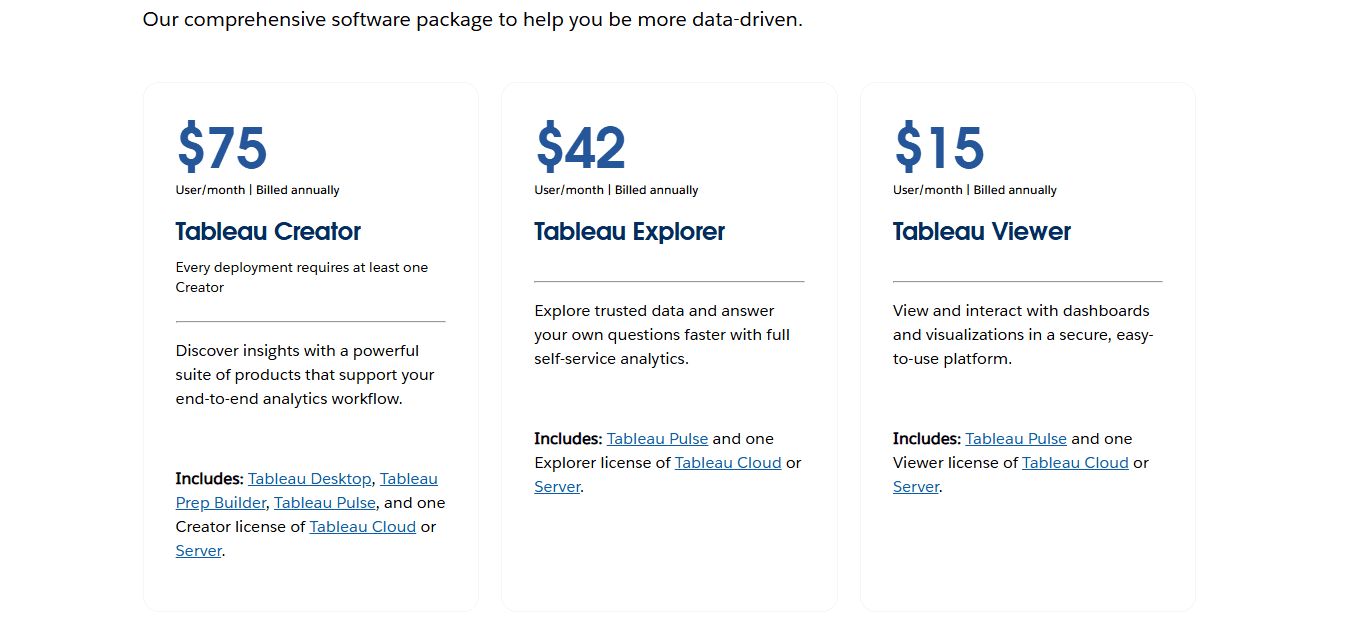
Role | Monthly Price (USD) | Annual Price (USD) | Hosting | What’s Included |
Creator | $75 | $900 | ✅ Fully hosted | Web-based dashboard creation, Tableau Prep, full access to publish and share |
Explorer | $42 | $504 | ✅ Fully hosted | Access existing dashboards, filter, comment, and create saved views (no authoring) |
Viewer | $15 | $180 | ✅ Fully hosted | View-only access, dashboard filters, alerts, subscriptions |
⚠️ Just like the Desktop version, Tableau Cloud pricing is billed annually upfront; there’s no pay-as-you-go monthly plan.
Who’s it Best for
Tableau Cloud is ideal for internal teams that want an easier way to:
Share dashboards across departments
Collaborate remotely
Avoid the complexity of setting up and maintaining servers
Whether your team is in sales, marketing, or operations, Tableau Cloud makes it easier to give everyone access to live data in one place.
✅ Pros of Tableau Cloud
No server or IT setup required
Access dashboards from anywhere
Simple collaboration across teams
Secure, with user-based permissions
Embedding support available
Fast rollout for new teams
⚠️ Where It Might Not Work
Only available with annual billing
Real-time data connections may lag
Embedding the setup can be complex
Gets expensive with multiple users
Not ideal for customer-facing analytics
Things to Consider Before Choosing Tableau Cloud
Still billed annually: Even though pricing is listed monthly, you pay yearly.
User minimums apply: In many cases, you may need to buy a mix of roles (e.g., at least 1 Creator to publish content).
Limited real-time features: For some data sources, real-time performance may lag compared to the Server.
Embedding dashboards: It supports embedding, but it’s not always developer-friendly for product teams.
So if you're planning to embed dashboards into your SaaS app or want more flexibility with how data is shared externally, Tableau Cloud may feel a bit limiting.
Tableau Server Pricing (Self-Hosted Option)
What is Tableau Server?
Tableau Server is the self-hosted version of Tableau’s analytics platform.
Unlike Tableau Cloud, it runs on your own infrastructure, whether that’s on-premise hardware or cloud providers like AWS or Azure.
It’s designed for organizations that want full control over how their data is stored, shared, and managed internally.
Clear Tableau Server Pricing Breakdown
Role | Monthly Price (USD) | Annual Price (USD) | Hosting | What’s Included |
Creator | $75 | $900 | ❌ Self-hosted (your server) | Full access like Cloud Creator, but hosted and maintained by your IT team |
Explorer | $42 | $504 | ❌ Self-hosted | Explore dashboards, interact, and create saved views (no dashboard creation) |
Viewer | $15 | $180 | ❌ Self-hosted | Read-only dashboard access inside a secure internal environment |
Additional Costs
Hosting is not included with Tableau Server.
You’ll need to budget for:
Your own servers or cloud infrastructure
IT personnel to manage setup, updates, and maintenance
Security layers, backups, and performance monitoring tools
Who's it Best For
Large businesses that already have an IT infrastructure in place
Organizations with strict compliance or security requirements
Teams that need full backend control and internal hosting flexibility
Licensing Notes
You must have at least one Creator license to set up and manage Tableau Server.
Explorers and Viewers can only interact with dashboards created by a licensed Creator.
You are fully responsible for all hosting, backups, and scaling requirements.
✅ Pros of Tableau Server
Full control over data storage and security
Can be customized to fit enterprise IT policies
Supports embedding dashboards into portals or apps
Integrates easily with internal tools and firewalls
No reliance on external cloud providers
⚠️ Where It Might Not Work
Requires technical staff to manage installation and updates
Higher hidden costs due to server hosting and admin time
Longer setup time compared to Tableau Cloud
Not suitable for startups or teams without IT support
Steeper learning curve for non-technical teams
Tableau Viewer vs Explorer vs Creator: Role Breakdown
Understanding the difference between Tableau’s three user roles is key before you decide how many licenses your team actually needs.
Each role comes with a different price and permission level, and using the right mix can save you money without limiting functionality.
Role | Monthly Price | Annual Price | What’s Included | Who It’s For | Cost Planning Tip |
Creator | $75 | $900 | Build dashboards, connect to data, use Tableau Desktop and Prep, and publish content | Data analysts, BI developers | Only assign to users who build or publish dashboards |
Explorer | $42 | $504 | Explore dashboards, apply filters, create saved views, and make light edits (no authoring) | Managers, team leads | Assign to users who need interactivity, not creation |
Viewer | $15 | $180 | View dashboards, use filters, subscribe to reports, receive alerts (read-only) | Executives, clients, passive data consumers | Use for users who just need to access and view insights |
Tableau Pricing Comparison Table: Desktop vs Cloud vs Server
Here’s a clear comparison of all three Tableau options: Desktop, Cloud, and Server, so you can quickly understand how they differ in pricing, setup, and features:
Feature | Tableau Desktop | Tableau Cloud | Tableau Server |
Deployment | Installed on the local device | Fully hosted by Tableau | Self-hosted (your servers or cloud VM) |
Pricing (Creator) | $75/month → $900/year | $75/month → $900/year | $75/month → $900/year + hosting costs |
Setup Required | Manual install | None | IT setup and ongoing maintenance |
Infrastructure Cost | ❌ None | ❌ None | ✅ Yes (servers, IT staff, upgrades) |
Embedding Dashboards | ❌ Not supported | ✅ Supported | ✅ Supported |
Web Access | ❌ No | ✅ Yes (browser-based) | ✅ Yes (internal or external browser) |
Best Fit For | Individual analysts | Teams that want easy collaboration | Enterprises with internal IT support |
Still Not Sure? Consider These Before Deciding
Ask yourself these simple questions to narrow it down:
Question | If Yes | Best Option |
Do you need to share dashboards with your team? | Yes | Tableau Cloud or Server |
Do you prefer not to manage infrastructure? | Yes | Tableau Cloud |
Do you have in-house IT or want full control? | Yes | Tableau Server |
Is your team small or solo? | Yes | Tableau Desktop |
Do you want dashboards embedded into your product? | Yes | Tableau Cloud or Server |
Is your team non-technical? | Yes | Tableau Cloud |
A Simpler Alternative to Tableau for User-Facing Analytics
If you’re building a SaaS product or a client-facing platform, Tableau can sometimes feel heavier than expected.
Why Tableau May Not Work Well for Embedded or Real-Time Use
Some common limitations teams mention include:
Extra setup required to embed dashboards into applications
Paid licenses still needed for viewers
Performance challenges with live or frequently updated data
More complexity as usage scales
A stronger focus on internal analytics than external, user-facing use cases
If you’ve run into challenges around pricing, setup, or embedded access, you’re not alone.
Real users often point this out:
“Tableau can be costly for individual users or small enterprises due to the high licensing prices associated with Tableau Desktop.”- Tableau user review from Getapp
“Cost for licenses are quit high compared to other tools. Technical support is not that efficient. Still work can be done to improve the interface.”- Tableau user review on Getapp
Because of these trade-offs, some teams explore simpler analytics platforms designed specifically for product and SaaS use cases.
Upsolve as an Option for Embedded, Client-Facing Analytics
Upsolve is one example of a fully hosted, no-code analytics platform built for SaaS teams that need to deliver dashboards inside their products.
Instead of focusing on internal BI workflows, it’s designed around user-facing analytics, where simplicity and scalability matter more than deep configuration.
It’s made for delivering data to your users in a way that’s fast, secure, and easy to maintain.
🔍 Why teams consider platforms like Upsolve for embedded analytics
Built-in access control, so users only see their own data
No per-user pricing, which helps as customer counts grow
Real-time dashboards optimized for product use cases
No-code setup, reducing reliance on engineering or BI teams
If your primary goal is to deliver analytics to your users, rather than manage internal reporting, tools like Upsolve may be worth evaluating alongside Tableau.
Final Thoughts: Which Tableau Option Is Right for You?
Tableau offers three main options: Desktop, Cloud, and Server but they’re not one-size-fits-all.
Choose Tableau Desktop if:
You’re a solo analyst or small team that prefers building dashboards locally.
Choose Tableau Cloud if:
You want a fully hosted solution for sharing dashboards across internal teams without managing infrastructure.
Choose Tableau Server if:
You’re an enterprise organization with in-house IT resources and strict compliance or security requirements.
Tableau remains a powerful BI platform, especially for internal analytics and reporting. However, the total cost and setup effort often depend on user roles, infrastructure needs, and how dashboards are shared or embedded.
If your main goal is to embed dashboards inside a SaaS product or client-facing platform, Tableau can work, but it may require additional setup, licensing, and ongoing maintenance.
In those cases, product-focused analytics platforms designed for embedded and user-facing use cases can be easier to operate at scale.
Tools like Upsolve are built around this model — offering simpler setup, usage-based credit pricing (free tier plus paid plans from $500/month), and dashboards designed to be delivered directly to end users rather than internal teams.
If embedded analytics is a core part of your product, it’s worth exploring platforms like Upsolve alongside Tableau to see which approach fits your needs best.
FAQs
❓ Is Tableau free?
No, Tableau is not fully free. However, there is a free version called Tableau Public, but it only lets you save dashboards publicly. If you want to keep data private or share securely, you’ll need a paid Creator license (starts at $75/month, billed annually).
❓ What’s the cheapest way to use Tableau?
The Viewer license is the cheapest paid option at $15/month per user, billed annually. But it only allows view-only access; you can’t create or edit dashboards. If you're just starting, Tableau Public is free but limited to public sharing.
❓ Can I use Tableau without the Cloud?
Yes. You can use Tableau Desktop for local dashboard building, or Tableau Server if you prefer to host everything yourself. Tableau Cloud is optional, but useful for easier sharing and access from anywhere.
❓ Do I need both Desktop and Cloud?
Not necessarily. If you're using Tableau Cloud, you can build dashboards directly in the browser with a Creator license. But many users prefer using Tableau Desktop for building dashboards locally and then publishing to the Cloud. So it depends on your workflow.
❓ What’s the difference between Tableau Public and Tableau Desktop?
Tableau Public is free, but saves all dashboards publicly on the web.
Tableau Desktop is part of the paid Creator license, and lets you save privately, connect to more data sources, and publish securely to Cloud or Server.
❓ Can I use Tableau for embedded analytics?
Yes, both Tableau Cloud and Tableau Server support embedded dashboards. But setup can be complex, and each viewer often needs a paid license. If you want simpler embedding, platforms like Upsolve may be easier to use and scale.
❓ Do I need separate licenses for Desktop and Server?
No. If you have a Creator license, it covers access to both Tableau Desktop and Tableau Server. You don’t need to buy them separately, but you will need to set up and manage the Server on your own infrastructure.

Try Upsolve for Embedded Dashboards & AI Insights
Embed dashboards and AI insights directly into your product, with no heavy engineering required.
Fast setup
Built for SaaS products
30‑day free trial



