
Understand how Metabase pricing works, where costs increase as teams scale, and what to expect from each plan as you grow.

Ka Ling Wu
Co-Founder & CEO, Upsolve AI
10 min

Metabase is often seen as a low cost way to get started with business intelligence. On the surface, its pricing page supports that idea, with an open source option, simple tiers, and clear monthly numbers.
But pricing for BI tools is rarely just about the plan you choose.
Many teams focus on cost per month rather than cost to value. That can make tools like Metabase look cheaper than they really are once you factor in infrastructure, engineering time, ongoing maintenance, and scaling requirements.
This tension shows up even in how users describe Metabase itself. Pricing can feel high for early stage teams, while the open source and self hosted option is often seen as the trade off that makes it worthwhile.

That trade off works well for some teams. For others, especially those without dedicated engineering resources, the real costs only become clear after adoption.
This guide breaks down Metabase pricing across all plans, explains what is included and what is not, and helps you understand whether its pricing model fits your team, resources, and long term needs.
How much does Metabase cost?
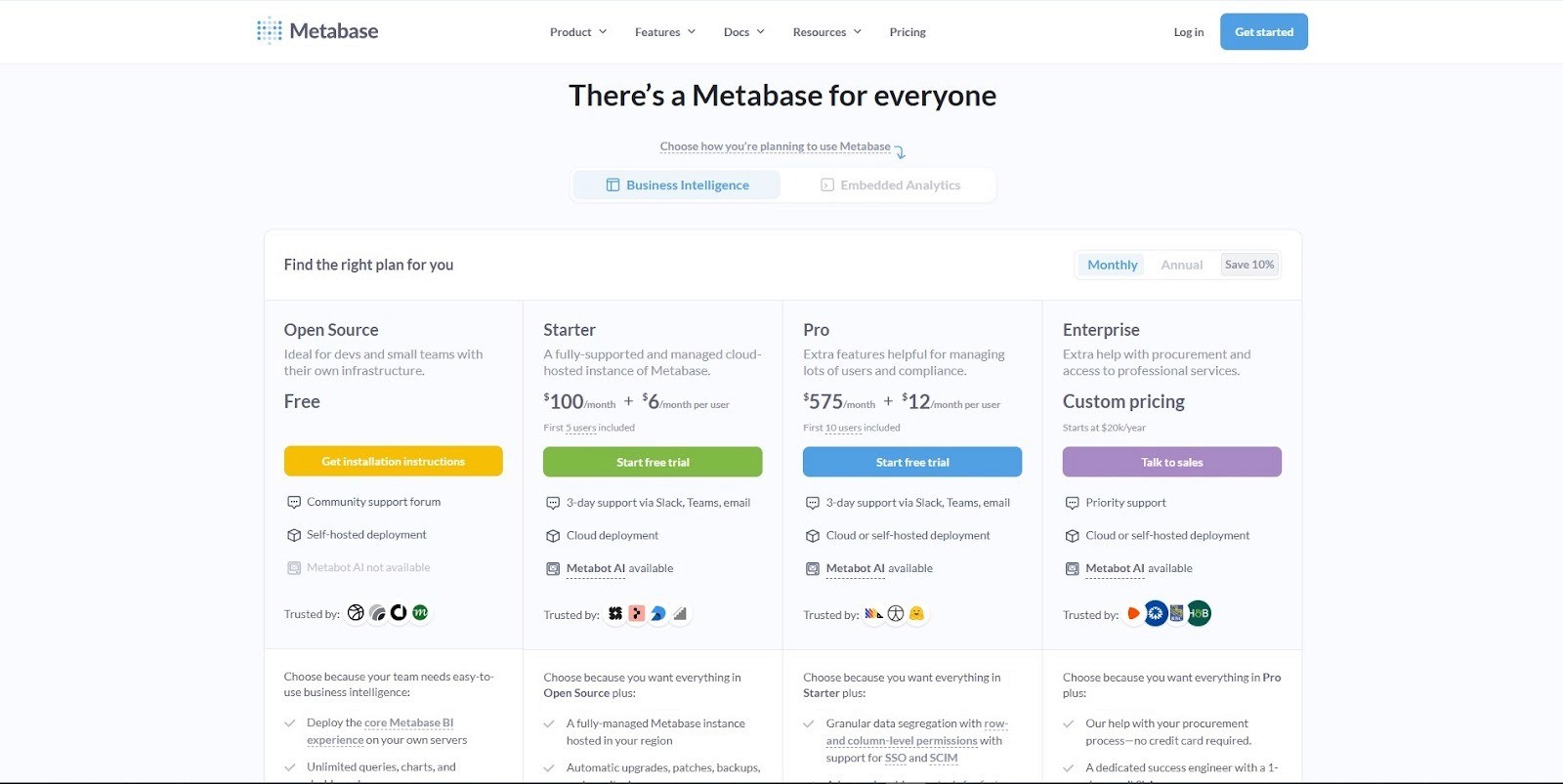
Here’s a quick comparison table of all Metabase pricing plans to help you understand better.
Plan | Cost | Deployment Options | Key Features | Best For |
Open Source | Free (forever) | Self-hosted | Unlimited queries & dashboards, community support only, “Powered by Metabase” badge on embeds | Developers & small teams with infra skills |
Starter | $100/month (includes 5 users) + $6/user/month | Cloud (fully managed) | Automatic updates & backups, email support (3-day SLA), basic embedding | Startups & small businesses |
Pro | $575/month (includes 10 users) + $12/user/month | Cloud or self-hosted (commercial license) | Row & column permissions, SSO/SCIM, advanced caching, staging/production envs, white-labeling, usage analytics | Growing teams, compliance-focused orgs |
Enterprise | Custom (starts at $20k/year) | Cloud or self-hosted (single-tenant/air-gapped optional) | Priority support, dedicated success engineer, procurement help, pro services | Enterprises with strict compliance & scaling needs |
Go with Open Source if you’re a developer or a small team that can handle hosting, upgrades, and server management on your own. It’s free forever but comes with extra engineering overhead.
Pick Starter if you want a fully managed cloud setup without worrying about infrastructure.
Choose Pro if you need compliance, granular permissions, white-labeling, and staging environments.
Opt for Enterprise if your organization requires priority support, advanced deployment (single-tenant/air-gapped), or procurement assistance.
Add “Metabase Without a Database” if you just want to upload CSVs or spreadsheets and start exploring data quickly without connecting an external database.
What You Won’t Find on the Metabase Pricing Page
Metabase’s pricing page looks simple at first glance - free, Starter, Pro, and Enterprise.
But if you’ve spent time in community forums or Reddit threads, you’ll notice users raise questions that go beyond just numbers.
Here are the realities worth knowing before you decide:
1. The Free Version Isn’t Really Free
Yes, the Open Source plan is free forever.
But you’ll need your own infrastructure to host it. That means server costs, developer time for upgrades, and ongoing maintenance.
For small teams without in-house engineers, this “free” plan can quickly become expensive due to hidden costs.

2. The Enterprise Jump Feels Steep
Pro costs $575/month, but Enterprise starts at $20,000 per year.
Many users feel this jump is too big for what you actually get — mostly priority support, procurement help, and advanced deployment options.
If your team is mid-sized, you may feel stuck: Pro might not give you enough governance features or advanced data visualization options, but Enterprise can feel overkill for the price.
3. Limited Advanced Features
Several users mention hitting a wall with basic functionality, crashes, slow dashboards, and limited visualization types.
Features like code versioning, multi-tab dashboards, and deep customization aren’t as strong as in other BI platforms.
Even Pro and Enterprise don’t fully address these gaps, which is why some teams move away once they outgrow simple dashboards.
4. Support Isn’t Always Smooth
Community edition relies on forums, but even paid users sometimes feel support is “slow and ticket-based.”
The 3-day SLA on Starter and Pro means urgent issues can drag. Enterprise offers better support, but only if you’re ready to pay the premium.
For teams relying on BI every day, this can create bottlenecks.

5. Compliance and Scalability Questions
Metabase is SOC 2 and GDPR compliant, but advanced compliance features like SCIM or air-gapped hosting only come with higher tiers.
Teams that start on Starter or Pro often realize they need an upgrade just to meet security or enterprise IT requirements.
At scale, managing permissions and user access also gets tricky, another area where users have reported frustration.
Metabase is a good entry point for BI, but once your team grows, pricing and feature limitations can become real pain points.
It’s not just about the monthly cost; it’s also about hidden infrastructure expenses, missing functionality, and support trade-offs.
Pros & Cons of Metabase Pricing
Pros | Cons |
✅ Free Open Source plan for developers and small teams | ❌ Hidden costs for hosting, upgrades, and maintenance if self-hosted |
✅ Starter plan is affordable ($100/month + $6/user) compared to big BI tools | ❌ Big price jump from Pro ($575/month) to Enterprise ($20k+/year) |
✅ Flexible deployment options (cloud or self-hosted) | ❌ Support on Starter/Pro is limited (3-day SLA), feels slow for urgent needs |
✅ Unlimited dashboards & queries across all tiers | ❌ Advanced features like code versioning, multi-tab dashboards, and richer visualizations are missing |
✅ Compliance features (SOC 2, GDPR, SSO, SCIM) available in higher tiers | ❌ Scaling costs can grow fast with per-user pricing |
✅ White-labeling and embedded analytics available in Pro+ | ❌ Enterprise features often feel too expensive for mid-sized teams |
Final Verdict: Is Metabase Pricing Worth It?
Metabase has built its reputation as one of the easiest entry points into business intelligence.
The free open-source plan is attractive if you have developers who can handle infrastructure, while the Starter plan makes sense for small teams that just want managed hosting.
The Pro plan is where real governance features kick in SSO, permissions, white-labeling, but at $575/month + $12/user, costs can climb quickly.
And the Enterprise tier, starting at $20k per year, often feels like too steep a jump for what’s added beyond Pro.
The truth is, Metabase works well for simple dashboards and quick queries, but many teams hit a ceiling. Common pain points include:
Crashes and performance bottlenecks at scale
Limited customization and visualization options
Expensive Enterprise features that don’t always justify the price
Gaps in team workflows, like version control and advanced collaboration
So, is it worth it? Yes, if you’re early stage and need something quick.
No, if you’re scaling and need a long term solution that balances cost and capability.
For teams that start to feel constrained by these trade offs, some look beyond traditional BI tools altogether.
Upsolve.ai follows a different approach, focusing on embedded, user-facing analytics designed to be part of the product experience rather than an internal reporting layer.
Instead of centering pricing around per user tiers or large Enterprise jumps, Upsolve emphasizes:
Embedded analytics that can be white labeled without additional licensing
Usability across multiple stakeholders, including both technical and non technical users
Lower ongoing engineering involvement after initial setup
Predictable pricing that scales with usage, rather than sudden tier changes
This model tends to appeal to product led SaaS teams that want to deliver analytics to customers without taking on additional infrastructure or long term maintenance overhead.
Ultimately, whether Metabase pricing makes sense depends on how much infrastructure, customization, and long term maintenance your team is prepared to take on.
FAQS
1. What is the main cost factor in Metabase pricing?
Metabase pricing mainly depends on your hosting setup, team size, and the features you need as you scale. While the open source version has no license cost, infrastructure, maintenance, and engineering time often become the primary cost drivers over time.
2. Is Metabase free or paid?
Metabase has a free open-source version, but scaling to enterprise features requires a paid plan. Upsolve, on the other hand, offers a free tier and published, usage-based credit pricing with turnkey analytics built in.
3. How does Metabase Enterprise pricing work?
Metabase offers a free open source version, as well as paid plans for teams that want managed hosting, governance features, and enterprise support. Many teams start on the free plan and move to paid tiers as their usage, compliance needs, or user count grows.
4. Who benefits most from Metabase?
Metabase works best for developer-heavy teams that are comfortable managing infrastructure and maintaining analytics tooling internally. It is often a good fit for organizations that prioritize flexibility and open source control over turnkey usability.
5. Which is better for fast-growing SaaS businesses?
Fast-growing SaaS teams often evaluate multiple approaches depending on how analytics is used. Some rely on internal BI tools like Metabase for internal reporting, while others explore embedded analytics platforms such as Upsolve when analytics needs to be delivered directly to customers as part of the product experience.

Try Upsolve for Embedded Dashboards & AI Insights
Embed dashboards and AI insights directly into your product, with no heavy engineering required.
Fast setup
Built for SaaS products
30‑day free trial



