
Context engineering is the discipline of curating everything an LLM sees at inference time. Definition, origins, core techniques, examples & best practices.

Ka Ling Wu
Co-Founder & CEO, Upsolve AI
10 min
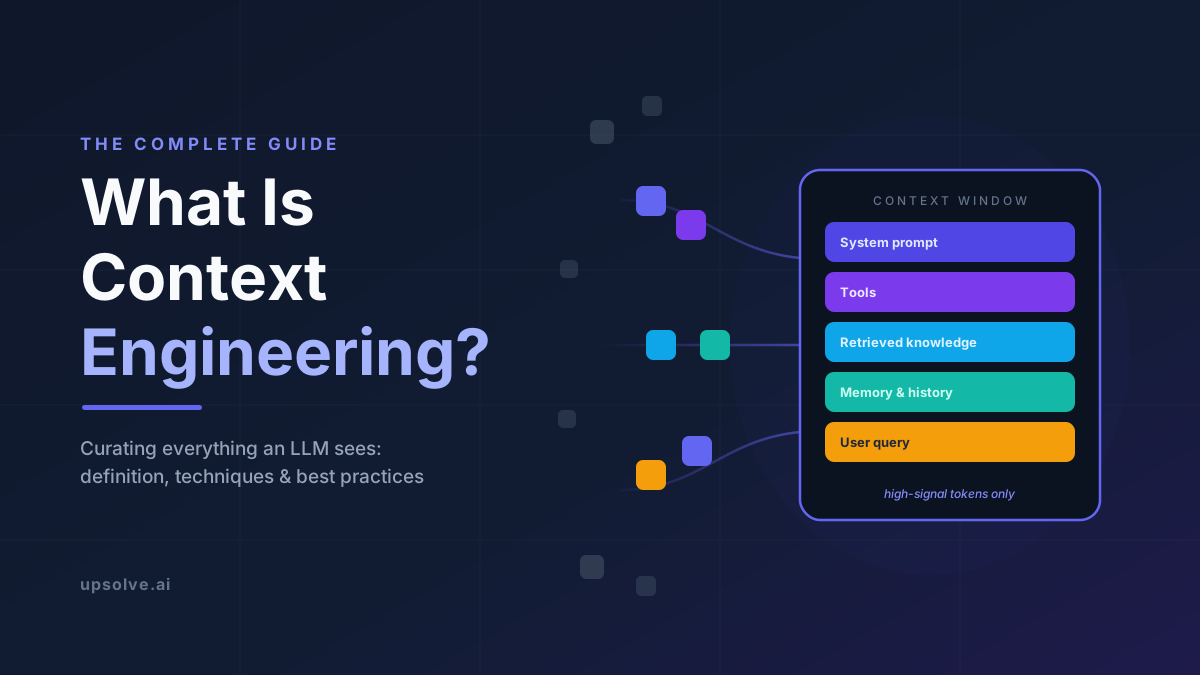
Context engineering is the process of designing and managing everything an AI model sees at inference time:
the system prompt
retrieved documents
memory
tool definitions
and conversation history
so the model can reliably complete its task. It might sound like a rebrand of prompt engineering, but it's fundamentally different. Instead of creating a single instruction, you're architecting an entire information pipeline.
This guide covers the core techniques, concrete examples, and the best practices that separate reliable AI systems from flaky ones.
Key Takeaways |
|---|
|
What Is Context Engineering? A Precise Definition
Context engineering is the process of deciding what information enters a large language model's context window, when it enters, and in what form, in order to consistently produce a desired behavior. The "context" is the full set of tokens the model conditions on when generating a response:
system instructions
tool definitions
retrieved documents
memory
message history
and the user's current query.
The engineering problem, as Anthropic's essay on effective context engineering frames it, is optimizing the utility of those tokens against the inherent constraints of LLMs. Models have a finite "attention budget," and every token you add draws that budget down. The guiding principle is to find the smallest set of high-signal tokens that maximizes the likelihood of your desired outcome.
This means context engineering is less like writing and more like systems design. You're building the pipeline that assembles the model's working memory fresh on every single step: deciding what to retrieve, what to summarize, what to persist, and what to throw away.
Where the Term Came From: Karpathy, Lütke, and Anthropic
On June 18, 2025, Shopify CEO Tobi Lütke posted that he preferred "context engineering" over "prompt engineering," describing it as "the art of providing all the context for the task to be plausibly solvable by the LLM." A week later, on June 25, Andrej Karpathy amplified it and that endorsement is what made the term stick.
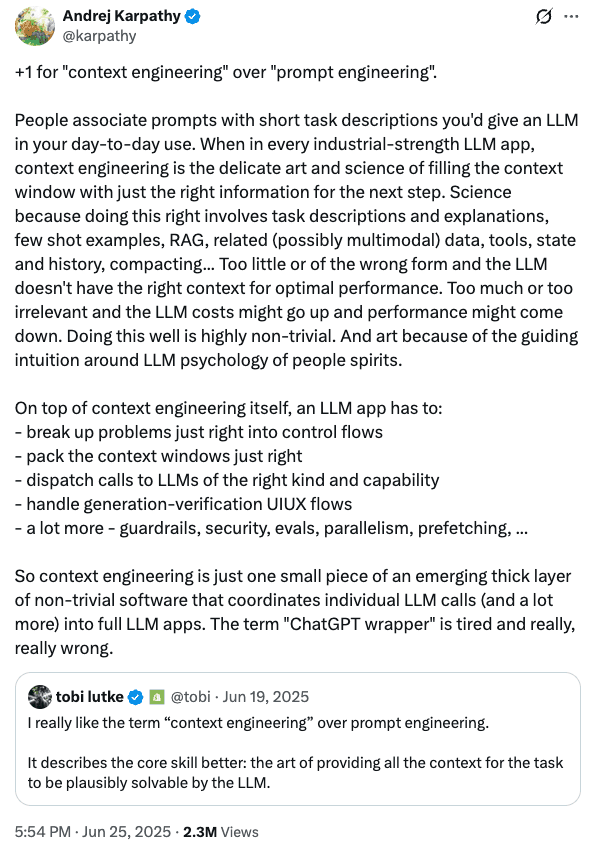
Karpathy's argument was that people associate "prompts" with the short task descriptions you type into a chatbot, while every industrial-strength LLM application actually depends on the delicate work of filling the context window with the right information for each step.
A few months later, Anthropic published "Effective Context Engineering for AI Agents", which turned this catchy phrase into a practical framework. The essay introduced the "attention budget" framing, described context as a finite resource with diminishing marginal returns, and laid out concrete techniques (e.g. compaction, structured note-taking, just-in-time retrieval, and sub-agent architectures) that we'll cover in detail below.
Meanwhile, LangChain, Philipp Schmid, IBM, and dozens of others published their own takes and the topic soon earned its own Manning book, whose open-source companion repository collects hands-on examples and a searchable catalog of the field's resources. By 2026, "context engineering" had effectively replaced "prompt engineering" as the term of art for building serious LLM applications.
Context Rot and the Attention Budget
If models keep shipping with bigger context windows (providers now prominently advertise windows of 1 million tokens or more) why not just stuff everything in and let the model sort it out? Because models do not process context uniformly, and more tokens actively degrade performance.
Every Model Degrades
Chroma's "Context Rot" study evaluated 18 state-of-the-art models, including GPT-4.1, Claude 4, and Gemini 2.5, and found that every one became less reliable as input length grew, even on simple retrieval tasks where difficulty was held constant. The researchers concluded that where and how information is presented in the context strongly influences task performance, and explicitly named context engineering as the remedy.
The "Lost in the Middle" study by Liu et al. (Stanford, TACL 2024) showed that model accuracy follows a U-shaped curve: highest when the relevant information appears at the beginning or end of the context, and significantly worse when it's buried in the middle. Follow-up analyses attribute drops of 30% or more to positioning alone.
A Finite Attention Budget
Transformer attention computes pairwise relationships between tokens: n² of them for n tokens. As one technical breakdown notes, a 100K-token context implies roughly 10 billion pairwise relationships for the model to manage. Attention gets stretched thin, and semantically similar but irrelevant content (known as “distractors”) actively pulls the model off course.
This is why Anthropic treats context as a depleting resource: like human working memory, an LLM's attention budget is drawn down by every token it must parse. As Sourcegraph's guide puts it, an agent making a decision at step 47 carries the residue of steps 1 through 46 in its window and most context failures stem from how that budget was spent.
Latency and cost scale with tokens: Every unnecessary token you send is paid for twice: once in dollars, once in degraded recall.
Noise compounds in loops: Agents accumulate search results, error messages, and dead ends; without curation, each step inherits all previous noise.
Stale data misleads: A price retrieved an hour ago or a schema cached at startup can silently invalidate the model's reasoning.
Distractors actively harm: Near-miss information isn't neutral filler; it measurably increases wrong answers.
Context Engineering vs. Prompt Engineering
As the field matured, the term ‘prompt engineering’ got associated with clever phrasing tricks rather than system design. Prompt engineering lives inside context engineering, as a component.
Dimension | Prompt Engineering | Context Engineering |
Scope | Wording of instructions | Entire information pipeline |
Artifact | A static prompt string | A dynamic assembly system |
Timing | Written once, before the task | Curated on every step of a loop |
Skills required | Writing, iteration | Retrieval, memory, state, orchestration |
Failure mode | Ambiguous instructions | Context rot, stale data, token waste |
Best suited for | Single-turn chat tasks | Agents and production applications |
In 2023, most LLM products were single-turn: one prompt, one completion. By 2025-2026, the field converged on agents, models autonomously calling tools in a loop over long horizons. In a loop, there is no single prompt to perfect; there is a window that must be re-curated dozens or hundreds of times per task.
We compare the two disciplines row by row in our context engineering vs prompt engineering guide.
The Anatomy of a Context Window
Before the techniques make sense, you need a map of the territory. Everything below competes for the same finite attention budget, which is why every technique in the next section is ultimately about managing one or more of these layers.
The Six Layers of Context
System prompt: The standing instructions: role, rules, tone, guardrails. Written once, but re-read by the model on every single turn, so every wasted word here is a recurring tax.
Tool definitions: Descriptions of what the model can do. Bloated or overlapping tool sets are a classic source of ambiguity and wrong tool calls.
Retrieved knowledge: Documents, schemas, code, and examples pulled in at runtime; the RAG layer. Quality here depends on retrieval precision, not volume.
Memory and notes: Facts that persist across turns or sessions (user preferences, task progress, prior decisions).
Message history and tool results: Prior conversation turns and the raw outputs of earlier tool calls. This layer grows fastest and rots first.
Current query: The immediate user request or the agent's next-step objective.
Think of it like packing a carry-on for a specific trip. The suitcase size is fixed. Every item you pack "just in case" is an item that makes the essential ones harder to find. Good packing isn't about fitting more in; it's about knowing exactly what the trip requires.
Core Context Engineering Techniques
The five technique families below appear, in some form, in virtually every production LLM system, from coding agents to customer support bots to embedded analytics assistants. They map onto a loop that runs on every step: retrieve, curate, generate, compact.
For how agents run this loop in their own context, see our deep dive on agentic context engineering.
1. System Prompt Design: Finding the Right Altitude
Anthropic's guidance describes the ideal system prompt as sitting in a Goldilocks zone between two failure modes. At one extreme, engineers hardcode brittle if-else logic into prose, which breaks the moment reality deviates from the script. At the other, prompts are so vague the model has no concrete signal to act on.
The right altitude gives the model heuristics and priorities. Structure helps: distinct sections for role, constraints, and workflow, in simple direct language. And because the system prompt is re-read on every turn, ruthless editing pays compound interest.
Pro Tip: Audit your system prompt quarterly. In my experience, production system prompts accrete rules the way codebases accrete dead code, instructions added for edge cases that no longer exist, still consuming attention budget on every request.
2. Retrieval (RAG): Just-in-Time Beats Just-in-Case
Retrieval-augmented generation loads external knowledge into the window at runtime instead of hoping the model memorized it. The context engineering insight is when and how much to retrieve. Early RAG systems front-loaded everything that might be relevant; modern systems retrieve just-in-time, pulling only what the immediate step requires.
Anthropic's essay highlights a further evolution: agentic search, where the agent uses lightweight references (file paths, queries, links) and explores its environment to load data only when needed, mirroring how a human uses bookmarks and file systems rather than memorizing entire documents. Neo4j's explainer extends this to structured knowledge: graphs and databases can serve precise, relationship-aware context that unstructured chunk retrieval misses.
Rank aggressively: Retrieval quality is precision at the top, not recall in bulk.
Deduplicate: Overlapping chunks are pure attention-budget waste.
Prefer references over payloads: Give the agent a pointer and a tool, not a dump.
3. Memory: Deciding What Persists
Context windows reset; tasks and relationships don't. Memory systems bridge the gap by writing selected information to storage outside the window and re-injecting it when relevant. Anthropic calls the agent-driven version structured note-taking: the agent maintains its own notes (a to-do list, a decision log, key findings) that survive context resets.
The engineering challenge is selectivity in both directions. Write too little and the agent repeats work or forgets commitments; inject too much and you've rebuilt the bloat problem you were solving. Good memory systems store facts with provenance and timestamps, so stale entries can be aged out rather than trusted forever.
Done well, this write-and-retrieve loop is also the foundation of self-improving agents.
4. Compaction: Summarize, Prune, Continue
Long-horizon tasks will outlive any context window. Compaction is the answer: when the window approaches its limit, summarize the conversation so far: preserving decisions, constraints, and unresolved items; and continue with the compressed version. This is exactly what tools like Claude Code do when a session runs long.
The art is in what you keep. A good compaction preserves architectural decisions, unresolved bugs, and explicit user constraints while discarding raw tool outputs and exhausted dead ends. A related, cruder technique is tool-result clearing: once a search result or file read has served its purpose, the raw payload can be dropped from history while its conclusion is kept.
Fair warning: Compaction is lossy by definition. Test your summarization prompt against real transcripts, because a compaction step that drops one hard constraint will send the agent confidently down a path the user already ruled out.
5. Tool and Result Management: Token-Efficient Capabilities
Tools are context too. Every tool definition consumes budget on every turn, and every tool result (often the largest single objects in an agent's history) lands in the window whether it's three lines or three thousand.
Keep tool sets minimal and non-overlapping: If a human engineer can't say definitively which tool fits a situation, the model can't either.
Design token-efficient returns: A database tool that returns 40 relevant rows beats one that returns 4,000 and asks the model to filter.
Paginate and truncate defensively: Cap result sizes at the tool layer, not in the prompt.
Isolate with sub-agents: For deep dives, Anthropic recommends spawning focused sub-agents with clean windows that return condensed summaries. Detailed exploration happens in an isolated context, and only distilled results flow back to the orchestrator.
Context Engineering Examples: Three Real-World Walkthroughs
Here are three examples that show the same loop (retrieve, curate, generate, compact) in very different products.
Example 1: A Coding Agent Fixing a Bug
A coding agent asked to fix a failing test doesn't load the whole repository. It retrieves the test file and the stack trace (retrieve), searches for the implicated function and pulls only those definitions (curate), proposes and applies a patch (generate), then records "root cause: off-by-one in pagination; fixed in utils/page.ts" in its notes while dropping the raw grep output (compact). If the session runs long, compaction summarizes the debugging journey so a fresh window can continue without re-reading thousands of lines of exploration.
This is why coding agents live or die on context engineering. As one analysis of context rot notes, the models are usually smart enough to solve the problem. The failure mode is noise accumulated during search and backtracking degrading every subsequent decision.
Example 2: A Customer Support Assistant
A support bot answering "why was I charged twice?" needs the customer's billing history, the refund policy, and the tone guidelines. Its pipeline injects the user's account state from a CRM lookup, retrieves the two policy paragraphs that match the issue, and carries a memory note that this customer had a similar dispute in March. The 40-page policy manual stays out of the window; the model gets the two paragraphs that matter, positioned near the query where recall is strongest.
Example 3: An Embedded Analytics Agent
Conversational analytics, where a user types "show me churn by plan tier this quarter" and gets back a correct chart, is one of the most demanding context engineering problems in production AI. The agent must know the database schema, the business definitions (what exactly counts as "churn"?), the user's role and row-level permissions, and the conventions of the specific tenant asking. Get any layer wrong and the model writes syntactically valid SQL that answers the wrong question, or worse, leaks another tenant's data.
This is precisely the problem Upsolve.ai engineers for. Our semantic layer acts as curated context (vetted metric definitions, schema relationships, and per-tenant, role-based permissions) assembled fresh for every question so the embedded analytics agent answers from governed definitions rather than guesses. In fact, it's a useful lens for evaluating any AI analytics product. Ask the vendor what enters the model's context window when a user asks a question, and how it's scoped. The quality of that answer predicts the quality of the product.
Context Engineering Best Practices
The techniques above tell you what to build. These practices, distilled from Anthropic's guidance, Chroma's findings, and hard-won production experience, tell you how to run it well.
Treat context as a scarce resource with a real budget: Assign token budgets per layer (system prompt, retrieval, history) and enforce them in code, the way you'd enforce a latency budget.
Curate on every step, not once up front: Agents need per-step context assembly. What was high-signal at step 3 is often noise at step 30.
Put critical information at the edges: Given the documented U-shaped recall curve, place must-not-miss constraints near the start or end of the window, never buried mid-context.
Prefer just-in-time retrieval over pre-loading: Give the model references and tools to fetch details when needed, instead of front-loading everything that might be relevant.
Log what the model actually saw: Most "the AI hallucinated" bugs are really "the context was wrong" bugs. You can't debug a window you didn't capture.
Evaluate at realistic context lengths: A pipeline that scores well on short test cases can fall apart at production lengths; Chroma's research shows degradation is non-uniform and model-specific.
Version and test your context pipeline: Retrieval prompts, compaction prompts, and memory schemas deserve the same CI treatment as application code.
Age out stale facts: Attach timestamps and provenance to memory and cached retrievals, and expire them; yesterday's price is today's misinformation.
Write less system prompt than you think you need: Smarter models need heuristics, not scripts — and every rule you add is a recurring per-turn cost.
One thing I've noticed reviewing agent transcripts: the single highest-leverage fix is usually deleting things. Before writing a new instruction to correct a behavior, check whether an existing piece of context is causing it.
Common Context Engineering Mistakes to Avoid
Mistake 1: Stuffing the Window Because It's Big
The most common mistake is treating a 200K or 1M-token window as an invitation. The evidence says otherwise. Every one of the 18 models Chroma tested degraded with input length, even on trivially simple tasks.
How to avoid it: Set an internal working budget well below the hard limit, and make adding context a deliberate decision that must justify its cost.
Mistake 2: Letting Tool Results Accumulate Raw
Each search result, file read, and API response lands in history at full size. Thirty steps later, the window is 80% payload the agent no longer needs, and the actual task instructions are lost in the middle of it.
How to avoid it: Clear or summarize tool results after they've been used, and cap result sizes at the tool layer.
Mistake 3: Confusing Memory with a Dumping Ground
Teams bolt on a memory store, write everything to it, and inject everything back, recreating context bloat with extra steps and stale data.
How to avoid it: Store selectively with timestamps, retrieve by relevance to the current step, and expire aggressively.
Mistake 4: Optimizing the Prompt When the Context Is the Problem
When output quality drops, the instinct is to rewrite instructions. But if the right information isn't in the window, or is drowned by distractors, no phrasing will fix it. Distractor content measurably harms accuracy even when the correct answer is present.
How to avoid it: Debug in order: Was the needed information present? Was it positioned well? Was it crowded by noise? Only then touch the wording.
Frequently Asked Questions
What is context engineering in simple terms?
Context engineering is deciding exactly what information an AI model gets to see when it does its work and keeping everything else out. It covers the system prompt, retrieved documents, memory, tool definitions, and conversation history, all of which compete for the model's limited attention.
Who coined the term context engineering?
Shopify CEO Tobi Lütke proposed the term in a June 18, 2025 post, and Andrej Karpathy's endorsement a week later popularized it. Anthropic's September 2025 essay then established the canonical framework, including the "attention budget" concept.
Is context engineering replacing prompt engineering?
It's absorbing it rather than replacing it. Prompt engineering represents clear instructions, good examples, specified formats. It remains one component inside the larger discipline of managing everything the model sees. For single-turn chat tasks, prompt skills still carry most of the weight; for agents and production systems, they're a small fraction of the work.
What is context rot?
Context rot is the measurable degradation in LLM performance as input length grows, documented by Chroma across 18 frontier models and it occurs well before the context window is actually full. Chroma leaves the exact mechanisms an open question, but follow-up analyses link it to attention dilution, the lost-in-the-middle effect, and interference from distractor content.
How do I get started with context engineering?
Start by logging the exact context your system sends on real requests. Most teams are surprised by what they find. Then apply the budget mindset: trim the system prompt, make retrieval just-in-time, cap tool result sizes, and add compaction for long sessions. Anthropic's essay and Philipp Schmid's explainer are the two best free starting points.
When you're ready to buy rather than build, our context engineering tools guide maps the stack layer by layer.
How is context engineering different from RAG?
RAG (retrieval-augmented generation) is one technique within context engineering, the retrieval layer. Context engineering also governs the system prompt, memory, history management, compaction, tool design, and how all of those layers share a finite token budget across the steps of a task.
Sources
Andrej Karpathy (X): June 25, 2025 post endorsing "context engineering" over "prompt engineering." https://x.com/karpathy/status/1937902205765607626
Anthropic Engineering: Effective Context Engineering for AI Agents; the canonical framework, including the attention budget and compaction techniques. https://www.anthropic.com/engineering/effective-context-engineering-for-ai-agents
Chroma Research: Context Rot: How Increasing Input Tokens Impacts LLM Performance; evaluation of 18 frontier models. https://www.trychroma.com/research/context-rot
Liu et al., Stanford (TACL 2024): Lost in the Middle: How Language Models Use Long Contexts. https://arxiv.org/abs/2307.03172 / https://aclanthology.org/2024.tacl-1.9/
Hamel Husain: Annotated presentation of Chroma's context rot research, with notes on 1M-token context marketing. https://hamel.dev/notes/llm/rag/p6-context_rot.html
Sourcegraph: Context Engineering: A Practical Guide for AI Agents (2026); token budgets in agent loops. https://sourcegraph.com/blog/context-engineering
Philipp Schmid: Context Engineering explainer; widely shared early framing of the discipline. https://www.philschmid.de/context-engineering
Prompt Engineering Guide (DAIR.AI): Context Engineering Guide; a hands-on walkthrough covering instructions, structured outputs, tools, RAG, memory, and state. https://www.promptingguide.ai/guides/context-engineering-guide
IBM Think: What Is Context Engineering?; enterprise-oriented overview. https://www.ibm.com/think/topics/context-engineering
Neo4j: What Is Context Engineering?; structured knowledge and graph-based context for agents. https://neo4j.com/blog/agentic-ai/what-is-context-engineering/
Boni García (GitHub): Open-source companion repository for the Manning book Context Engineering: Build Consistent, Accurate, Predictable AI Systems, with per-chapter examples and a further-reading catalog. https://github.com/bonigarcia/context-engineering
Morph: Context Rot: Why LLMs Degrade as Context Grows; mechanisms including attention dilution and distractor interference. https://www.morphllm.com/context-rot
ZenML LLMOps Database: Summary of ChromaDB's context rot evaluation and its production implications. https://www.zenml.io/llmops-database/context-rot-evaluating-llm-performance-degradation-with-increasing-input-tokens
GeniOS: What Andrej Karpathy Is Saying About Memory, Context, and Agents; reception and impact of the June 2025 posts. https://thegenios.com/blog/karpathy-on-memory-and-context/
Upsolve.ai: Embedded analytics agents and semantic-layer-governed AI analytics. https://upsolve.ai/embedded-bi
Tobi Lütke (X): June 18, 2025 post proposing "context engineering" over "prompt engineering." https://x.com/tobi/status/1935533422589399127

Try Upsolve for Embedded Dashboards & AI Insights
Embed dashboards and AI insights directly into your product, with no heavy engineering required.
Fast setup
Built for SaaS products
30‑day free trial